

In this article we will see how to send a List<> from an ASP.NET Webserivce and consume a List<> in our application.
I am providing a simple procedure with snapshots for a good understanding and for you to use in your projects.
Let's create our webservice first for sending a List.
Step 1: Open Visual Studio then select "File" -> "New" -> "Project..." then provide the project a name.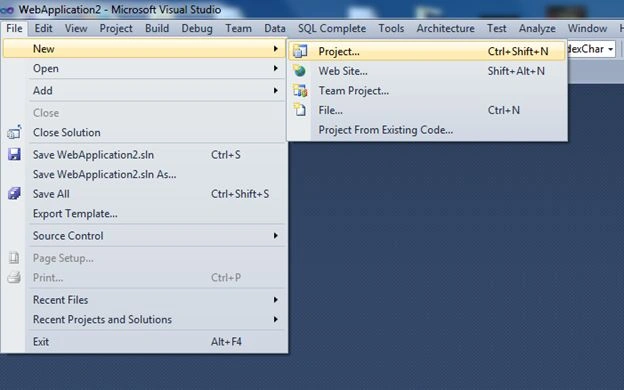
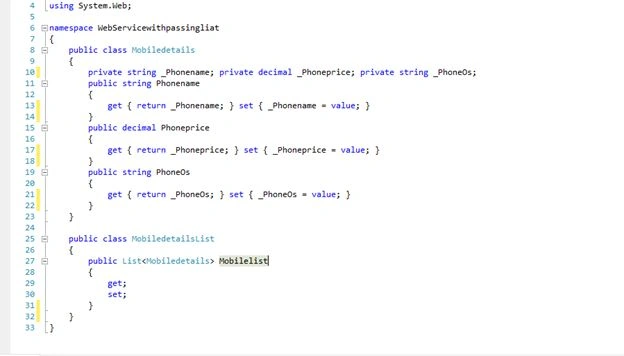
Step 2: Let us add a class with the name Mobiledetails.cs.
Inside this class we will do Get { } and Set { } Parameters.
Step 3: Also create another class inside Mobiledetails.cs with the name Mobiledetailslist.
Which contains List<> of Mobiledetails ( List<Mobiledetails> ).
You can see the image below for reference.
Step 4: Let us add a Webservice for sending the list.
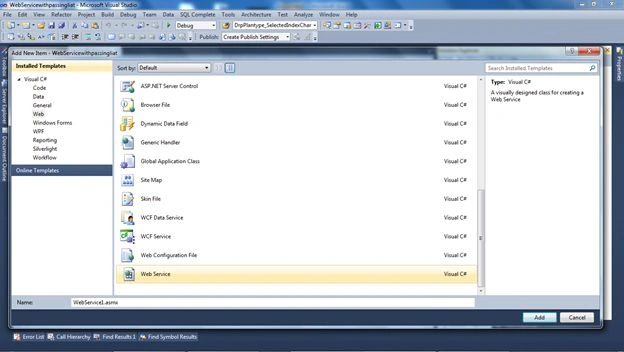
For adding a Webservice right-click on the solution then select Add -> Add New Item then select Web service then click the Add button.
Step 5: After adding Webservice you will see WebMethod with the name Helloworld; just remove it.
And a new WebMethod of generic type List<Mobiledetails> and name it as Allmobilelist().
This WebMethod will return a List of Mobiledetails.
- using System;
- using System.Collections.Generic;
- using System.Linq;
- using System.Web;
- using System.Web.Services;
- using System.Data;
- namespace WebServicewithpassingliat
- {
- [WebService(Namespace = "http://tempuri.org/")]
- [WebServiceBinding(ConformsTo = WsiProfiles.BasicProfile1_1)]
- [System.ComponentModel.ToolboxItem(false)]
- // [System.Web.Script.Services.ScriptService]
- public class Service1 : System.Web.Services.WebService
- {
- [WebMethod]
- public List<Mobiledetails> Allmobilelist()
- {
- Mobiledetails md = new Mobiledetails();
- md.Phonename = "Nokia X";
- md.PhoneOs = "Nokia X platfrom";
- md.Phoneprice = 10000;
- Mobiledetails md1 = new Mobiledetails();
- md1.Phonename = "Nokia XL";
- md1.PhoneOs = "Nokia X platfrom";
- md1.Phoneprice = 10000;
- List<Mobiledetails> ob = new List<Mobiledetails>();
- ob.Add(md);
- ob.Add(md1);
- return ob;
- }
- }
- }
In this webmethod I have created an object of class Mobiledetails and accessed its properties for assigning a value.
After assiging a value to the properties I created a List <Mobiledetails> object and added properties to the List. And finally returing a list.
Now we have completed the part of sending a List.
Just run your application now.
You will see the same screen that is given below.
Now just copy this URL.:
http://localhost:2157/Service1.asmx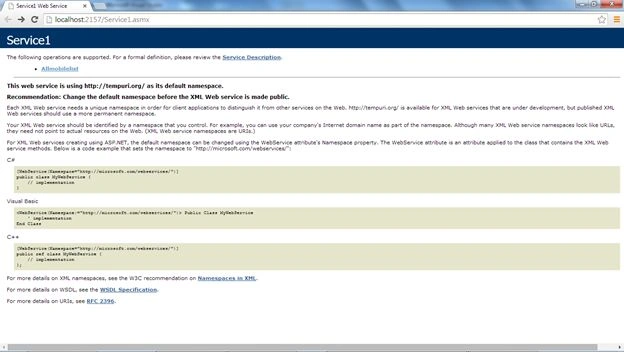
Open Visual Studio then select "File" -> "New" -> "Project..." then provide the project a name.
Here I am giving the name WebApplication2.
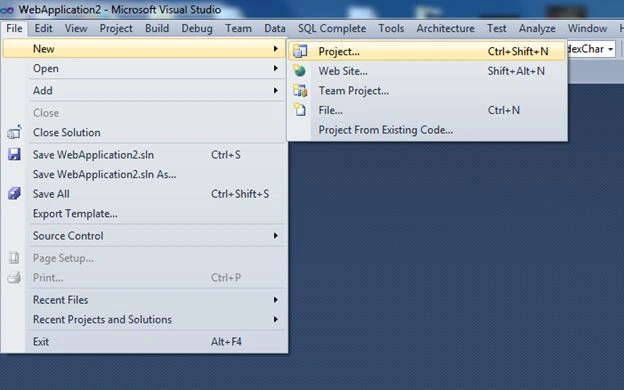
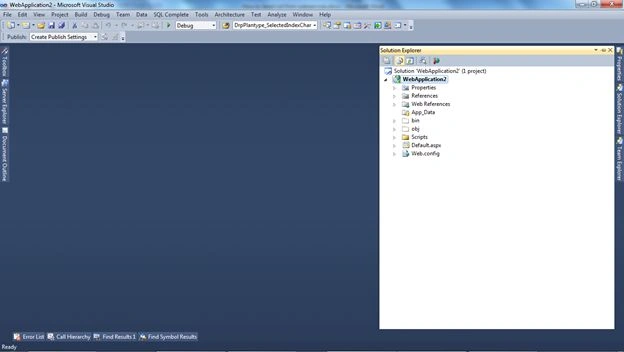
After creating it your solution will look as in the following.
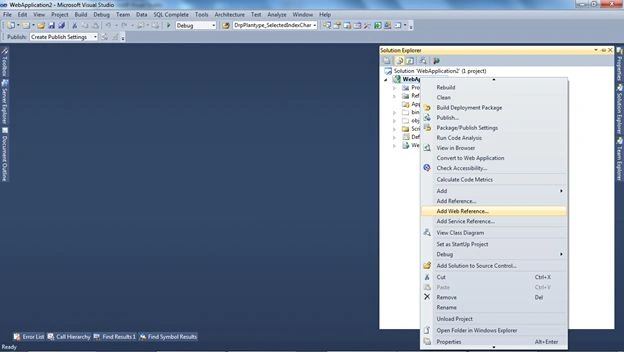
Then just right-click on the solution and select Add Web Reference.
After selecting Add Web Reference a new dialog will pop up asking for Address.
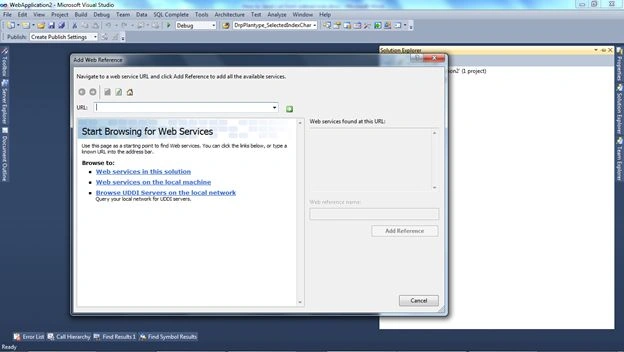
Just put the preceding address that you have copied.
http://localhost:2157/Service1.asmx
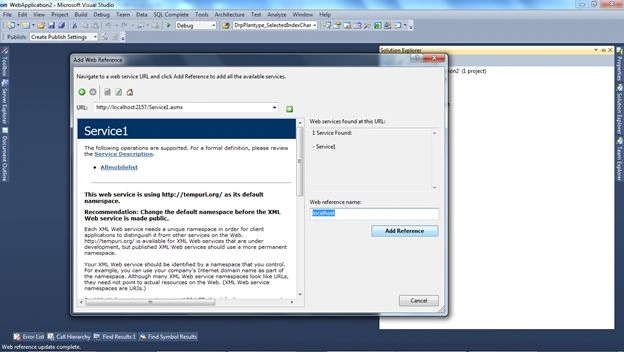
Now your solution will look like this.
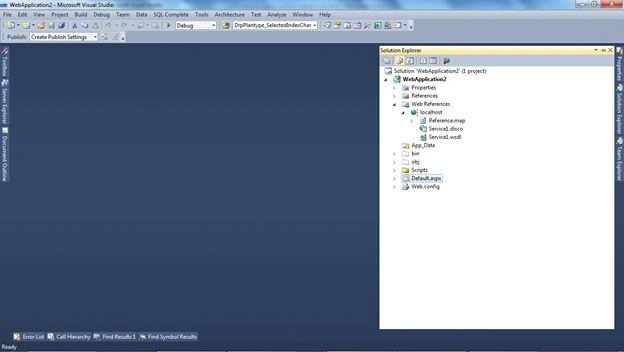
Now we have completed adding the service.
We just want to use this service.
We have a Default Page that is created by default.
On page load of that page I have created a Method named Getlist().
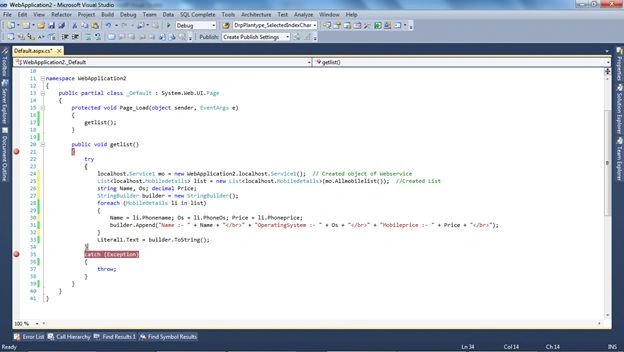
Code of Default page
- using System;
- using System.Collections.Generic;
- using System.Linq;
- using System.Web;
- using System.Web.UI;
- using System.Web.UI.WebControls;
- using System.Data;
- using WebApplication2.localhost;
- using System.Text;
- namespace WebApplication2
- {
- public partial class _Default : System.Web.UI.Page
- {
- protected void Page_Load(object sender, EventArgs e)
- {
- getlist();
- }
- public void getlist()
- {
- try
- {
- localhost.Service1 mo = new WebApplication2.localhost.Service1();
- // Created object of Webservice
- List<localhost.Mobiledetails> list = new
- List<localhost.Mobiledetails>(mo.Allmobilelist());
- //Created List
- string Name, Os;
- decimal Price;
- StringBuilder builder = new StringBuilder();
- foreach (Mobiledetails li in list)
- {
- Name = li.Phonename;
- Os = li.PhoneOs;
- Price = li.Phoneprice;
- builder.Append("Name :- " + Name + "</br>"
- + "OperatingSystem :- " + Os + "</br>"
- + "Mobileprice :- " + Price + "</br>");
- }
- Literal1.Text = builder.ToString();
- }
- catch (Exception)
- {
- throw;
- }
- }
- }
- }
Namespace
- using WebApplication2.localhost; // is the namespace for accessing service objects.
In this code I created an object of the webservice that we added.
- localhost.Service1 mo = new WebApplication2.localhost.Service1();
- After creating object I have created a list of Mobilesdetails ( List<localhost.Mobiledetails> )
- and add object of mo.Allmobilelist();
- List<localhost.Mobiledetails> list = new List<localhost.Mobiledetails>(mo.Allmobilelist()); //Created List
I used a loop for getting the data from the List and a StringBuilder for displaying the formatted data.
The last thing is to add a Literal for displaying this list.
After completing, just run the application and check it.
Here is the output:
Now we have successfully transferred this list.
Edrick LomibaoPosted Aug 24, 2015, 4:07 AM
Saineshwar Bageri thank you for your article.