

Introduction
Recently, I was working on a project and in that project, there was a new scenario for me. The scenario is that when communicating with the database we need to work with the Stored Procedure using Entity Framework. So, I am creating an article series and in the first part, I am dealing with the database using Entity Framework for it.
In this article, we'll learn to communicate with the database using the Entity Framework with a Stored Procedure. So, let's begin with the step-by-step procedure and follow the sections given below:
- Working with Stored Procedure
- Creating a Library Project and Adding ADO.NET Entity Data Model
- Stored Procedure Mapping with Entity
- Import Function
- Adding Class to do CRUD Operations
Working with Stored Procedure
At first, we need to have the Stored Procedure in the database, so let's create the Stored Procedure of Insert, Update, and Delete.
Creating a Stored Procedure to Insert
Suppose we have the table and now we are creating the Stored Procedure to insert the record. Have a look at the following code.
CREATE PROCEDURE [dbo].[Insert_CollegeDetails]
    (
        @CollegeName varchar(100),
        @CollegeAddress nvarchar(150),
        @CollegePhone bigint,
        @CollegeEmailID nvarchar(50),
        @ContactPerson varchar(50),
        @ContactPersonPhoneNo bigint,
        @ContactPersonEmailID nvarchar(50),
        @ContactPersonDesignation varchar(50),
        @FirstVisitDate date,
        @FirstVisitMode varchar(20),
        @State varchar(100),
        @City varchar(100),
        @FDP varchar(20),
        @Workshops int,
        @CreatedBy varchar(25),
        @ReturnValue int OUT
    )
AS
BEGIN
    IF EXISTS(SELECT CollegeEmailID FROM CollegeDetails)
    BEGIN
        INSERT INTO CollegeDetails (
            CollegeName, CollegeAddress, CollegePhone, CollegeEmailID, ContactPerson,
            ContactPersonPhoneNo, ContactPersonEmailID, ContactPersonDesignation,
            FirstVisitDate, FirstVisitMode, State, City, FDP, Workshops, CreatedBy
        )
        VALUES (
            @CollegeName, @CollegeAddress, @CollegePhone,
            @CollegeEmailID, @ContactPerson, @ContactPersonPhoneNo,
            @ContactPersonEmailID, @ContactPersonDesignation, @FirstVisitDate,
            @FirstVisitMode, @State, @City, @FDP, @Workshops, @CreatedBy
        )
        SET @ReturnValue = 1
    END
    ELSE
    BEGIN
        SET @ReturnValue = 0
    END

    SELECT @ReturnValue = SCOPE_IDENTITY()
END
GO
Creating a Stored Procedure to Edit
Now we are creating the Stored Procedure to edit the record. Have a look at the following code.
CREATE PROCEDURE [dbo].[SP_EditCollegeDetails]
(
    @CollegeID int,
    @CollegeName varchar(100),
    @ContactPerson varchar(50),
    @ContactPersonPhoneNo bigint,
    @ContactPersonEmailID nvarchar(50),
    @FDP varchar(20),
    @Workshops int,
    @CreatedBy varchar(25),
    @EditedBy varchar(50)
)
AS
BEGIN
    DECLARE @ReturnValue int

    IF EXISTS(SELECT CollegeEmailID FROM CollegeDetails)
    BEGIN
        UPDATE CollegeDetails SET
            CollegeName = @CollegeName,
            ContactPerson = @ContactPerson,
            ContactPersonPhoneNo = @ContactPersonPhoneNo,
            ContactPersonEmailID = @ContactPersonEmailID,
            FDP = @FDP,
            Workshops = @Workshops,
            CreatedBy = @CreatedBy,
            EditedBy = @EditedBy
        WHERE CollegeID = @CollegeID

        SET @ReturnValue = 1
    END
    ELSE
    BEGIN
        SET @ReturnValue = 0
    END

    SELECT @ReturnValue
END
GO
Creating a Stored Procedure to Delete
Now we are creating the Stored Procedure to delete the record. Have a look at the following code.
CREATE PROCEDURE [dbo].[SP_DeleteCollegeDetails]
(
    @CollegeID int
)
AS
BEGIN
    DECLARE @ReturnValue int

    IF EXISTS(SELECT CollegeEmailID FROM CollegeDetails WHERE CollegeID = @CollegeID)
    BEGIN
        DELETE FROM CollegeDetails WHERE CollegeID = @CollegeID
        SET @ReturnValue = 1
    END
    ELSE
    BEGIN
        SET @ReturnValue = 0
    END

    SELECT @ReturnValue
END
GO
Creating a Library Project and Adding ADO.NET Entity Data Model
Now, we'll create the class library in which we'll do the CRUD operations. So, just follow the procedure given below.
Step 1. Open Visual Studio and create a Class Library project.

Step 2. In this project, now we'll add an ADO.NET Entity Data Model.

Step 3. At first, we select the model content by choosing model contents.

Step 4. Add the new connection to the database.

Step 5. Now we'll choose the Entity Framework version to work with it.

Step 6. In the next wizard, we'll select the database objects.

Now the entity model has been added to the library project. Have a look at the following screenshot.

Stored Procedure Mapping with Entity
In this section, we'll create the mapping of Stored Procedure with the Entity Model. So, let's start with the following procedure.
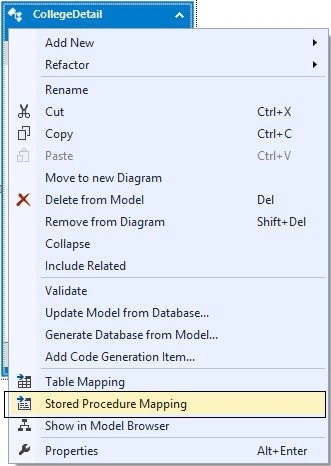
Step 1. Just right-click on the entity model and select the Stored Procedure Mapping.





Vikash KumarPosted Jun 15, 2016, 3:58 AM
I was able to add the diagram to the db but still it doesn't show up in the emdx.Diagram as you shown in the screenshot.
Vikash KumarPosted Jun 15, 2016, 1:34 AM
It might be a silly question for you but is important for me
Vikash KumarPosted Jun 15, 2016, 1:33 AM
Thanks but could you please tell me how do I review that
Vikash KumarPosted Jun 14, 2016, 5:52 AM
Hello, I am having issues with mapping stored procedures to entity in 2012. I don't get the Entity version wizard window. Also when I try to drag from model browser, it doesn;t allow. I am able to add ADO.NET EDM to the project but then the EDM diagram is empty. Any suggestiosn would be great.
Prakash JoshiPosted Sep 1, 2015, 1:15 AM
Hi Nimit Joshi you have not described CollegeDataEntities() in the article
Atul AgrawalPosted Jan 16, 2015, 3:18 AM
thanks in advance
Atul AgrawalPosted Jan 16, 2015, 3:07 AM
Sir,Can you please tell me how can i integrate my ssrs reports with mvc
Prerana TiwariPosted Jul 6, 2014, 11:10 PM
Nice one...........