

UpdateSourceTrigger
Data trigger scenarios
Let's talk about some of the data trigger scenarios. By default, modified values in the binding controls only get pushed down when we do activity related to focus change, like tab out, minimizing and maximizing window, and so on.
In some scenarios we want to update values as quickly as possible, or let's say with every keystoke. So, to do that Microsoft provided UpdateSourceTrigger.
Properties available with UpdateSourceTrigger
- Default: This is the default value and it means a lost focus for most of the controls
- LostFocus: Value update will be on hold until the focus moves out of the control
- PropertyChanged: Value update will happen whenever a target property changes. It usually happen on every keystoke
- Explicit: Used to defer source updates until the user does it forcibly by the click of a button or so.
Default vs LostFocus
Default and LostFocus means the same thing for most of the controls with the exception of DataGrid. For DataGrid:
- Lost Focus: Cell lost focus
- Default: Row lost focus
Code Walkthrough
Now let's have a look at the example and sample code:
<Window x:Class="UpdateSourcePropertyDemo.MainWindow"
xmlns="http://schemas.microsoft.com/winfx/2006/xaml/presentation"
xmlns:x="http://schemas.microsoft.com/winfx/2006/xaml"
Title="MainWindow" Height="150" Width="525">
<Grid>
<Grid.ColumnDefinitions>
<ColumnDefinition Width="50*"/>
<ColumnDefinition Width="50*"/>
</Grid.ColumnDefinitions>
<TextBlock Text="Source:" Width="auto"/>
<TextBox Name="SourceText" Width="160" Height="30" Margin="48,0,44,82" />
<TextBlock Text="Target:" Grid.Column="1" Width="auto"/>
<TextBox Name="TargetText" Width="160" Height="30"
Grid.Column="1" Margin="44,0,47,82" />
</Grid>
</Window>
In the code above I am creating 2 TextBlocks and 2 TextBoxes, that will be shown as:
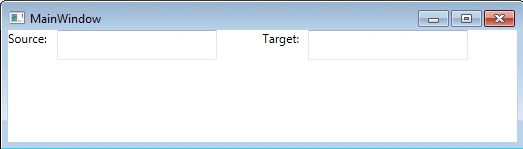
Please note, as of now I haven't done any binding on my textboxes. As a next step, let's pick properties of UpdateSourceTrigger and see what each one does.
Default: When the user changes a value in the source TextBox, the value will be automatically updated in the target TextBox. But when the user modifies the value in the target TextBox, it won't be reflected in the source TextBox, until loss of focus happens.
Code
<grid>
<Grid.ColumnDefinitions>
<ColumnDefinition Width="50*"/>
<ColumnDefinition Width="50*"/>
</Grid.ColumnDefinitions>
<TextBlock Text="Source:" Width="auto"/>
<TextBox Name="SourceText" Width="160" Height="30" Margin="48,0,44,82" />
<TextBlock Text="Target:" Grid.Column="1" Width="auto"/>
<TextBox Name="TargetText" Width="160" Height="30"
Text="{Binding ElementName=SourceText, Path=Text,UpdateSourceTrigger=Default}"
Grid.Column="1" Margin="44,0,47,82" />
</grid>
Output
When the user types into the source TextBox :
When user types in Target TextBox :

LostFocus: As I mentioned earlier, except for a DataGrid, LostFocus behaves the same for all the controls as the Default property.
Code
<grid>
<Grid.ColumnDefinitions>
<ColumnDefinition Width="50*"/>
<ColumnDefinition Width="50*"/>
</Grid.ColumnDefinitions>
<TextBlock Text="Source:" Width="auto"/>
<TextBox Name="SourceText" Width="160" Height="30" Margin="48,0,44,82" />
<TextBlock Text="Target:" Grid.Column="1" Width="auto"/>
<TextBox Name="TargetText" Width="160" Height="30"
Text="{Binding ElementName=SourceText, Path=Text,UpdateSourceTrigger=LostFocus}"
Grid.Column="1" Margin="44,0,47,82" />
</grid>
Output
Here the output will be the same as in the above case (Default) as it is for a TextBox.
PropertyChanged: If the UpdateSourceTrigger property is set to PropertyChanged, then everytime both the source and target will be synchronized. In other words, updating the source TextBox will update the target TextBox on every keystroke and that proves true if the value is updated in the target TextBox.
Code
<Grid>
<Grid.ColumnDefinitions>
<ColumnDefinition Width="50*"/>
<ColumnDefinition Width="50*"/>
</Grid.ColumnDefinitions>
<TextBlock Text="Source:" Width="auto"/>
<TextBox Name="SourceText" Width="160" Height="30" Margin="48,0,44,82" />
<TextBlock Text="Target:" Grid.Column="1" Width="auto"/>
<TextBox Name="TargetText" Width="160" Height="30"
Text="{Binding ElementName=SourceText, Path=Text,UpdateSourceTrigger=PropertyChanged}"
Grid.Column="1" Margin="44,0,47,82" />
</Grid>
Output
When the user types into the source TextBox:

When the user types into the Target TextBox:

After reading this article, I hope you have a clear understanding of UpdateSourceProperty.
minakshi khairePosted Mar 22, 2018, 4:18 AM
I have some problem in my project will u help me plz
minakshi khairePosted Mar 22, 2018, 4:17 AM
Thanx this article is really very usefull