

Introduction
My previous article “Relationship in Entity Framework Using Code First Approach With Fluent API” introduced relationships of entities but when you read that article then some questions will occur to you such as.
- Should I create a database each time?
- How can I add/remove a field from an existing table?
- How can I avoid data loss when a field is added or removed from an existing table?
- Can I get a database script that has changes in the database?
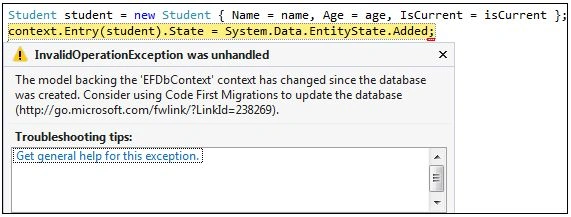
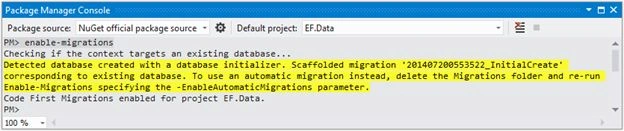
This article will provide answers to all those questions. As you saw in the previous article, you add some entity classes to a project and it might be that you add or remove fields from entities. That's why the data model changes frequently. We have some configuration options in Entity Framework to create a database, such as creating a database if it does not exist, and automatically dropping and re-creating the database each time when you change an entity or data model. Suppose you have first the configuration option that creates a database if it does not exist and now you add a new entity and run the application. Then you get an error such as Database "xx" cannot be created because it already exists but when you use the second configuration option and you add or remove a field from the entity or change entity classes or make a change in a DbContext class, the next time the application is run it automatically deletes the existing database creates a new one that matches the model and seeds it with test data. The Entity Framework migration feature enables us to change the entity or data model and deploy these changes to the database server by updating the database schema without dropping and re-creating the database.
Create a database from the Data Model
To understand the migrations in the Entity Framework Code First approach, we create an entity and define its configuration using the Fluent API. We will create two class library projects, one library project (EF.Core) has entities, and another (EF.Data) has these entities configured with DbContext. Let's define a very simple data model. We are just defining it in the EF.Core project. Below the Student class definition is the Student.cs file under the EF—core project.
using System;
namespace EF.Core
{
   public class Student
   {
      public Int64 Id { get; set; }
      public string Name { get; set; }
      public int Age { get; set; }
   }
}
First of all, we install the Entity Framework package to the EF.Data project so we can use it.
From the Tools menu, click Library Package Manager and then Package Manager Console then choose default project EF.Data in it, which means always choosing the project where you want to install a package.
At the PM> prompt enter the following command
PM> Install-Package EntityFramework -Version 5.0.0
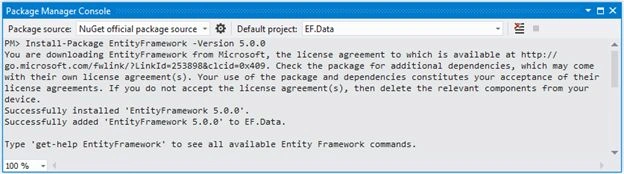
Figure 1. Install Entity Framework
We add a reference to the EF.Core project DLL to the EF.Data project so that we could use the data model to create the database table. Thereafter we define the configuration for the preceding data model that will be used when the database table is created. The configuration defines another class library project EF.Data under the Mapping folder. For the Student data model, we create the StudentMap configuration class definition in the StudentMap.cs file under the EF.Data project.
using System.ComponentModel.DataAnnotations.Schema;
using System.Data.Entity.ModelConfiguration;
using EF.Core;

namespace EF.Data.Mapping
{
  public class StudentMap : EntityTypeConfiguration<Student>
    {
      public StudentMap()
      {
          //key
          HasKey(t => t.Id);
          //property
          Property(t => t.Id).HasDatabaseGeneratedOption(DatabaseGeneratedOption.Identity);
          Property(t => t.Name);
          Property(t => t.Age);
          //table
          ToTable("Students");
      }
    }
}
Now define the connection string in the App.config file under the EF.Data Project so that we can create a database with an appropriate name. The connectionstring is.
<configuration>
  <connectionStrings>
    <add name="DbConnectionString" connectionString="Data Source=sandeepss-PC;Initial Catalog=EFCodeFirst;User ID=sa; Password=****" providerName="System.Data.SqlClient" />
 </connectionStrings>
</configuration>
Now we create a context class EFDbContext (in EFDbContext.cs) that inherits the DbContext class. In this class, we override the OnModelCreating() method. This method is called when the model for a context class (EFDbContext) has been initialized, but before the model has been locked down and used to initialize the context such that the model can be further configured before it is locked down. The following is the code snippet for the context class.
using System.Data.Entity;
using EF.Data.Mapping;
namespace EF.Data
{
    public class EFDbContext : DbContext
    {
        public EFDbContext()
            : base("name=DbConnectionString")
        {
        }

        protected override void OnModelCreating(DbModelBuilder modelBuilder)
        {
            modelBuilder.Configurations.Add(new StudentMap());
        }

    }
}
As you know the EF Code First approach follows convention over configuration so in the constructor we just pass the connection string name the same as an App.Config file and it connects to that server. In the OnModelCreating() method, we add a configuration class object to DbModelBuilder.
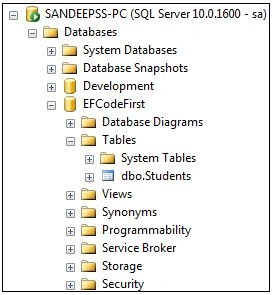
We create a console application EF.Console to create a database and insert data into the database table. Implement the Main method in Program.cs as shown below. This code creates a new instance of our context and then uses it to insert a new Student.
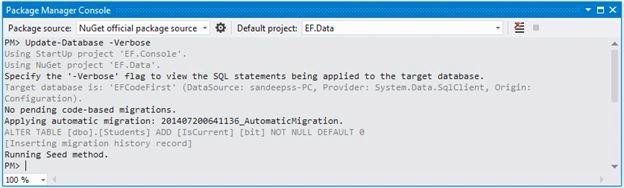
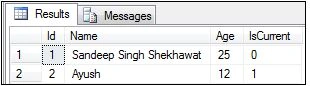
vasudev choudharyPosted Sep 17, 2019, 11:40 PM
This is Very Nice Blog for me .. it is resolved my problem which is i am getting at time of Db Migration.
Amit Kumar SinghPosted Oct 8, 2018, 12:46 AM
Thanks for sharing Sandeep !!!
Santosh DeshmukhPosted Jun 16, 2016, 11:28 PM
Good article.. really helpful..
Cao FangshengPosted May 28, 2016, 4:52 AM
good article
Gowtham RajamanickamPosted Mar 13, 2015, 5:22 AM
Good article !