

In this article, you will learn how to use camera API in Windows Universal Platform to capture an image using camera and save it local storage.
Let’s see the steps
Create a Universal App using Visual Studio 2015.
Create a Universal App using Visual Studio 2015.
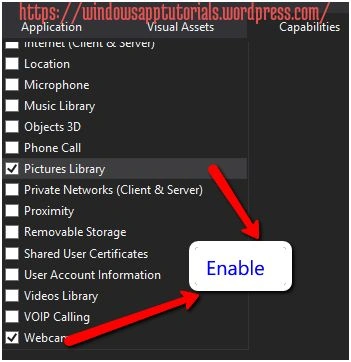
First of all, we need to enable the following capabilities: “Pictures Library” and “Webcam" in the Package.appxmanifest file as in the following image. By enabling these capabilities allows our apps to browse photos and camera resources on a machine.
Next, we need to add a button to capture Image and an Image control to show the captured image. Then we will save the image in the location of the current system.
Now go to MainPage.xaml and design your UI according to your wish.
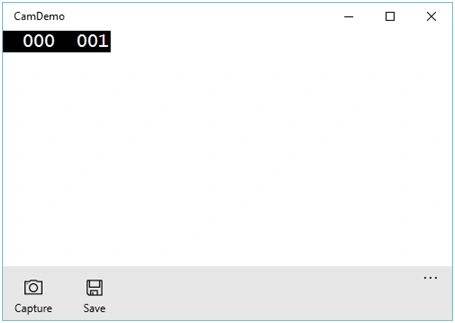
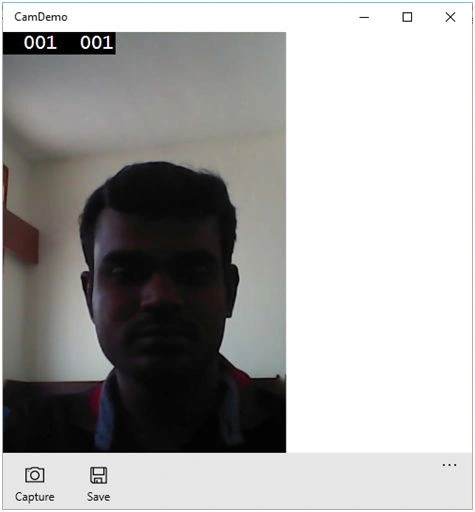
Here, I have created an application bar with two buttons: one is for capturing the image and another is for saving the image. Create one image control to preview the captured image.
XAML Code
XAML Code
- <Page.BottomAppBar>
- <AppBar IsOpen="True" IsSticky="True">
- <StackPanel Orientation="Horizontal">
- <AppBarButton x:Name="captureBtn" Label="Capture" Icon="Camera" Click="captureBtn_Click"></AppBarButton>
- <AppBarButton x:Name="saveBtn" Label="Save" Icon="Save" Click="saveBtn_Click"></AppBarButton>
- </StackPanel>
- </AppBar>
- </Page.BottomAppBar>
- <Grid Background="{ThemeResourceApplicationPageBackgroundThemeBrush}">
- <Image Name="captureImage" HorizontalAlignment="Left" Height="503" VerticalAlignment="Top" Width="360" />
- </Grid>
- private StorageFilestoreFile;
- private IRandomAccessStream stream;
- private asyncvoidcaptureBtn_Click(object sender, RoutedEventArgs e)
- {
- CameraCaptureUI capture = newCameraCaptureUI();
- capture.PhotoSettings.Format = CameraCaptureUIPhotoFormat.Jpeg;
- capture.PhotoSettings.CroppedAspectRatio = newSize(3, 5);
- capture.PhotoSettings.MaxResolution = CameraCaptureUIMaxPhotoResolution.HighestAvailable;
- storeFile = awaitcapture.CaptureFileAsync(CameraCaptureUIMode.Photo);
- if (storeFile != null)
- {
- BitmapImageb image = new BitmapImage();
- stream = awaitstoreFile.OpenAsync(FileAccessMode.Read);;
- bimage.SetSource(stream);
- captureImage.Source = bimage;
- }
- }
- private async void saveBtn_Click(object sender, RoutedEventArgs e)
- {
- try
- {
- FileSavePickerfs = newFileSavePicker();
- fs.FileTypeChoices.Add("Image", newList < string > ()
- {
- ".jpeg"
- });
- fs.DefaultFileExtension = ".jpeg";
- fs.SuggestedFileName = "Image" + DateTime.Today.ToString();
- fs.SuggestedStartLocation = PickerLocationId.PicturesLibrary;
- fs.SuggestedSaveFile = storeFile;
- // Saving the file
- var s = awaitfs.PickSaveFileAsync();
- if (s != null)
- {
- using(vardataReader = new DataReader(stream.GetInputStreamAt(0)))
- {
- awaitdataReader.LoadAsync((uint) stream.Size);
- byte[] buffer = new byte[(int) stream.Size];
- dataReader.ReadBytes(buffer);
- awaitFileIO.WriteBytesAsync(s, buffer);
- }
- }
- }
- catch (Exception ex)
- {
- varmessageDialog = newMessageDialog("Unable to save now.");
- awaitmessageDialog.ShowAsync();
- }
- }
Source Code.
Tuhin DeyPosted Aug 31, 2022, 12:27 PM
How To find Package.appxmanifest file in visual studio -19 for WPF project ?Please respond
Raja SekharPosted Jan 24, 2022, 12:07 PM
Thank you so much
Imran MominPosted Dec 27, 2021, 11:47 AM
How can i capture image when camera is in use by webex, skype etc, pls suggest
Asfend YarPosted Jan 29, 2016, 6:27 AM
great article
Santhakumar MunuswamyPosted Jan 29, 2016, 2:03 AM
Thanks for nice article
Nanddeep NachanPosted Jan 28, 2016, 5:49 AM
Nice