

Introduction
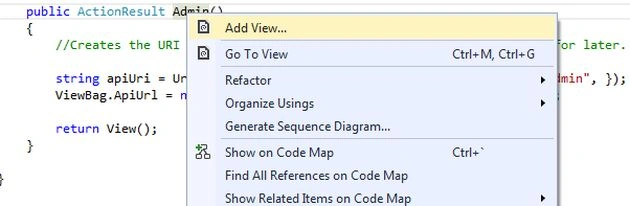
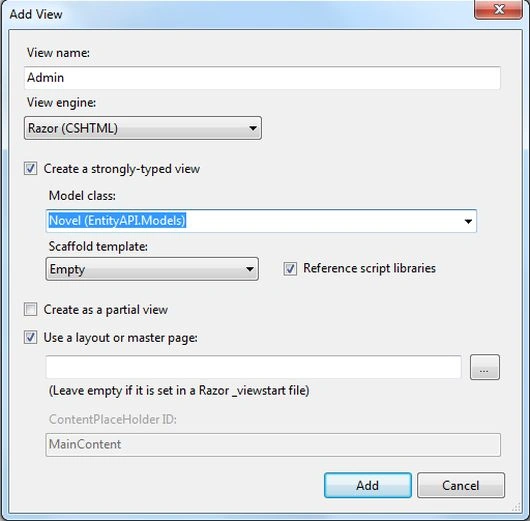
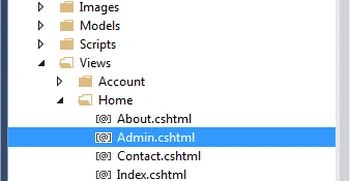
My previous article in this series explained how to create an API Controller with the Entity Framework. This article explains how to add a view for adding the HTML code.
Step 1
Add the "Admin" action method in the HomeController.cs file.
- In the "Solution Explorer".
- Expand the "Controller" folder.
- Select the "HomeController.cs" file.
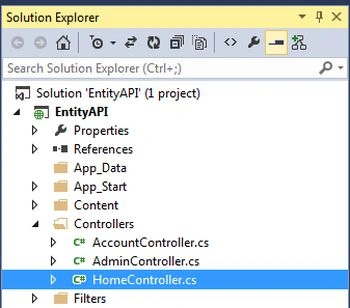
Add the following code in this file;
- public ActionResult Admin()
- {
- //Creates the URI to the web API, and we store this in the view bag for later.
- string apiUri = Url.HttpRouteUrl("DefaultApi", new { controller = "admin", });
- ViewBag.ApiUrl = new Uri(Request.Url, apiUri).AbsoluteUri.ToString();
- return View();
- }
The entire code of the "HomeController" looks like this:
- using System;
- using System.Collections.Generic;
- using System.Linq;
- using System.Web;
- using System.Web.Mvc;
- namespace EntityAPI.Controllers
- {
- public class HomeController : Controller
- {
- public ActionResult Index()
- {
- ViewBag.Message = "Modify this template to jump-start your ASP.NET MVC application.";
- return View();
- }
- public ActionResult About()
- {
- ViewBag.Message = "Your app description page.";
- return View();
- }
- public ActionResult Contact()
- {
- ViewBag.Message = "Your contact page.";
- return View();
- }
- public ActionResult Admin()
- {
- //Creates the URI to the web API, and we store this in the view bag for later.
- string apiUri = Url.HttpRouteUrl("DefaultApi", new { controller = "admin", });
- ViewBag.ApiUrl = new Uri(Request.Url, apiUri).AbsoluteUri.ToString();
- return View();
- }
- }
- }
Join the conversation! Your thoughts help the community grow.