

Introduction
In my previous article I explained Send Email Using ASP.Net With C#. In this article I will explain how to send multiple emails with attachments. If you don't bother about the code because I just change some codes in my previous article. ! Let's start.
Code
In my previous article I explained Send Email Using ASP.Net With C#. In this article I will explain how to send multiple emails with attachments. If you don't bother about the code because I just change some codes in my previous article. ! Let's start.
Code
- protected void btn_sendemail_Click(object sender, EventArgs e)
- {
- string to = Txt_toaddress.Text; //To address
- string from = "fromaddress"; //From address
- string[] Multiple = to.Split(',');
- MailMessage message = new MailMessage();
- message.From = new MailAddress(from);
- foreach (string multiple_email in Multiple)
- {
- message.To.Add(new MailAddress(multiple_email));
- }
- if (FileUpload2.HasFile)//Attaching document
- {
- string FileName = Path.GetFileName(FileUpload2.PostedFile.FileName);
- message.Attachments.Add(new Attachment(FileUpload2.PostedFile.InputStream, FileName));
- }
- string mailbody = Txt_Bodycontent.Text;
- message.Subject = Txt_Subject.Text;
- message.Body = mailbody;
- message.BodyEncoding = Encoding.UTF8;
- message.IsBodyHtml = true;
- SmtpClient client = new SmtpClient("smtp.gmail.com", 587); //Gmail smtp
- System.Net.NetworkCredential basicCredential1 = new
- System.Net.NetworkCredential("fromaddress", "fromaddresspassword");
- client.EnableSsl = true;
- client.UseDefaultCredentials = false;
- client.Credentials = basicCredential1;
- try
- {
- client.Send(message);
- }
- catch (Exception ex)
- {
- throw ex;
- }
- }
We must add the following namespace:
- using System.Net;
- using System.Net.Mail;
- using System.Text;
The following code will help to split the Comma '"," Separated email in the given textbox( Txt_toaddress.Text ).
- string to = Txt_toaddress.Text; //To address
- string from = "fromaddress"; //From address
- string[] Multiple = to.Split(',');
- MailMessage message = new MailMessage();
- message.From = new MailAddress(from);
- foreach (string multiple_email in Multiple)
- {
- message.To.Add(new MailAddress(multiple_email));
- }
If you want to send an attachment with email you can add the following code. Otherwise you just remove this part in the code.
- if (FileUpload2.HasFile)//Attaching document
- {
- string FileName = Path.GetFileName(FileUpload2.PostedFile.FileName);
- message.Attachments.Add(new Attachment(FileUpload2.PostedFile.InputStream, FileName));
- }
If you want to select multiple files in a single file uploader, then you just add AllowMultiple="true". This is one of the option in ASP file upload.
- <div>
- <asp:FileUpload runat="server" ID="FileUpload2" AllowMultiple="true" />
- </div>
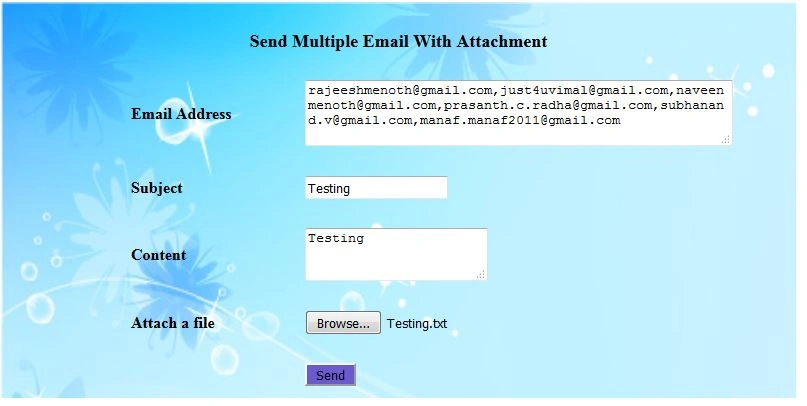
Design
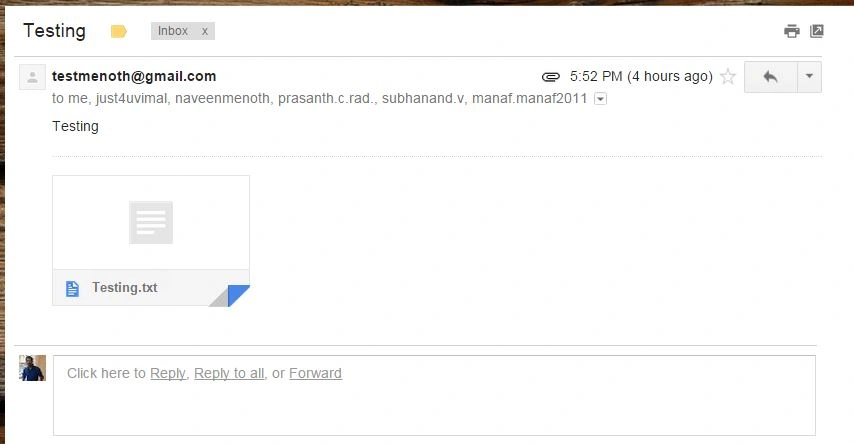
Output
Common Error for sending an Email
Check the following reference to solve your 5.5.1 Authentication.
Check the following reference to solve your 5.5.1 Authentication.
Reference: You can also see this in my blog:
Summary
We learned how to send multiple emails with attachment using ASP.NET and C#. I hope this article is useful for all .NET beginners.
Donna PatriaPosted Jun 2, 2025, 8:42 AM
How about with multiple attachment
Gowri SwaminathanPosted Nov 25, 2019, 12:21 AM
Useful article
Rajeesh MenothPosted Aug 30, 2016, 4:27 AM
Thank You Delpin Susai Raj
Delpin Susai RajPosted Aug 28, 2016, 7:11 AM
Nice
Rajeesh MenothPosted Sep 20, 2015, 2:02 AM
Thank you Saineshwar Bageri
Saineshwar BageriPosted Sep 20, 2015, 1:09 AM
nice one
Rajeesh MenothPosted Sep 18, 2015, 1:42 PM
Thanks Pratham Dave
Pratham DavePosted Sep 18, 2015, 2:32 AM
Nice Article, Good Sharing...
Rajeesh MenothPosted Sep 17, 2015, 1:16 PM
Thanks Santhakumar Munuswamy sir
Santhakumar MunuswamyPosted Sep 17, 2015, 10:17 AM
Thanks for nice article:)
Rajeesh MenothPosted Sep 17, 2015, 6:50 AM
Thanks Sibeesh Venu
Sibeesh VenuPosted Sep 17, 2015, 6:26 AM
Nice Share
Rajeesh MenothPosted Sep 17, 2015, 5:09 AM
Thank you Ankit Bansal
Ankit BansalPosted Sep 17, 2015, 4:33 AM
thanks for share..
Rajeesh MenothPosted Sep 17, 2015, 2:33 AM
Thanks Humayun Kabir Mamun
Humayun Kabir MamunPosted Sep 17, 2015, 2:18 AM
Nice...
Rajeesh MenothPosted Sep 17, 2015, 12:31 AM
Thank you Pankaj Kumar Choudhary
Pankaj Kumar ChoudharyPosted Sep 16, 2015, 8:36 PM
Thanks for Nice Article Sir.........
Rajeesh MenothPosted Sep 16, 2015, 2:31 PM
Thanks Mohammed Ibrahim
Mohammed IbrahimPosted Sep 16, 2015, 2:29 PM
nice
Shridhar SharmaPosted Sep 16, 2015, 12:59 PM
Nice demo :)
Karthikeyan KPosted Sep 16, 2015, 12:27 PM
Good one bro-:)
Rajeesh MenothPosted Sep 16, 2015, 11:20 AM
Thanks Raja Prs
Raja TPosted Sep 16, 2015, 8:27 AM
Nice one, Thanks for sharing
Muhammad Aqib ShehzadPosted Sep 16, 2015, 8:25 AM
Good Article
Saritha K TPosted Sep 16, 2015, 8:20 AM
Nice
RakeshPosted Sep 16, 2015, 8:14 AM
Nice one buddy
Rajeesh MenothPosted Sep 16, 2015, 7:36 AM
Thanks Kalyankumar Ravichandran
Kalyankumar RavichandranPosted Sep 16, 2015, 6:34 AM
Good one bro!
Prasanth RadhakrishnanPosted Sep 16, 2015, 6:03 AM
NICE ARTICLE Rajeesh Menoth Keep it up :)
Rajeesh MenothPosted Sep 16, 2015, 5:57 AM
Thanks Harshad Pansuriya
Harshad PansuriyaPosted Sep 16, 2015, 5:12 AM
Nice One