

Introduction
This article describes how to add a YouTube Video search and play feature in ASP.Net. Here I will describe how to communicate with the Google Search API.
Description
Since it is third party software, we require a third-party DLL to be referenced by our application that will communicate with the Google server.
For this we must download the Google Search API:
- GoogleSearchAPI.dll
You can download it from the source code attached to this article.
Or from this link: http://google-api-for-dotnet.googlecode.com/files/GoogleSearchAPI_0.3.1.zip
Design
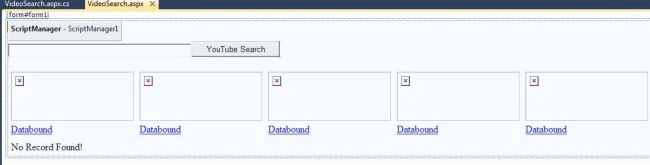
Now add one TextBox,one Button and one Datalist.In the Datalist I used two HyperLinks to show the search result title with image and duration of video.
For playing the video I used an AJAX ModalPopupExtender to show it in a popup panel with an Iframe.
Design your screen as in the following screen:
- <body>
- <form id="form1" runat="server">
- <asp:ScriptManager ID="ScriptManager1" runat="server">
- </asp:ScriptManager>
- <div>
- <asp:TextBox ID="TextBox1" runat="server" Width="300px"></asp:TextBox>
- <asp:Button ID="btnSearch" runat="server" Text="YouTube Search" OnClick="Button1_Click" /><br />
- <br />
- <asp:DataList ID="dlSearch" runat="server" Width="600px" RepeatColumns="6" CellPadding="5">
- <ItemTemplate>
- <a id="aVid1" href="javascript:ShowMyModalPopup('<%#Eval("PlayUrl") %>');">
- <img src='<%#Eval("Url") %>' width="200px" height="80px" /></a><br />
- <a id="a1" href="javascript:ShowMyModalPopup('<%#Eval("PlayUrl") %>');">
- <%#Eval("Title")+"(" +Eval("Duration")+")"%></a>
- <br />
- </ItemTemplate>
- <FooterTemplate>
- <asp:Label Visible='<%#bool.Parse((dlSearch.Items.Count==0).ToString())%>' runat="server" ID="lblNoRecord" Text="No Record Found!"></asp:Label>
- </FooterTemplate>
- </asp:DataList>
- </div>
- <asp:Panel ID="pnlModal" runat="server" CssClass="panel" Style="display: none">
- <div id="wrapper">
- <div id="placeholder" style="padding-top: 10px;">
- <iframe name="myIframe" id="myIframe" width="690px" height="500px" frameborder="0">
- </iframe>
- </div>
- </div>
- <span style="position: absolute; right: -10px; top: -10px; z-index: 1000;">
- <asp:LinkButton ID="lnkClose" runat="server"><img src="close.png" width="30px" height="30px" /></asp:LinkButton>
- </span>
- </asp:Panel>
- <asp:ModalPopupExtender ID="ModalPopupExtender1" runat="server" PopupControlID="pnlModal"
- TargetControlID="pnlModal" BackgroundCssClass="modalBackground" CancelControlID="lnkClose" OnCancelScript="HideModalPopup()">
- </asp:ModalPopupExtender>
- </form>
- </body>
- <head runat="server">
- <script type="text/javascript">
- function ShowMyModalPopup(id)
- var modal = $find('ModalPopupExtender1');
- modal.show();
- document.getElementById('myIframe').src = id;
- }
- function HideModalPopup() {
- var modal = $find('ModalPopupExtender1');
- modal.hide();
- document.getElementById('myIframe').src = "";
- }
- </script>
- <style type="text/css">
- .panel
- {
- background-color: transparent;
- width: 700px;
- height: 500px;
- padding: 5px;
- text-align: center;
- z-index: 5;
- }
- .modalBackground
- {
- background-color: Gray;
- filter: alpha(opacity=70);
- opacity: 0.7;
- }
- </style>
- <title></title>
- </head>
Now go to the code view.
Next add a reference of the following Google Search API DLL to your website:
- GoogleSearchAPI.dll
- using System;
- using System.Collections.Generic;
- using System.Linq;
- using System.Web;
- using System.Web.UI;
- using System.Web.UI.WebControls;
- using System.Data;
- using Google.API.Search;
- public partial class VideoSearch : System.Web.UI.Page
- {
- protected void Page_Load(object sender, EventArgs e)
- {
- if (!IsPostBack)
- {
- dlSearch.DataSource = null;
- dlSearch.DataBind();
- TextBox1.Text = "";
- }
- }
- protected void Button1_Click(object sender, EventArgs e)
- {
- DataSet ds = new DataSet();
- DataTable dt = new DataTable();
- dt.Columns.Add(new DataColumn("Title", typeof(string)));
- dt.Columns.Add(new DataColumn("PlayUrl", typeof(string)));
- dt.Columns.Add(new DataColumn("Url", typeof(string)));
- dt.Columns.Add(new DataColumn("Duration", typeof(string)));
- GvideoSearchClient imageClient = new GvideoSearchClient("www.c-sharpcorner.com");
- IList<IVideoResult> results = imageClient.Search(TextBox1.Text, 30);
- foreach (IVideoResult result in results)
- {
- DataRow dr = dt.NewRow();
- dr["Title"] = result.Title.ToString();
- dr["PlayUrl"] = result.PlayUrl;
- dr["Url"] = result.TbImage;
- //convert seconds to hour and minute
- TimeSpan t = TimeSpan.FromSeconds(result.Duration);
- string time = string.Format("{0:D2}h:{1:D2}m", t.Hours, t.Minutes);
- dr["Duration"] = time;
- dt.Rows.Add(dr);
- }
- dlSearch.DataSource = dt;
- dlSearch.DataBind();
- }
- }
In the code above I passed the TextBox value in the button click to the Google server.
After getting the result I bound it to the datatable then to the datalist control.
Just check these two lines:
- GvideoSearchClient client = new GvideoSearchClient ("www.c-sharpcorner.com");
- IList<IVideoResult> results = client.Search(TextBox1.Text, 30);
In the first line I am passing "www.c-sharpcorner.com" as the client because it requires a hosted site for security purposes.
If you don't pass that then it will show an exception.
In the second line I am passing "30" and a TextBox value. In other words I am getting 30 search results.
So you can increase or decrease this value as needed.
Now build your application. Enter a search query then press the button.
It will show the images of all the YouTube video results.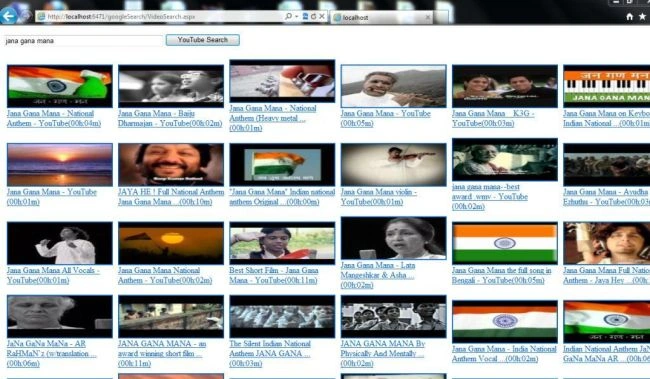
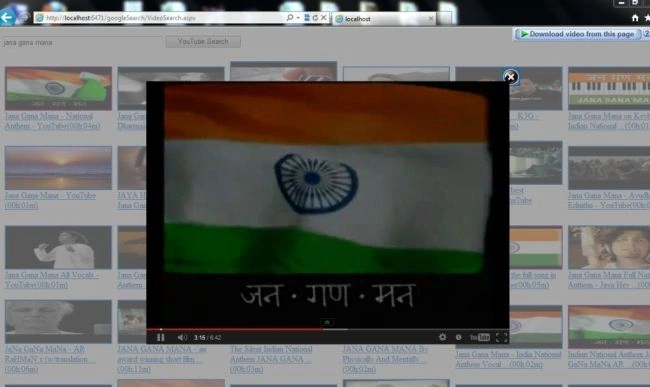
Click on the image or link to play the video in the Popup.
For any modifications or problems please comment.
Thank You.
Prabhu AthmanathanPosted Mar 15, 2019, 3:00 PM
It showing response status 403 api no longer issue how to resolve it kindly help me.
Deepank PantPosted Jul 13, 2017, 12:07 PM
I have created my own YouTube downloader using Java. Check it out athttp://www.bakeyourcode.com/youtube-downloader-javafx/
Hiren NayeePosted May 23, 2017, 3:08 AM
Your post is very nice and easy to understand. now i want to also download this you tube video in our local folder so it's possible or not?
Archana AllishePosted Nov 10, 2015, 8:07 AM
The video is not displayed...Please help me..
aishwar nigamPosted Oct 31, 2015, 8:09 AM
the video is not displayed in the popup, what to do?
trushal tradaPosted Apr 9, 2015, 1:59 PM
video not loaded in popup it gives me error of trusted connection can you please help me?
bhaskar chauhanPosted Apr 10, 2014, 3:39 PM
please tell me how to enable fullscreen mode of the pop up
alok ranjanPosted Jul 27, 2013, 9:33 AM
Error 8 Unknown server tag 'asp:ModalPopupExtender'. is comming i am beginner so kindly mail me what to do