

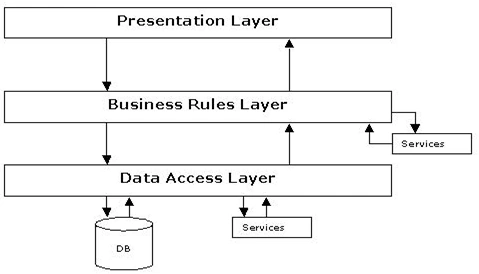
I want to write this article using Layer Architecture.
This is the screen design. I want to store a product type image into the database.
I want to enter Product Type Name and that Image.
Presentation Layer
You have to write code for the Button Click event:
protected void Button2_Click(object sender, EventArgs e)
{
lblMessage.Visible = true;
p.ProductType = txtName.Text;
if (FileUpload1.PostedFile != null &&
FileUpload1.PostedFile.FileName != "")
{
byte[] imageSize = new byte
[FileUpload1.PostedFile.ContentLength];
HttpPostedFile uploadedImage = FileUpload1.PostedFile;
uploadedImage.InputStream.Read
(imageSize, 0, (int)FileUpload1.PostedFile.ContentLength);
p.Image = imageSize;
}
p.InsertProducts();
lblMessage.Text = "File Uploaded";
}
Business Access Layer
public void InsertProducts()
{
SqlParameter[] p=new SqlParameter[2];
p[0]=new SqlParameter("@ProductType",producttype);
p[0].DbType=DbType.String;
p[1]=new SqlParameter("Image",image);
SqlHelper.ExecuteNonQuery(clsConnection.Connection,
CommandType.StoredProcedure, "sp_InsertProducts", p);
}
// Here "sp_InsertProducts" is the stored procedure Name.
Data Access Layer
public class clsConnection
{
public clsConnection()
{
//
// TODO: Add constructor logic here
//
}
public static string Connection = ConfigurationManager.ConnectionStrings["ConnectionString"].ConnectionString;
}
Under Web.Config
<connectionStrings>
<add name="ConnectionString" connectionString="user Id=sa;Password=123;DataBase=RentalShopping;Data Source=server2" providerName="System.Data.SqlClient"/>
</connectionStrings>
//Here write your database name,userid,password,datasource.
Under DataBase:
Create one database i.e RentalShopping.Under Database create one table.I have created one table i.e Products.
CREATE TABLE [dbo].[Products]
(
[ProductId] [int] IDENTITY(101,1) NOT NULL,
[ProductType] [varchar](50) NULL,
[Image] [image] NULL
}
This is the Stored Procedure
USE [RentalShopping]
GO
-SET ANSI_NULLS ON
GO
SET QUOTED_IDENTIFIER ON
GO
ALTER PROCEDURE [dbo].[sp_InsertProducts](@ProductType varchar(50),@Image image)
as
begin
insert into Products(ProductType,Image)values(@ProductType,@Image)
end
SubashPosted Sep 19, 2016, 2:38 AM
Nice one
kalu singh raoPosted Jul 26, 2016, 9:55 AM
Nice share
Mahesh BabuPosted Jul 22, 2014, 2:30 AM
thank you all
RiniPosted Aug 27, 2013, 11:37 PM
nice article
Anand NPosted Dec 17, 2012, 3:54 AM
Thanks a lot Mahesh...
Mahesh BabuPosted Dec 14, 2012, 2:01 PM
Hi Anand, You can follow the below link to find How to retrieve images from database... http://www.c-sharpcorner.com/UploadFile/225bcd/how-to-retrieve-images-from-database-in-layer-architecture/
Anand NeditedPosted Dec 14, 2012, 4:34 AMEdited Dec 14, 2012, 4:35 AM
HI Thanks a lot Can you please share how to retrieve and display the Uploaded image back to Asp Page....?
Mahesh BabuPosted Dec 6, 2012, 4:10 AM
Thanks Rohatash......
Rohatash KumarPosted Dec 5, 2012, 9:58 PM
Nice article Mahesh. Keep it up...
Mahesh BabuPosted Dec 5, 2012, 6:17 AM
I have attached sqlHelper class, you can download attached zip file and put in your solution..
anant tomarPosted Jul 5, 2012, 5:50 AM
how to convert type 'byte[]' to 'System.Web.UI.WebControls.Image plz tell me...
ashish sharmaPosted Oct 26, 2011, 3:41 AM
sql helper does not find.......
sultan kadanyoPosted Aug 16, 2011, 10:30 AM
i want to use the 3tier to fetch the image and also use a handler ??