Introduction
Applets are
small Java programs that are embedded in Web pages. They can be transported over
the Internet from one computer (web server) to another (client computers). They
transform the web into rich media and support the delivery of applications via the
Internet. It is also a special Java program that can be embedded in HTML
documents. A Java applet is a Java program written in a special format to have a
graphical user interface. The graphical user interface is also called a GUI,
and it allows a user to interact with a program by clicking the mouse, typing
information into boxes, and performing other familiar actions. With a Java
applet, GUIs are easy to create even if you've never run into such GUI before.
Life Cycle Of An Applet
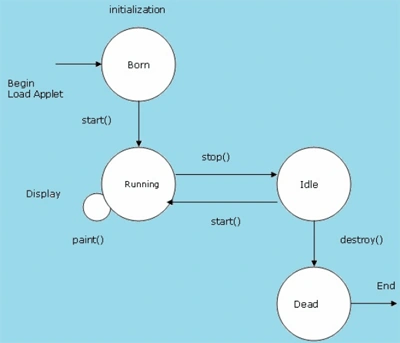
These are the different stages involved in the life cycle of an applet:
- Initialization State
- Running state
- Idle or stopped state
- Dead state
- Display state
Applet Life Cycle
Initialization State: This state is the first state of the applet life
cycle. An applet is created by the method init(). This method initializes the
created applet. It is Called exactly once in an applet's life when applet is
first loaded, which is after object creation, e.g. when the browser visits the
web page for the first time. Used to read applet parameters, start downloading
any other images or media files, etc. Init() method should be overridden in our
applet.
- Public void init()
- {
- bgColor = Color.cyan;
- setBackground(bgColor);
- }
Running State: This state is the second stage of the applet life
cycle. This state comes when start() method is called. Called at least
once. Called when an applet is started or restarted, i.e., whenever the browser
visits the web page.
- Public void start()
- {
- super.start();
- }
Idle or Stopped State: This state is the third stage of the applet
life cycle. This state comes when stop() method is called implicitly or
explicitly
.stop() method is called implicitly. It
is called at least once when the browser leaves the web page when we move from
one page to another. This method is called only in the running state and can be
called any number of times.
It should be overridden in our applet.
- Public void stop()
- {
- super.stop();
- }
Dead State: This state is the fourth stage of the applet life cycle. This
state comes when destroy() method is called. In this state the applet is
completely removed from the memory. It called exactly once when the browser
unloads the applet. Used to perform any final clean-up. It occurs only once in
the life cycle. It should be overridden in our applet.
- Public void destroy()
- {
- super.destroy();
- }
Display State: This state
is the fifth stage of the applet life cycle. This state comes when use s the
applet displays something on the screen. This is achieved by calling paint()
method.Paint() method can be called any number of times. This can be called only
in the running state. This method is a must in all applets. It should be
overridden in our applet.
- Public void paint(Graphics obj)
- {
- super.paint(g);
- }
Example Application of Applet: Here we create two applications to
understand the applet working.
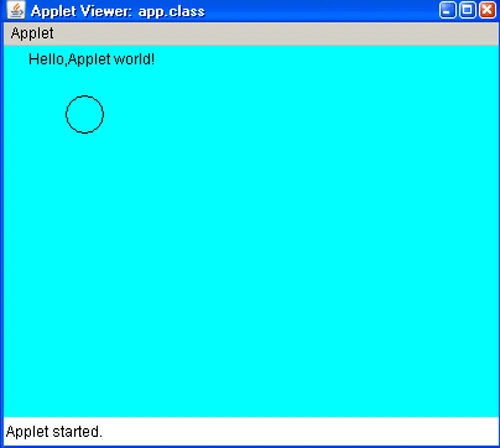
App.java: In this
application we simple print the "Hello Apllet world".
- import java.applet.Applet;
- import java.awt.*;
- public class app extends Applet
- {
- Color bgColor;
- public void init()
- {
- bgColor = Color.cyan;
- setBackground(bgColor);
- }
- public void stop() {}
- public void paint(Graphics g)
- {
- g.drawString("Hello,Applet world!", 20,15);
- g.drawArc(50,40,30,30,0,360);
- }
- }
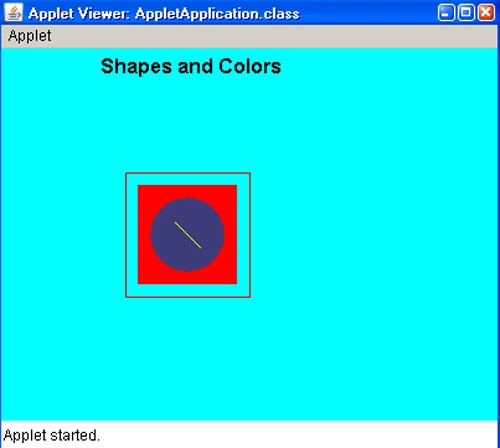
AppletApplication.java: In this application we make a rectangle and fill
it with color.
- import java.awt.*;
- import java.applet.*;
-
- public class AppletApplication extends Applet
- {
- Font bigFont;
- Color redColor;
- Color weirdColor;
- Color bgColor;
-
- public void init()
- {
- bigFont = new Font("Arial",Font.BOLD,16);
- redColor = Color.red;
- weirdColor = new Color(60,60,122);
- bgColor = Color.cyan;
- setBackground(bgColor);
- }
- public void stop()
- {
- }
- public void paint(Graphics g)
- {
- g.setFont(bigFont);
- g.drawString("Shapes and Colors",80,20);
- g.setColor(redColor);
- g.drawRect(100,100,100,100);
- g.fillRect(110,110,80,80);
- g.setColor(weirdColor);
- g.fillArc(120,120,60,60,0,360);
- g.setColor(Color.yellow);
- g.drawLine(140,140,160,160);
- g.setColor(Color.black);
- }
- }
Run the Application: Run
it on the browser.
App.java
ApplicationApplet


Join the conversation! Your thoughts help the community grow.