

To get the serial number of the hard disk, we need to use some C# classes.
ManagementObjectSearcher Class is the class which initializes the new instance of ManagementObjectSearcher class. Basically, it is used to retrieve the management system of the system.
ManagementObjectSearcher Class is the class which initializes the new instance of ManagementObjectSearcher class. Basically, it is used to retrieve the management system of the system.
Let's Start.
Step 1: Creat a Project =>Right click on references, then Add System.Management, System.Management.Instrument.
Add a button and three labels to it.
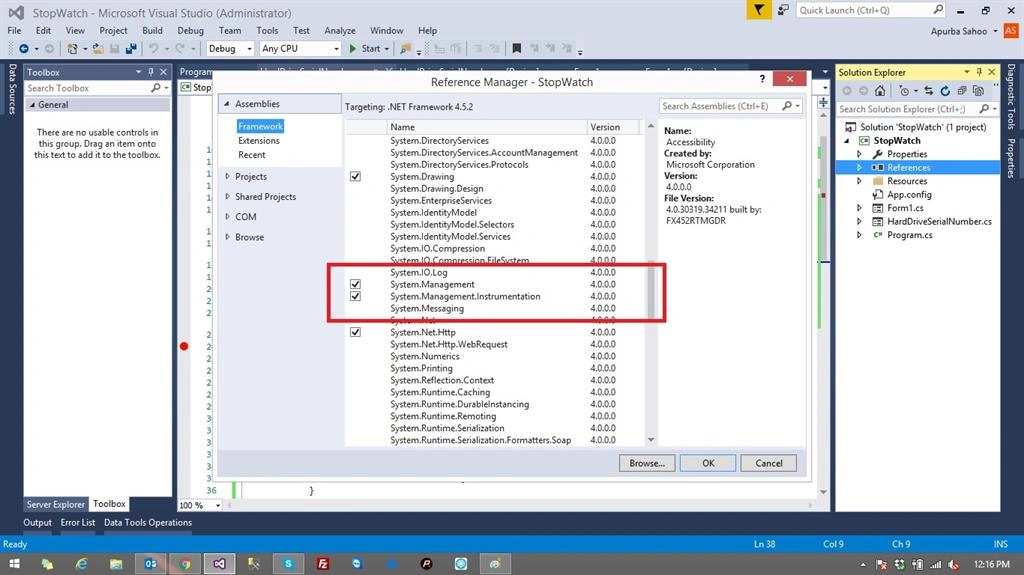
Add a button and three labels to it.
Step 2 : Add the Namespaces to the project.
C# Code
C# Code
- using System.Management;
- using System.IO;
- using System.Collections;
- ArrayList hardDriveDetails = new ArrayList();
- private void button1_Click(object sender, EventArgs e)
- {
- ManagementObjectSearcher moSearcher = new
- ManagementObjectSearcher("SELECT * FROM Win32_DiskDrive");
- foreach (ManagementObject wmi_HD in moSearcher.Get())
- {
- HardDrive hd = new HardDrive(); // User Defined Class
- hd.Model = wmi_HD["Model"].ToString(); //Model Number
- hd.Type = wmi_HD["InterfaceType"].ToString(); //Interface Type
- hd.SerialNo= wmi_HD["SerialNumber"].ToString(); Serial Number
- hardDriveDetails.Add(hd);
- label1.Text ="Model : "+ hd.Model ;
- label2.Text = " Type : " + hd.Type;
- label3.Text = " Serial Number : " + hd.SerialNo;
- }
- }
- class HardDrive
- {
- private string model = null;
- private string type = null;
- private string serialNo = null;
- public string Model
- {
- get { return model; }
- set { model = value; }
- }
- public string Type
- {
- get { return type; }
- set { type = value; }
- }
- public string SerialNo
- {
- get { return serialNo; }
- set { serialNo = value; }
- }
- }
Step 6: Now, run the code.
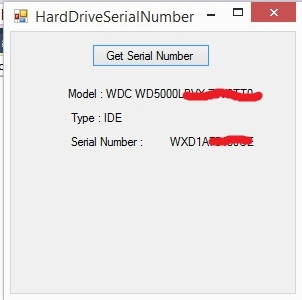
yuxin zhangPosted Sep 19, 2024, 1:52 AM
To obtain the correct disk name and serial number, the best approach is to use CrystalDiskInfo(https://github.com/hiyohiyo/CrystalDiskInfo) . However, CrystalDiskInfois a Windows software written in C++. As a result, it cannot be directly used in one's own project. Therefore, I wrapped CrystalDiskInfo into a DLL. Now, other languages or Windows applications can also accurately distinguish the disk serial number with the help of CrystalDiskInfo. I have open-sourced this project on GitHub. If you are interested in it, you can check it out and use it.https://github.com/ftyszyx/CrystalDiskInfo_dll_lib
Hocine FerradjPosted Aug 27, 2021, 10:43 PM
Thanks......
Mashtullah ShavalullahPosted Jan 10, 2017, 4:23 AM
Apurba Ranjan , thanks for sharing this topic, i have a small problem with your code, if the computer has more than one hard disk, the array hardDriveDetails will have several items, how will i identify the current hard disk where the exe is running from?
SubashPosted Sep 7, 2016, 9:04 AM
Great sir
Ramesh PalaniappanPosted Aug 11, 2016, 9:24 AM
Nice Share
Bhavik PatelPosted Jul 31, 2016, 2:17 AM
Nice