

Introduction
Welcome to the "Demonstrate Backbone.js" article series. This article demonstrates how to create and use a Model in Backbone.js. This article starts with the concept of Backbone.js and various components of it. In our previous article we saw an introduction to Backbone.js and in Part 1 and Part 2 the model implementation that you can get form here.
- Introduction of Backbone.js
- Demonstrating Backbone.js: Implement Model
- Demonstrating Backbone.js: Implement Model Part-2
In this article we will see more about a Model implementation in Backbone.js.
How do we define a function within a Model?
We can also define a function in a model. In the following snippet we will set a function as a member of the Model. Here is the sample implementation.
<%@ Page Language="C#" AutoEventWireup="true" CodeBehind="JavaScript.aspx.cs" Inherits="JavaScript.JavaScript" %>
<!DOCTYPE html>
<html xmlns="http://www.w3.org/1999/xhtml">
<head id="Head1" runat="server">
<script src="backbone/Jquery.js"></script>
<script src="backbone/underscore-min.js"></script>
<script src="backbone/backbone-min.js"></script>
</head>
<body>
<form id="form1" runat="server">
<script>
Product = Backbone.Model.extend({
samplefunction: function () {
console.log('I am function within Product Model');
}
);
var product = new Product();
product.samplefunction();</script>
</form>
</body>
</html>
The “samplefunction” property contains one anonymous function that we are calling with an object of the Product class. Here is the sample output: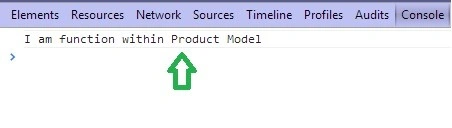
How to save the Model data using the save() function?
To save Model data we need to define one property of the Model class called “url”. This property will contain the URL of any service based application, for example a Web API service. Have a look at the following snippet.
<%@ Page Language="C#" AutoEventWireup="true" CodeBehind="JavaScript.aspx.cs"Inherits="JavaScript.JavaScript" %>
<!DOCTYPE html>
<html xmlns="http://www.w3.org/1999/xhtml">
<head id="Head1" runat="server">
<script src="backbone/Jquery.js"></script>
Join the conversation! Your thoughts help the community grow.