

Introduction
I have seen many articles on the GridView control with scrolling headers. I tried
several forums and websites, but didn't come up with a good solution that work well enough. Some work with the browser compatibility and some others don't work
In this article, I am trying to solve the problem of scrolling headers in the ASP.NET GridView control.
This article will fulfill the following requirements:
- GridView will have fixed header.
- GridView can be scrolled vertically.
Initial view of GridView when loaded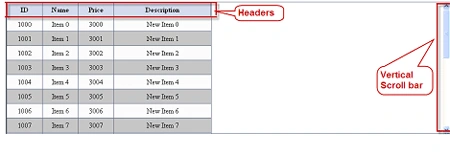
Final view of GridView when scrolls down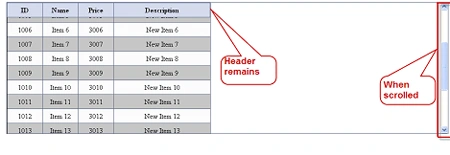
Overview
GridView doesn't have the ability to scroll. But if the GridView contains a larger number of rows or columns (say more than 100 rows and 15 columns), we
want it to have scrollbars.
Since the Div control has the ability to scroll horizontally and vertically,
therefore, to achieve scrolling in GridView, we have to wrap the GridView in the
Div control. It is the Div that actually scrolls, but it looks like the GridView
is scrolling.
Using the Code
<meta
http-equiv="Content-Type"
content="text/html;
charset=UTF-8" />
<meta
http-equiv='X-UA-Compatible'
content='IE=7'
/>
<link
rel='stylesheet'
type='text/css'
href='Styles/StaticHeader.css'
/>
<title></title>
<script
type='text/javascript'
src='Styles/x.js'></script>
<script
type='text/javascript'
src='Styles/xtableheaderfixed.js'></script>
<script
type='text/javascript'>
xAddEventListener(window, 'load',
function() {
new xTableHeaderFixed('gvTheGrid', 'table-container',
0); }, false);
</script>
<div
id='table-container'>
<asp:GridView
ID="gvTheGrid"
runat="server"
GridLines="Both"
CellPadding="3"
AutoGenerateColumns="false"
BackColor="WhiteSmoke"
AlternatingRowStyle-BackColor="Silver"
HeaderStyle-Font-Size="Medium"
OnPreRender="gvTheGrid_PreRender"
CssClass="gvTheGrid">
<Columns>
<asp:BoundField
DataField="ID"
HeaderText="ID"
HeaderStyle-Width="60"
ItemStyle-Width="60"
/>
<asp:BoundField
DataField="Name"
HeaderText="Name"
HeaderStyle-Width="60"
ItemStyle-Width="60"
/>
<asp:BoundField
DataField="Price"
HeaderText="Price"
HeaderStyle-Width="60"
ItemStyle-Width="60"
/>
<asp:BoundField
DataField="Description"
HeaderText="Description"
HeaderStyle-Width="200"
ItemStyle-Width="200"
/>
</Columns>
</asp:GridView>
</div>
Reference
The main reference I have taken is this from site to fix the issue.
http://cross-browser.com/x/examples/xthf-demo.php?s=sep&n=3
arun rajPosted Sep 24, 2019, 5:55 AM
Thanks, it's working nice in normal asp.net grid
masterdp singhPosted Jul 3, 2015, 6:04 AM
hi friend, its working fine but i am facing problem after put it inside update panel..please suggest how to resolve it..
BalaPosted Nov 13, 2014, 8:42 AM
thanks.. its working great
senthil kumarPosted Sep 13, 2012, 3:15 AM
I WANT THESE PRERENDER EVENT FOR DATAGRID ?????? CAN U HELP ME ?? if (gvTheGrid.Rows.Count > 0) { //This replaces <td> with <th> and adds the scope attribute gvTheGrid.UseAccessibleHeader = true; //This will add the <thead> and <tbody> elements gvTheGrid.HeaderRow.TableSection = TableRowSection.TableHeader; //This adds the <tfoot> element. //Remove if you don't have a footer row //gvTheGrid.FooterRow.TableSection = TableRowSection.TableFooter; }
senthil kumarPosted Sep 13, 2012, 3:14 AM
I WANT THESE PRERENDER EVENT FOR DATAGRID ?????? CAN U HELP ME ?? if (gvTheGrid.Rows.Count > 0) { //This replaces <td> with <th> and adds the scope attribute gvTheGrid.UseAccessibleHeader = true; //This will add the <thead> and <tbody> elements gvTheGrid.HeaderRow.TableSection = TableRowSection.TableHeader; //This adds the <tfoot> element. //Remove if you don't have a footer row //gvTheGrid.FooterRow.TableSection = TableRowSection.TableFooter; }
BrianPosted Jun 18, 2012, 3:17 PM
It would be nice to have a .zip archive insteat of .rar.
Natalia TarasovaPosted Mar 10, 2012, 1:08 PM
Thank you very much. It is a great article!! Works!
Jean Paul OlveraPosted Sep 7, 2011, 10:55 AM
Hi Dorababu! I tried to follow your example but It doesnt work, there is a restriction in browser's versions (IE 7)? this is my code: <script type='text/javascript'> xAddEventListener(window, 'load', function () { new xTableHeaderFixed('DDGridView', 'table-container', 0); }, false); </script> <div id="table-container" style="width: 99%; height: 500px; overflow: auto; padding-left:10px"> <asp:GridView ID="GridView1" runat="server" CssClass="DDGridView" AutoGenerateColumns="False" RowStyle-CssClass="td" HeaderStyle-CssClass="th" CellPadding="6" onrowdatabound="GridView1_RowDataBound" onprerender="GridView1_PreRender1"> <HeaderStyle CssClass="th" /> <PagerStyle CssClass="DDFooter"/> <Columns> <asp:BoundField DataField="Id" HeaderText="Id"> <HeaderStyle Width="30px" /></asp:BoundField> <asp:BoundField DataField="NumOficio" HeaderText="NumOrden" > <HeaderStyle Width="100px" /></asp:BoundField> </Columns> <EmptyDataTemplate> No existen elementos en la tabla </EmptyDataTemplate> <RowStyle CssClass="td" /> </asp:GridView> </div>