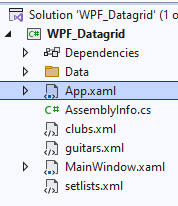
Hi, everyone and thanks in advance. I have a WPF DataGrid project using xmldataprovider to populate the datagrid. using a simple xml file - setlists.xml. In Window.Resources, If I set the source of the xml file to a folder such as d:\xml files\setlists.xml the datagrid populates perfectly. However, if I include the xml file in the project solution the datagrid won't populate.
This works:
This fails:
Using Visual Studio 2022
Any suggestions would be appreciated.
Thanks
Alan
Amit MohantyPosted Dec 9, 2024, 10:42 AM
Try the below step once:
In the Solution Explorer, right-click on setlists.xml and choose Properties.
Set the Build Action to Content.
Set the Copy to Output Directory property to either: Copy always or Copy if newer
Alan DarlingtonPosted Dec 9, 2024, 11:07 AM
Thank you both for your help. I am a hobby programmer and finally moved across fro vb to c# a few months ago. This has been driving me mad for a week or two.
Cheer
Alan
Sangeetha SPosted Dec 9, 2024, 10:46 AM
Set Build Action: Ensure that the XML file (
setlists.xml) is set to the correct build action. Right-click on the file in the Solution Explorer, go to Properties, and set the Build Action to Content. This ensures that the file is included in the output directory when you build your project.Use Relative Path: When you reference the XML file in your
XmlDataProvider, you may need to use a relative path. If your XML file is in the same directory as your executable (e.g., in thebin\\Debugorbin\\Releasefolder), you can simply use:Resource URI: If you want to embed the XML file as a resource, you can also access it using the
packURI scheme, like this:Just replace
YourAssemblyNamewith the actual name of your project or assembly.Check Output Directory: After building your project, check the output directory (like
bin\\Debugorbin\\Release) to confirm that thesetlists.xmlfile is actually being copied there.Debugging: If it still doesn’t work, try adding some error handling to see if there are any exceptions being thrown when loading the XML.