
Hello,
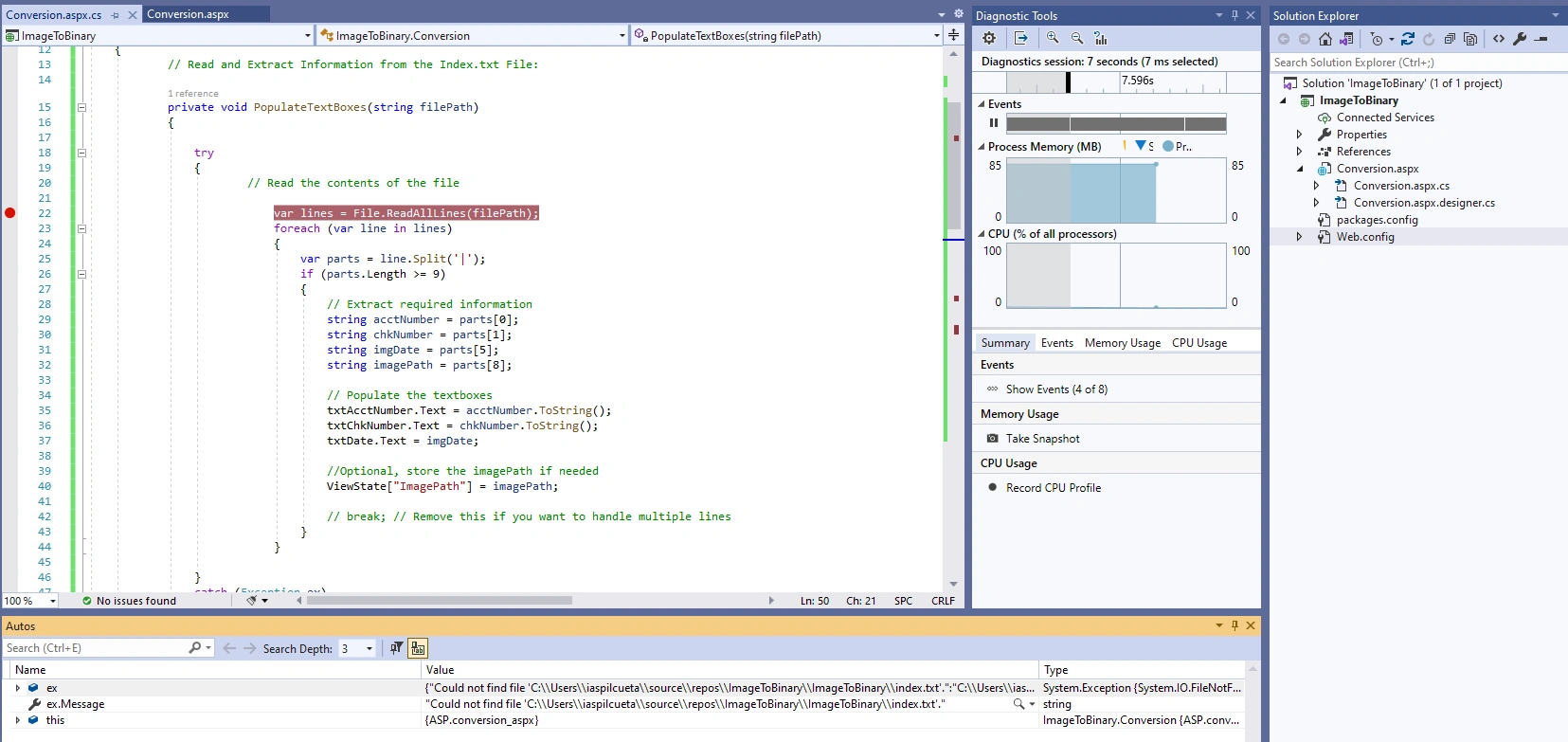
I am having problems with this code, it errors the following:
System.Exception {System.IO.FileNotFoundException} ex.Message "Could not find file 'C:\\Users\\iaspilcueta\\source\\repos\\ImageToBinary\\ImageToBinary\\index.txt'.
I have tried to fix it by adding System.IO.StreamReader Streamreader, but same error.
Screen Shot and Code below.
            // Read and Extract Information from the Index.txt File:

            private void PopulateTextBoxes(string filePath)
            {

                try
                {
                    // Check if the file exists
                    if (System.IO.File.Exists(filePath))
                    {
                        // Read the contents of the file
                        using (System.IO.StreamReader reader = System.IO.File.OpenText(filePath))
                        {
                            string fileContents = reader.ReadToEnd();

                            var lines = File.ReadAllLines(filePath);
                            foreach (var line in lines)
                            {
                                var parts = line.Split('|');
                                if (parts.Length >= 9)
                                {
                                    // Extract required information
                                    string acctNumber = parts[0];
                                    string chkNumber = parts[1];
                                    string imgDate = parts[5];
                                    string imagePath = parts[8];

                                    // Populate the textboxes
                                    txtAcctNumber.Text = acctNumber.ToString();
                                    txtChkNumber.Text = chkNumber.ToString();
                                    txtDate.Text = imgDate;

                                    //Optional, store the imagePath if needed
                                    ViewState["ImagePath"] = imagePath;

                                    // break; // Remove this if you want to handle multiple lines
                                }
                            }
                        }
                    }
                }
                catch (Exception ex)
                {
                    // Handle any exceptions that occurred
                    Console.WriteLine("An error occurred while reading the file: " + ex.Message);
                }
            }


            //Convert the Image to a Byte Array:
            private byte[] ConvertImageToByteArray(string imagePath)
            {
                string fullPath = Server.MapPath("~/Images/") + imagePath;
                return File.ReadAllBytes(fullPath);
            }

            //Save the Data into the Database:

            protected void Button1_Click(object sender, EventArgs e)
            {
                if (!FileUpload1.HasFile) //Validation
                {
                    Response.Write("No file Selected"); return;
                }
                else
                {
                    // Read and populate textboxes from Index.txt

                    string indexFilePath = Server.MapPath("~/index.txt");
                    PopulateTextBoxes(indexFilePath);

                    // Extract values from textboxes
                    string acctNumber = txtAcctNumber.Text;
                    string chkNumber = txtChkNumber.Text;
                    string imgDate = txtDate.Text;
                    string imagePath = ViewState["ImagePath"].ToString();

                    // Convert the image to byte array
                    byte[] imageData = ConvertImageToByteArray(imagePath);

                    // Insert the data into the database
                    using (SqlConnection connection = new SqlConnection(ConfigurationManager.ConnectionStrings["DBCS"].ToString()))
                    {
                        connection.Open();
                        SqlCommand cmd = new SqlCommand("INSERT INTO chkImages (acctNumber, chknumber, imgdate, imageData) VALUES (@acctNumber, @chknumber, @imgdate, @imageData)", connection);

                        cmd.Parameters.AddWithValue("@acctNumber", acctNumber);
                        cmd.Parameters.AddWithValue("@chknumber", chkNumber);
                        cmd.Parameters.AddWithValue("@imgdate", imgDate);
                        cmd.Parameters.AddWithValue("@imageData", imageData);

                        cmd.ExecuteNonQuery();
                        connection.Close();

                        Response.Write("Image has been Added");
                    }
                }
Vishal JoshiPosted Jul 16, 2024, 4:35 AM
Hello
Using / or \\ for folder paths in C# is an issue.
Use Path.Combine() method to avoid file path issues.
Please replace the below line of code and try again.
From your code, it looks like there are two approaches to reading the file, StreamReader and ReadAllLines. you can skip ReadAllLines and keep the code below
Thanks
Vishal Joshi
Anoop Kumar SharmaPosted Jul 16, 2024, 3:08 AM
Hi Ivonne Aspilcueta,
As you are getting the "System.Exception {System.IO.FileNotFoundException}" exception which clearly means that the file is not present at the path (C:\\Users\\iaspilcueta\\source\\repos\\ImageToBinary\\ImageToBinary\\index.txt). Please verify that you have the path and try again.
I hope this will help you