
I have an MVC 5 generated "Create" page. Now for the related data I have made a table, which looks like this:
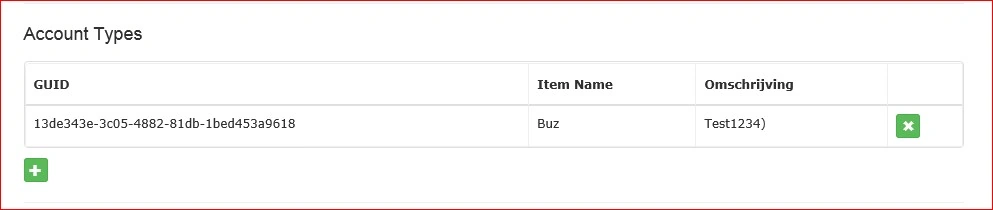
When clicking on the green add button, the following modal is shown:
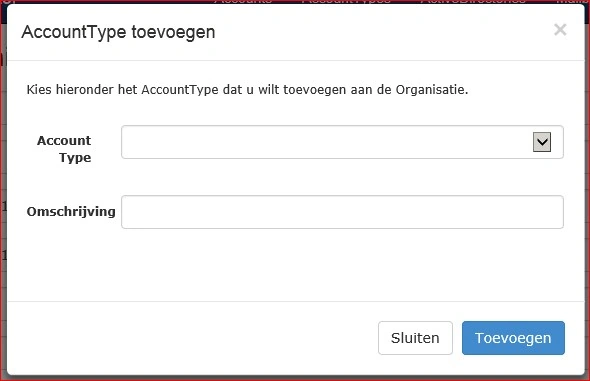
In this design, the user is able to add/remove sub-items to the list before submitting the form.
In this example, the row in the screenshot I add initially. All works well, except when I remove this initial row in my Create action (which shouldn't be there anyway, it should start with an empty table) no rows added are available on the server. Somehow, the Model Binder only works when there's initially 1 row rendered from the create action.
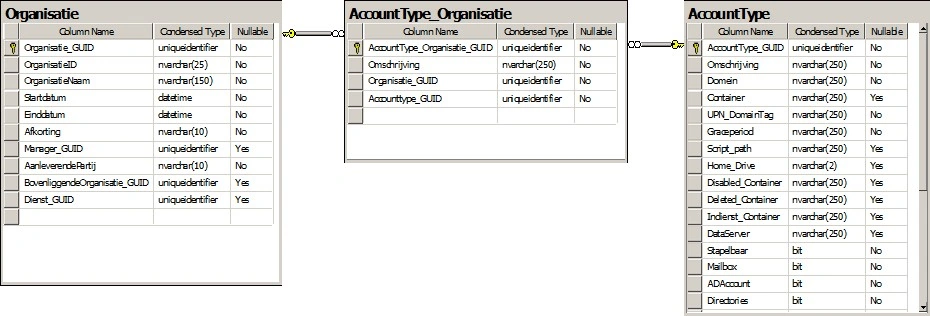
Data Model:
Controller actions: (OrganisatieController.cs)
public ActionResult Create()
{
Organisatie myOrganisatie = new Organisatie();
//-- Test Data --
AccountType_Organisatie myAccTypeOrg = new AccountType_Organisatie();
myAccTypeOrg.Accounttype_GUID = csContext.AccountTypes.First().AccountType_GUID;
myAccTypeOrg.AccountType = csContext.AccountTypes.First();
myAccTypeOrg.Omschrijving = "Test1234";
myOrganisatie.AccountType_Organisaties.Add(myAccTypeOrg);
//-- End Test Data –
//-- Load Dropdown Data --
ViewBag.slAccountTypes = new SelectList(csContext.AccountTypes, "AccountType_GUID", Omschrijving");
return View(myOrganisatie);
}
[HttpPost]
[ValidateAntiForgeryToken]
public ActionResult Create(
[Bind(Include = "Organisatie_GUID,OrganisatieID,OrganisatieNaam,Startdatum,Einddatum,Afkorting,Manager_GUID,AanleverendePartij,BovenliggendeOrganisatie_GUID,AccountType_Organisaties")]
Organisatie myOrg)
{
try
{
int x = 0;
foreach(AccountType_Organisatie myAccType_Org in myOrg.AccountType_Organisaties)
{
myAccType_Org.AccountType_Organisatie_GUID = Guid.NewGuid();
myAccType_Org.AccountType = csContext.AccountTypes.Find(myAccType_Org.Accounttype_GUID);
//-- Remove Related Model Validation errors --
ModelState.Remove(String.Format("AccountType_Organisaties[{0}].AccountType.Omschrijving", x));
ModelState.Remove(String.Format("AccountType_Organisaties[{0}].AccountType.Domein", x));
ModelState.Remove(String.Format("AccountType_Organisaties[{0}].AccountType.UPN_DomainTag", x));
ModelState.Remove(String.Format("AccountType_Organisaties[{0}].AccountType.Graceperiod", x));
x++;
}
if (ModelState.IsValid)
{
myOrg.Organisatie_GUID = Guid.NewGuid();
//-- Update related data with new GUID --
foreach(AccountType_Organisatie myAccType_Org in myOrg.AccountType_Organisaties)
{
myAccType_Org.Organisatie_GUID = myOrg.Organisatie_GUID;
}
csContext.Organisaties.Add(myOrg);
csContext.SaveChanges();
return RedirectToAction("Index");
}
}
catch (System.Data.DataException ex)
{
ModelState.AddModelError("", "Could not create the Organisation. [Reason: " + ex.Message + "]");
}
//-- Load Dropdown Data --
ViewBag.slAccountTypes = new SelectList(csContext.AccountTypes, "AccountType_GUID", Omschrijving");
return View(myOrg);
}
ViewPage: (Create.shtml)
@model ConfiguratorWeb.Models.Organisatie
@section Styles {
@Styles.Render("~/bundles/data-input-css")
}
@{
ViewBag.Title = "Nieuwe Organisatie";
Layout = "~/Views/Shared/_Layout.cshtml";
}
@using (Html.BeginForm())
{
@Html.AntiForgeryToken()
<div class="form-horizontal">
@Html.ValidationSummary(true)
@Html.HiddenFor(model => model.Organisatie_GUID)
<div class="form-group">
@Html.LabelFor(model => model.OrganisatieID, new { @class = "control-label col-md-2" })
<div class="col-md-10">
@Html.EditorFor(model => model.OrganisatieID)
@Html.ValidationMessageFor(model => model.OrganisatieID)
div>
div>
<div class="form-group">
@Html.LabelFor(model => model.OrganisatieNaam, new { @class = "control-label col-md-2" })
<div class="col-md-10">
@Html.EditorFor(model => model.OrganisatieNaam)
@Html.ValidationMessageFor(model => model.OrganisatieNaam)
div>
div>
<hr />
<div class="h4">Account Typesdiv>
<br />
<table id="tblAccountTypes" data-toggle="table" style="visibility:visible;">
<thead>
<tr>
<th>GUIDth>
<th>Item Nameth>
<th>Omschrijvingth>
<th>th>
tr>
thead>
<tbody>
@Html.EditorFor(model => model.AccountType_Organisaties)
tbody>
table>
<button id="btnAddAccountType" type="button" class="btn btn-success btn-xs btn-glyph-xs" title="Add AccountType" onclick="showModal();" style="margin-top:10px;">
<span class="glyphicon glyphicon-plus">span>
button>
<hr />
@{ Html.RenderPartial("_ActionButtons", new ViewDataDictionary { { "SubmitClientClick", "return fixIndexing();" } }); }
div>
}
<div id="modalAddAccountType" class="modal fade">
<div class="modal-dialog">
<div class="modal-content">
<div class="modal-header">
<button type="button" class="close" data-dismiss="modal" aria-label="Close"><span aria-hidden="true">×span>button>
<h4 class="modal-title">AccountType toevoegenh4>
div>
<div class="modal-body">
<p>Kies hieronder het AccountType dat u wilt toevoegen aan de Organisatie.p>
<br />
<div class="form-horizontal">
<div class="form-group">
<label class="control-label col-md-2">Account Typelabel>
<div class="col-md-10">
@Html.DropDownList("ddlAccountType", (IEnumerable<SelectListItem>)ViewData["slAccountTypes"], "", new { @class = "form-control dropdown" })
<label id="lblAccountType_Required" class="h6 control-label" style="visibility:hidden;">U dient een Account type te selecterenlabel>
div>
div>
<div class="form-group">
<label class="control-label col-md-2">Omschrijvinglabel>
<div class="col-md-10">
@Html.TextBox("txtOmschrijving", null, new { @class = "form-control" })
<label id="lblOmschrijving_Required" class="h6 control-label" style="visibility:hidden;">U dient een omschrijving in te voerenlabel>
div>
div>
div>
div>
<div class="modal-footer">
<button type="button" class="btn btn-default" data-dismiss="modal">Sluitenbutton>
<button type="button" class="btn btn-primary" onclick="addAccountType();">Toevoegenbutton>
div>
div>
div>
div>
@section Scripts {
@Scripts.Render("~/bundles/jqueryval")
@Scripts.Render("~/bundles/data-input-js")
<script>
$(document).ready(function () {
$('#tblAccountTypes').bootstrapTable('hideLoading', null);
//$('.no-records-found').remove();
//-- Add onclick handler to Delete button --
$('[id^="btnDelete_"]').on("click", deleteRow);
});
function showModal() {
$('#modalAddAccountType').modal();
}
function addAccountType() {
var IsValid = true;
var AccountType_GUID = $('#ddlAccountType option:selected').val();
var AccountType_Naam = $('#ddlAccountType option:selected').text();
var Omschrijving = $('#txtOmschrijving').val();
if (IsValid) {
//-- Determine index to be used --
var Index = 0;
//-- Add new row to table --
var newRow = "
newRow += "
newRow += "
newRow += "
newRow += "
$('#tblAccountTypes tbody:last').append(newRow);
//-- Add onclick handler to Delete button --
$('#btnDelete_' + AccountType_GUID).on("click", deleteRow);
//-- Remove Item from Dropdownlist in Modal --
$('#ddlAccountType').find('option[value=' + AccountType_GUID + ']').remove();
//-- Close Modal --
$('#modalAddAccountType').modal('toggle');
}
}
function fixIndexing() {
var tableRows = $('#tblAccountTypes tbody tr');
for (x = 0; x < tableRows.length; x++) {
tableRows.eq(x).attr('data-index', x);
tableRows.eq(x).children('td:nth-child(1)').children('input:first').attr('name', 'AccountType_Organisaties[' + x + "].Accounttype_GUID");
tableRows.eq(x).children('td:nth-child(2)').children('input:first').attr('name', 'AccountType_Organisaties[' + x + "].AccountType.Omschrijving");
tableRows.eq(x).children('td:nth-child(3)').children('input:first').attr('name', 'AccountType_Organisaties[' + x + "].Omschrijving");
}
return true; //- Submit Form -
}
function deleteRow() {
//-- Add Item to Dropdownlist in Modal --
var row = $(this).parents('tr');
var Account_GUID = row.children('td:nth-child(1)').text();
var Account_Naam = row.children('td:nth-child(2)').text();
$('#ddlAccountType').append(new Option(Account_Naam, Account_GUID));
//-- Remove row from table --
row.remove();
}
script>
}
And finally the Editor Template for the related data (AccountType_Organisatie.cshtml):
@model ConfiguratorWeb.Models.AccountType_Organisatie
<tr>
<td>@Html.HiddenFor(x => Model.Accounttype_GUID)@Model.Accounttype_GUIDtd>
<td>@Html.HiddenFor(x => Model.AccountType.Omschrijving, new { data_val = false })@Model.AccountType.Omschrijvingtd>
<td>@Html.HiddenFor(x => Model.Omschrijving, new { data_val = false })@Model.Omschrijving)td>
<td>
<button id="btnDelete_@Model.Accounttype_GUID" type="button" class="btn btn-success btn-xs btn-glyph-xs" title="Verwijderen" onclick="deleteRow()">
<span class='glyphicon glyphicon-remove'>span>
button>
td>
tr>
Pinpoint SolutionsPosted Jan 14, 2015, 1:21 AM
Suraj SahooPosted Jan 13, 2015, 12:39 PM
The thing is, the ID for the Account_Type or the Primary key, isautoincremented or Identity column??