im reposting my question. i made a mistake checking the "do you like the answer" from a post that didnt helped at all. (nobody seems to check on posts that are already marked answered) the dude that answered never came back.
so heres my original question:
"hi, this is my second question here. thanks for the help on the previous one.
now
im in a bit of a dilemma whether i should implement ASP.net's built in
user registration control (createuserwizard) versus creating my own
registration form. the problem is i want to add extra criteria on the
createuserwizard (already set up the table under aspnetdb.mdf which is
aspnet_users for the extra fields) without adding a new
createuserwizardstep ( i saw this on a tutorial, it doesnt suit my
taste, i want one straight form to be filled up by the customer).
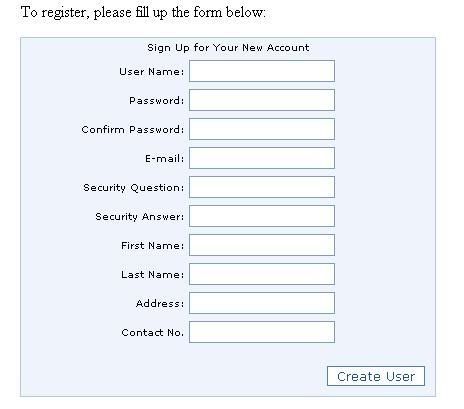
heres the screenshot of my modified form.
http://i279.photobucket.com/albums/kk137/wh3resmycar/createuser.jpg
thanks in advance."
problem is i can modify both the createuserwizard control as well as the aspnet_membership but i cant modify how the create user button will save onto the database, as it will save using its default schema sans the changes that i have made.
thanks in advance again.
Loading
mohamed suhaibPosted May 24, 2010, 10:16 PM
when using profile, is there any way i could count a certain field to get the total number of data in that specified field.
for example, if i have a department field in the profile, i want to count the number of employees who are working in that department.
is that possible?
thank you
Dipa AhujaPosted May 2, 2010, 2:16 PM
mohamed suhaibPosted May 2, 2010, 12:48 PM
mohamed suhaibPosted Apr 28, 2010, 8:48 AM
in the createuserwizard, i've got 3 steps...
1st is to create the user,
2nd assigns roles to the user,
and the 3rd is the wizard complete step.
i've got the cancel button enabled on the wizard, but i want it to be seen only on the 1st step and not on the 2nd. is that possible to do?
Dipa AhujaPosted Apr 27, 2010, 7:44 AM
mohamed suhaibPosted Apr 27, 2010, 5:31 AM
i've managed for it to work now... atleast its writing to the database now.
but i've also noticed something new in the database.
when i create a new user, i am writing data into 4 tables. Membership tabe, UsersInRoles table, aspnet_Users table, profile table and then to the table i created which is called Users.
everything is written correctly in all the tables except the aspnet_Users table.
for each new user i create, 2 rows are filled up.
61de6a06-9a65-448c-a033-ed107863f36e
i created the user "U000" and the above record was filled in automatically..
do you have any idea why this happens?
mohamed suhaibPosted Apr 26, 2010, 1:52 PM
thanks a lot :D
i managed to solve it with help from a friend.
i was trying to write the username value to the userid field which is set as a uniqueidentifier file type.
but thanks a LOT.
will come back if i got any more queries like this :D
Dipa AhujaPosted Apr 26, 2010, 1:31 PM
mohamed suhaibPosted Apr 26, 2010, 11:31 AM
hi diya ahuja
thank you for ur replies and sorry for having to keep bugging you like this..
below is the source code for the CreatedUser event
using System;
using System.Data;
using System.Configuration;
using System.Web;
using System.Web.Security;
using System.Web.UI;
using System.Web.UI.WebControls;
using System.Web.UI.WebControls.WebParts;
using System.Web.UI.HtmlControls;
using System.Web.SessionState;
using System.Collections.Generic;
using System.Linq;
using System.Data.SqlClient;
public partial class Admin_Default : System.Web.UI.Page
{
protected void CreateUserWizard1_CreatedUser(object sender, EventArgs e)
{
//// Create an empty Profile for the newly created user
ProfileCommon p = (ProfileCommon)ProfileCommon.Create(CreateUserWizard1.UserName, true);
p.FirstName = ((TextBox)CreateUserWizard1.CreateUserStep.ContentTemplateContainer.FindControl("txtfname")).Text;
p.LastName = ((TextBox)CreateUserWizard1.CreateUserStep.ContentTemplateContainer.FindControl("txtlname")).Text;
p.Email = ((TextBox)CreateUserWizard1.CreateUserStep.ContentTemplateContainer.FindControl("Email")).Text;
p.Department = Int32.Parse(((TextBox)CreateUserWizard1.CreateUserStep.ContentTemplateContainer.FindControl("txtdepartment")).Text);
p.MobileNo = ((TextBox)CreateUserWizard1.CreateUserStep.ContentTemplateContainer.FindControl("txtmobno")).Text;
p.ExtNo = ((TextBox)CreateUserWizard1.CreateUserStep.ContentTemplateContainer.FindControl("txtextno")).Text;
//// Save the profile - must be done since we explicitly created this profile instance
p.Save();
TextBox UserNameTextBox = (TextBox)CreateUserWizardStep1.ContentTemplateContainer.FindControl("UserName");
SqlDataSource DataSource = (SqlDataSource)CreateUserWizardStep1.ContentTemplateContainer.FindControl("InsertUserDetails");
MembershipUser User = Membership.GetUser(UserNameTextBox.Text);
object UserGUID = User.ProviderUserKey.ToString();
Session["UserId"] = Membership.GetUser(UserNameTextBox.Text);
//Perform insert operation like
String connString = "Data Source=ZELLOLA-PC;Initial Catalog=BMLHelpDesk;Persist Security Info=True;User ID=sa;Password=psswrd";
SqlConnection objcon = new SqlConnection(connString);
objcon.Open();
string q = "insert into users (UserId, usr_ID, usr_FName, usr_LName, usr_email, dprt_ID, usr_MobNo, usr_ExtNo) values (@UserId, @usr_ID, @usr_FName, @usr_LName, @usr_email, @dprt_ID, @usr_MobNo, @usr_ExtNo)";
SqlCommand comm = new SqlCommand(q, objcon);
comm.Parameters.AddWithValue("@UserId", Session["UserId"]);
comm.Parameters.AddWithValue("@usr_ID", p.UserName);
comm.Parameters.AddWithValue("@usr_FName", p.FirstName);
comm.Parameters.AddWithValue("@usr_LName", p.LastName);
comm.Parameters.AddWithValue("@usr_email", p.Email);
comm.Parameters.AddWithValue("@dprt_ID", p.Department);
comm.Parameters.AddWithValue("@usr_MobNo", p.MobileNo);
comm.Parameters.AddWithValue("@usr_ExtNo", p.ExtNo);
comm.ExecuteNonQuery();
objcon.Close();
}
}
the @UserId parameter is supposed to add the UserId field from the aspnet_Users to the table i created.
i still can't save anything into the table i've created myself. :S
now i am getting a different error message saying ...
No mapping exists from object type System.Web.Security.MembershipUser to a known managed provider native type.
Description: An unhandled exception occurred during the execution of the current web request. Please review the stack trace for more information about the error and where it originated in the code.Exception Details: System.ArgumentException: No mapping exists from object type System.Web.Security.MembershipUser to a known managed provider native type.
and the
Source Error:
Line 54: comm.Parameters.AddWithValue("@usr_ExtNo", p.ExtNo);Line 55:
Line 56: comm.ExecuteNonQuery();
Line 57:
Line 58: objcon.Close();
Stack Trace:
i am really sorry about this :S
i am just going nuts because of this.. i am working on my final project and trying to finish this asap and focus on the studies since this is the last semester.. hehe
hope you could help me on this..
thank you :)
Dipa AhujaPosted Apr 26, 2010, 6:31 AM
Third create instance of profilecommon class like
mohamed suhaibPosted Apr 26, 2010, 3:25 AM
but can you PLEAAASEEEE explain what is happening in it for me.
i don't know what the file UserProfile.ascx does in it and where the user details are added to the db.
also, i tried to modify mine looking at the sample you gave.
it managed to save everything... but the extra fields which were supposed to go into the table i created ended up in the profile table which was created when i ran aspnet_regsql.exe
thank you
Dipa AhujaPosted Apr 25, 2010, 1:36 PM
mohamed suhaibPosted Apr 25, 2010, 12:56 PM
thanks for replying.. i am going nuts because of this.. hehe
i need to know if this would let me save the data in my own table in the database??
i am actually looking for something like this... http://aspnet.4guysfromrolla.com/code/CreateUserWizard.zip
thank you again :)
Dipa AhujaPosted Apr 25, 2010, 7:09 AM
mohamed suhaibPosted Apr 24, 2010, 1:52 PM
i am trying to customize the CreateUserWizard by adding additional steps and a cutom user table for additional user info to be written into it.
The codes i am using here is as follows.
protected void CreateUserWizard1_CreatedUser(object sender, EventArgs e)
{
TextBox UserNameTextBox =
(TextBox)CreateUserWizardStep1.ContentTemplateContainer.FindControl("UserName");
SqlDataSource DataSource =
(SqlDataSource)CreateUserWizardStep1.ContentTemplateContainer.FindControl("SqlDataSource1");
MembershipUser User = Membership.GetUser(UserNameTextBox.Text);
object UserGUID = User.ProviderUserKey;
DataSource.InsertParameters.Add("UserId", UserGUID.ToString());
DataSource.Insert();
}
the syntax and everything seems to be fine... but when i execute the project, and when i am about to save the user details to the table i created, i get an "Object reference not set to an instance of an object." error on this line. "DataSource.InsertParameters.Add("UserId", UserGUID.ToString());"
can you please help me out on this
thanks
Mark UyPosted Nov 13, 2009, 9:03 AM
anyway what i would be doing instead is to keep the 2 step scenario. where i will retain the createuserwizard template as is then create a separate form which is optional for the customer to fill up. that way i wouldnt have to mess with the createuserwizard control.
the obstacle that im facing now is trying to figure out the best way to capture the user logged in to the session. as well as automatically redirecting the customer to a redirect page after he finished signing up.
Mark UyPosted Nov 13, 2009, 2:53 AM
http://aspnet.4guysfromrolla.com/articles/070506-1.aspx
a 2 step wizard scenario.
can you show me how you would do it instead? as im actually refraining from doing a 2 step honestly.
and if i do your example, will i still be able to implement membership roles for sitemap, ect.?
Mark UyPosted Nov 12, 2009, 11:05 PM