
I have a web page in which i have a searchbox and a button to click for searching the records from the database just like the below image
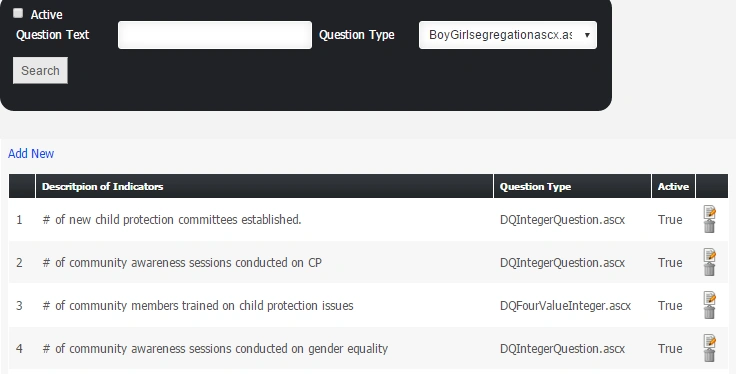
when i click on the text box and press enter my page automatically goes into the edit mode of gridview why it is so ? please assists me i am sending you the markup of my page as well as below.
Important Note:
To add a new indicator remember these things if the target value for indicator has
options like Men,women,Boy,Girl then you much check the Multivalue check box.
Text="guide for creating indicators" />
Checked="false" Style="vertical-align: text-bottom;" />
Admin
Checked="true" Style="vertical-align: text-bottom;" />
Active
Question Text
Width="200px" Style="margin-left: 25px;">
Question Type
Height="30px" Width="61px" />
GridLines="None" AutoGenerateColumns="False" DataKeyNames="QuestionIds" CssClass="items" EmptyDataText="No Records could be Found" PageSize="15"> <%# Container.DataItemIndex + 1 %> CausesValidation="false" CommandName="edit" AlternateText="Edit" ToolTip="Edit" /> OnClientClick="return ( confirm("Are you sure, you want to Remove?") );" CausesValidation="False">  Values for all the fields marked with * must be provided. Create Indicators * Width="650px"> Display="Dynamic" SetFocusOnError="True" Text=" Question must not be left blank.<br />" CssClass="Validator" ValidationGroup="Node"> MultiValue Question Type* Country Programs * Width="200px" AutoCompleteMode="Suggest" CaseSensitive="False" CssClass="TextBox"> ValidationGroup="Node" /> CausesValidation="false" /> CommandName="delete" ToolTip="Delete the current page and its associated all contents." />  |
1 Reply
Know the answer? Post it — somebody with the same question will find it here.
Sign in to answer this question
It is the same account you read, post and publish with — and you will come straight back to this page.
Danish HabibPosted Mar 9, 2016, 3:27 AM