Hi I want to save the value which is entered in the PopUp window.
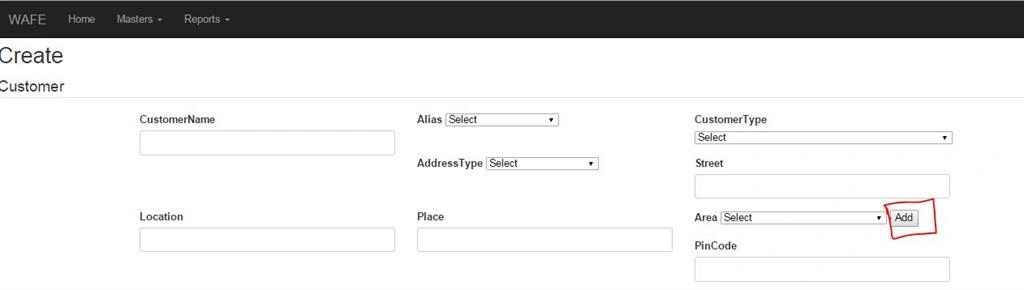
In my CustomerView I have Field called Area and near to area i have created one add button. suppose i enter the customer details(customerName, alias, customerType, street, location, place...) and then select the area . suppose the area is not in the dropdown list means i need to add the area . so i click the add button . it open one Pop-Up window in the same view.
My PopUp-window
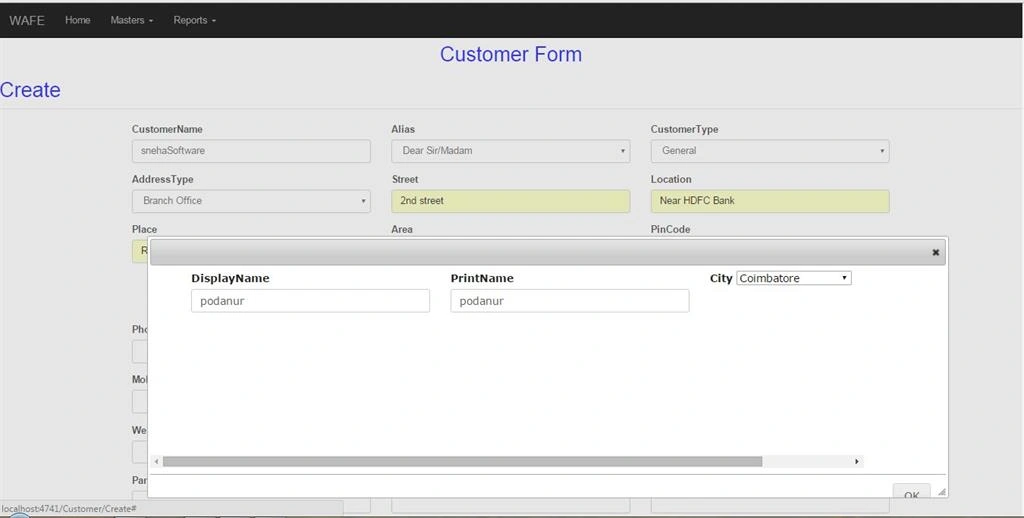
If i enter the Display Name ,PrintName, City and click ok it save the null values with new Guid in Area Table that is the value of DisplayName ,PrintName , CityID will be null.so please any one correct my code.
My ViewModel
Actually i created the Property of all fields which is in CustomerView in CustomerViewModel. Now i open the Popup window in same view so i created the property of fields which is popup window in same CustomerViewModel .
public System.Guid CustomerID { get; set; }
public string CustomerName { get; set; }
public string Street { get; set; }
public string Location { get; set; }
public string Place { get; set; }
public Nullable AreaID { get; set; }
public string DisplayName { get; set; }
public string PrintName { get; set; }
public Nullable CityID { get; set; }
My ControllerCode
public PartialViewResult ShowPartailView()
{
ViewBag.CityID = new SelectList(db.Cities, "CityID", "DisplayName");
return PartialView("ShowPartailView");
}
[HttpPost]
public ActionResult ShowPartailView(CustomerViewModel areaModel)
{
ViewBag.CityID = new SelectList(db.Cities, "CityID", "DisplayName");
var Area_Db= new Area()
{
AreaID = Guid.NewGuid(),
DisplayName = areaModel.DisplayName,
PrintName = areaModel.PrintName,
CityID = areaModel.CityID
};
db.Areas.Add(Area_Db);
db.SaveChanges();
My View
Area Field with Button in parent View(CustomerView)
@Html.LabelFor(model => model.Area)
@Html.DropDownList("AreaID", null, "Select", new { @class = "form-control" })
PopUpwindow Code
@Html.LabelFor(model => model.DisplayName, new { @class = "control-label" })
@Html.TextBoxFor(model => model.DisplayName, new { @class = "form-control", type = "text" })
@Html.ValidationMessageFor(model => model.DisplayName)
@Html.LabelFor(model => model.PrintName, new { @class = "control-label" })
@Html.TextBoxFor(model => model.PrintName, new { @class = "form-control", type = "text" })
@Html.ValidationMessageFor(model => model.PrintName)
@Html.Label("City")
@Html.DropDownList("CityID", "Select")
J - query code with reference plugin
I follow the correct procedure i think so . but it save the null values. Anyone give me the correct solution
Advance Thanks..
Shuvojit HalderPosted Feb 16, 2016, 1:46 AM
Jithil JohnPosted Feb 15, 2016, 11:56 PM
Amit Kumar SinghPosted Feb 15, 2016, 11:52 PM