My View
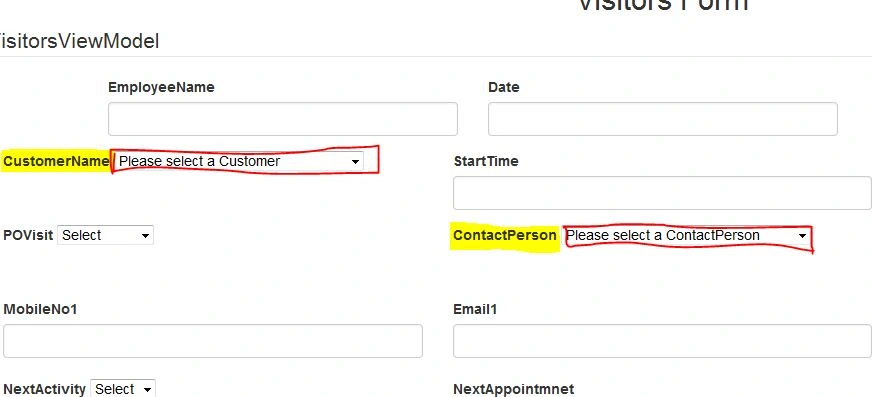
I done the first part. That is if i select the CustomerName the related ContactPeson Name has to be stored in ContactPerson Dropdown and also it save the Value in DB . But now my second issue is If select the ContactPerson Name the ContactPerson related Email and MobileNo have to display in their textboxes. The email Phone no in Contact Table
Customer Table
CustomerID Uniqueidentifier not null, DisplayName varchar(100), PrintName varchar(100)
Customer Contact Table
CustomerCoontactID Uniqueidentifier not null, CustomerID Uniqueidentifier null, ContactID Uniqueidentifier null
Contact Table
ContactID Uniqueidentifier not null, Email1,Emai2,Emai3,Mobile1,Mobile2,Mobile3,
My ViewModel
public Nullable CustomerID { get; set; }
public string CustomerName { get; set; }
public Nullable CustomerContactID { get; set; }
public string ContactPerson { get; set; }
public string CustomerName { get; set; }
public Nullable
public string ContactPerson { get; set; }
public Nullable ContactID { get; set; }
public string MobileNo1 { get; set; }
public string MobileNo2 { get; set; }
public string MobileNo2 { get; set; }
public string Email1 { get; set; }
public string Email2 { get; set; }
public string Email2 { get; set; }
My View
@Html.LabelFor(model => model.CustomerName , new { @class = "control-label" })
@Html.DropDownListFor(model => model.CustomerID, new SelectList(string.Empty, "Value", "Text"), "Please select a Customer", new { @style = "width:250px;" })
@Html.DropDownListFor(model => model.CustomerID, new SelectList(string.Empty, "Value", "Text"), "Please select a Customer", new { @style = "width:250px;" })
@Html.LabelFor(model => model.ContactPerson, new { @class = "control-label" })
@Html.DropDownListFor(model => model.CustomerContactID, new SelectList(string.Empty, "Value", "Text"), "Please select a ContactPerson", new { @style = "width:250px;" })
@Html.DropDownListFor(model => model.CustomerContactID, new SelectList(string.Empty, "Value", "Text"), "Please select a ContactPerson", new { @style = "width:250px;" })
@Html.LabelFor(model => model.Email1, new { @class = "control-label" })
@Html.TextBoxFor(model => model.ContactID, new { @class = "form-control", type = "text" })
@Html.ValidationMessageFor(model => model.Email1)
@Html.LabelFor(model => model.MobileNo1, new { @class = "control-label" })
@Html.TextBoxFor(model => model.ContactID, new { @class = "form-control", type = "text" })
@Html.ValidationMessageFor(model => model.MobileNo1)
My Controller
public ActionResult Create()
{
ViewBag.CustomerContactID = new SelectList(db.CustomerContacts, "CustomerContactID", "ContactReference");
ViewBag.CustomerID = new SelectList(db.Customers, "CustomerID", "DisplayName");
return View();
}
public JsonResult GetCustomers()
{
return Json(db.Customers.ToList(), JsonRequestBehavior.AllowGet);
}
public JsonResult GetContactPersobByCustomerId(string customerId)
{
Guid Id = Guid.Parse(customerId);
var customercontacts = from a in db.CustomerContacts where a.CustomerID == Id select a;
return Json(customercontacts);
}
{
ViewBag.CustomerContactID = new SelectList(db.CustomerContacts, "CustomerContactID", "ContactReference");
ViewBag.CustomerID = new SelectList(db.Customers, "CustomerID", "DisplayName");
return View();
}
public JsonResult GetCustomers()
{
return Json(db.Customers.ToList(), JsonRequestBehavior.AllowGet);
}
public JsonResult GetContactPersobByCustomerId(string customerId)
{
Guid Id = Guid.Parse(customerId);
var customercontacts = from a in db.CustomerContacts where a.CustomerID == Id select a;
return Json(customercontacts);
}
public JsonResult GetEmailByCustomerContactId(string CustomerContactId)
{
Guid Id = Guid.Parse(CustomerContactId);
var contacts = from a in db.Contacts where a.ContactID == Id select a;
return Json(contacts);
}
[HttpPost]
public ActionResult Create(VisitorsViewModel visitorviewmodel)
{
ViewBag.CustomerContactID = new SelectList(db.CustomerContacts, "CustomerContactID", "ContactReference",visitorviewmodel .CustomerContactID );
ViewBag.CustomerID = new SelectList(db.Customers, "CustomerID", "DisplayName",visitorviewmodel .CustomerID );
var VisitorsViewObj = new VisitorsForm()
{
CustomerID = visitorviewmodel.CustomerID,
CustomerContactID = visitorviewmodel.CustomerContactID
};
{
Guid Id = Guid.Parse(CustomerContactId);
var contacts = from a in db.Contacts where a.ContactID == Id select a;
return Json(contacts);
}
[HttpPost]
public ActionResult Create(VisitorsViewModel visitorviewmodel)
{
ViewBag.CustomerContactID = new SelectList(db.CustomerContacts, "CustomerContactID", "ContactReference",visitorviewmodel .CustomerContactID );
ViewBag.CustomerID = new SelectList(db.Customers, "CustomerID", "DisplayName",visitorviewmodel .CustomerID );
var VisitorsViewObj = new VisitorsForm()
{
CustomerID = visitorviewmodel.CustomerID,
CustomerContactID = visitorviewmodel.CustomerContactID
};
My J-queryCode
$(function () {
$.ajax({
type: "GET",
url: "/VisitorsForm/GetCustomers",
datatype: "Json",
success: function (data) {
$.each(data, function (index, value) {
$('#CustomerID').append('');
});
}
});
$('#CustomerID').change(function () {
$('#CustomerContactID').empty();
$.ajax({
type: "POST",
url: "/VisitorsForm/GetContactPersobByCustomerId",
datatype: "Json",
data: { CustomerID: $('#CustomerID').val() },
success: function (data) {
$.each(data, function (index, value) {
$('#CustomerContactID').append('');
});
}
});
});
});
$('#CustomerContactID').change(function () {
$('#ContactID').empty();
$.ajax({
type: "POST",
url: "/VisitorsForm/GetEmailByCustomerContactId",
datatype: "Json",
data: { CustomerContactID: $('#CustomerContactID').val() },
success:function(data){
$.each(data, function (index, value) {
$('#ContactID').append('');
});
}
});
});
I just want to show the value in the textbox don't want to save the value in Db .So i got confusion which method have to use . and this code is not working. please any one tell me where i did mistake.
$.ajax({
type: "GET",
url: "/VisitorsForm/GetCustomers",
datatype: "Json",
success: function (data) {
$.each(data, function (index, value) {
$('#CustomerID').append('');
});
}
});
$('#CustomerID').change(function () {
$('#CustomerContactID').empty();
$.ajax({
type: "POST",
url: "/VisitorsForm/GetContactPersobByCustomerId",
datatype: "Json",
data: { CustomerID: $('#CustomerID').val() },
success: function (data) {
$.each(data, function (index, value) {
$('#CustomerContactID').append('');
});
}
});
});
});
$('#CustomerContactID').change(function () {
$('#ContactID').empty();
$.ajax({
type: "POST",
url: "/VisitorsForm/GetEmailByCustomerContactId",
datatype: "Json",
data: { CustomerContactID: $('#CustomerContactID').val() },
success:function(data){
$.each(data, function (index, value) {
$('#ContactID').append('');
});
}
});
});
I just want to show the value in the textbox don't want to save the value in Db .So i got confusion which method have to use . and this code is not working. please any one tell me where i did mistake.
Advance Thanks..
8 Replies
Know the answer? Post it — somebody with the same question will find it here.
Sign in to answer this question
It is the same account you read, post and publish with — and you will come straight back to this page.
Chandu KumawatPosted Feb 4, 2016, 6:42 AM
Sneha KPosted Feb 4, 2016, 6:39 AM
Ranjit PowarPosted Feb 4, 2016, 6:21 AM
Sneha KPosted Feb 4, 2016, 5:53 AM
Ranjit PowarPosted Feb 4, 2016, 5:34 AM
Sneha KPosted Feb 4, 2016, 5:16 AM
Sneha KPosted Feb 4, 2016, 5:05 AM
Ranjit PowarPosted Feb 4, 2016, 4:59 AM
@Html.LabelFor(model => model.Email1, new { @class = "control-label" })
@Html.TextBoxFor(model => model.Email1, new { @class = "form-control", type = "text" })
@Html.ValidationMessageFor(model => model.Email1)
@Html.LabelFor(model => model.MobileNo1, new { @class = "control-label" })
@Html.TextBoxFor(model => model.MobileNo1, new { @class = "form-control", type = "text" })
@Html.ValidationMessageFor(model => model.MobileNo1)
$('#ContactID').empty();
$.ajax({
type: "POST",
url: "/VisitorsForm/GetEmailByCustomerContactId",
datatype: "Json",
data: { CustomerContactID: $('#CustomerContactID').val() },
success:function(data){
$('#Email1').val(data.Email1);
$('#MobileNo1').val(data.Mobile1);
}
});
});