I work on asp.net razor page model . i face issue i can't edit datatable on same page by edit cell without redirect to another page
I need to edit cell on same page
my code details as below :
public class UserModel
{
    public string Id { get; set; }
    public string Name { get; set; }
    public string Email { get; set; }
    // add other user properties as needed
}

public class IndexModel : PageModel
{
    private readonly YourDbContext _dbContext; // replace with your DbContext class

    public IndexModel(YourDbContext dbContext)
    {
        _dbContext = dbContext;
    }

    public List Users { get; set; }

    public void OnPost(string userId)
    {
        Users = _dbContext.Users
            .Where(u => u.Id == userId)
            .Select(u => new UserModel
            {
                Id = u.Id,
                Name = u.Name,
                Email = u.Email
                // map other user properties as needed
            })
            .ToList();
    }
}
I need to edit data on table by edit every cell on rows
@if (Users != null && Users.Count > 0)
{
ID
Name
Email
@foreach (var user in Users)
{
@user.Id
@user.Name
@user.Email
}
}
so How to allow edit cell by enabled for edit then close it after edit
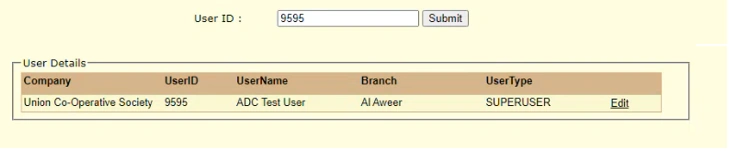
this is image for what i need to do
Tuhin PaulPosted Jun 10, 2023, 12:10 PM
1. Update your Razor page with the necessary JavaScript/jQuery code:
2. Create an action method in your controller to handle the AJAX request and update the user property in the database:
You can modify the cell values directly by clicking on them, and the changes will be saved when you move the focus out of the cell. The changes are sent to the server via an AJAX request and the updated value is saved in the database.
Prasad RaveendranPosted Jun 10, 2023, 5:22 AM
Note: This is a basic example to demonstrate the functionality of editing a row directly in the table. In a real-world scenario, you would typically perform the data update operation on the server-side, using AJAX or other means, and handle any validation or error scenarios accordingly.
Please refer the attached sample.