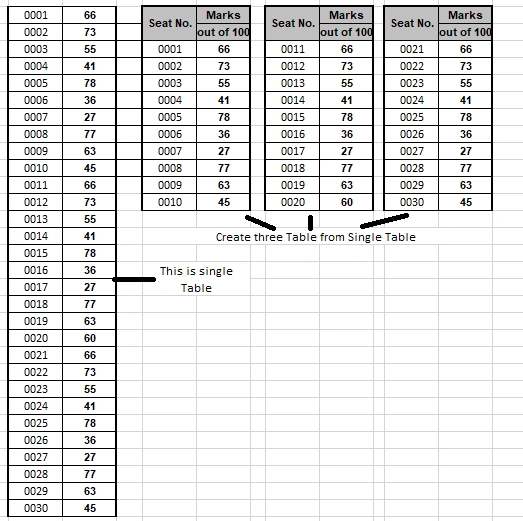
Seat no ---- Marks
    @foreach (var client in Model)
    {

            @client.Seat_no
            ----
            @client.Marks


    }
I’m new and I have no idea how to create this type of view shown in above picture. So I need help. The scenario is that; I have data in single table with two columns. the question is that I want to divide single table into Multiple tables one table start from seat no 1 and end on 10 and other table start from 11 and end on 20 and next one start from 21 and end on 30 each table 10 row not more than 10 shown in picture. I try to create this structure but i know other way is available.
Sam HobbsPosted Oct 15, 2023, 1:01 AM
It seems to me that you want to show only one table but in 3 columns. I think you do not need multiple tables, that would be too complicated for what you need. I am not experienced with this but I find several answers saying to use a DataList control and set RepeatColumns=3. The following I think is one question like yours.
asp.net - List displayed as 2 columns - Stack Overflow
https://stackoverflow.com/questions/9103314/list-displayed-as-2-columns
Prasad RaveendranPosted Oct 14, 2023, 9:24 PM
It seems like you want to display data from a single table in multiple tables with 10 rows each, and you're using ADO.NET with MVC. You can achieve this by first fetching the data from your database using ADO.NET and then organizing it into multiple tables for display in your MVC view. Here's a step-by-step guide on how to accomplish this:
Retrieve Data from the Database:
First, you need to retrieve the data from your database using ADO.NET. You can use SQL queries to fetch the data you need. For example:
Organize Data into Multiple Tables:
After fetching the data, you can organize it into multiple tables, each containing up to 10 rows. You can do this by iterating through the data and creating a new table every 10 rows.
Pass Data to the MVC View:
In your MVC controller, you can pass the list of tables to your view using a ViewModel or ViewBag.
Display the Data in the View:
In your MVC view, you can loop through the list of tables and generate HTML tables for each batch of data.
This code will create multiple HTML tables, each containing up to 10 rows of data from your single table. You can customize the table headers and row properties according to your actual data structure.