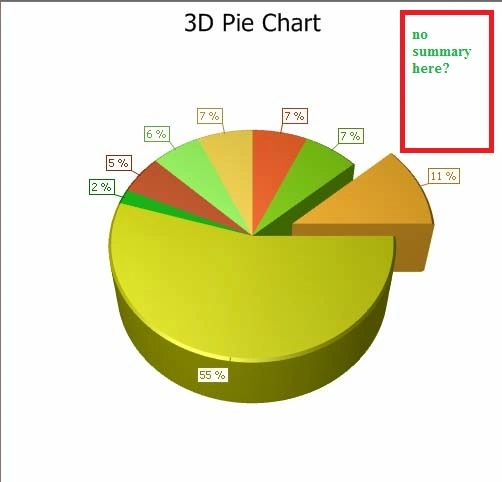
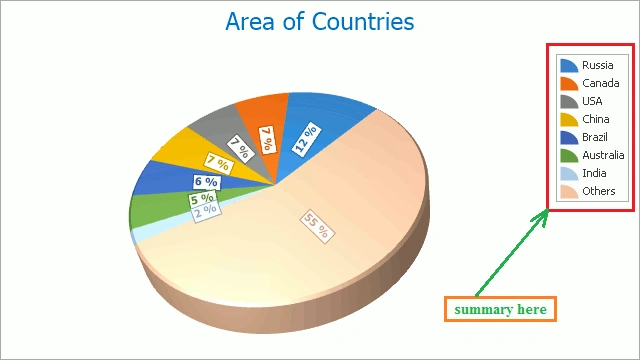
I have the code that after plotting it does not have a summary of statistics, see the image file ? How to get a summary with additional paragraphs ?
            // Create an empty chart.
            ChartControl PieChart3D = new ChartControl();

            // Create a pie series.
            Series series1 = new Series("Pie Series 1", ViewType.Pie3D);


            // Populate the series with points.
            series1.Points.Add(new SeriesPoint("Russia", 17.0752));
            series1.Points.Add(new SeriesPoint("Canada", 9.98467));
            series1.Points.Add(new SeriesPoint("USA", 9.63142));
            series1.Points.Add(new SeriesPoint("China", 9.59696));
            series1.Points.Add(new SeriesPoint("Brazil", 8.511965));
            series1.Points.Add(new SeriesPoint("Australia", 7.68685));
            series1.Points.Add(new SeriesPoint("India", 3.28759));
            series1.Points.Add(new SeriesPoint("Others", 81.2));

            // Add the series to the chart.
            PieChart3D.Series.Add(series1);

            // Adjust the value numeric options of the series.
            series1.PointOptions.ValueNumericOptions.Format = NumericFormat.Percent;
            series1.PointOptions.ValueNumericOptions.Precision = 0;

            // Adjust the view-type-specific options of the series.
            ((Pie3DSeriesView)series1.View).Depth = 30;
            ((Pie3DSeriesView)series1.View).ExplodedPoints.Add(series1.Points[0]);
            ((Pie3DSeriesView)series1.View).ExplodedDistancePercentage = 30;

            // Access the diagram's options.
            ((SimpleDiagram3D)PieChart3D.Diagram).RotationType = RotationType.UseAngles;
            ((SimpleDiagram3D)PieChart3D.Diagram).RotationAngleX = -35;

            // Add a title to the chart and hide the legend.
            ChartTitle chartTitle1 = new ChartTitle();
            chartTitle1.Text = "3D Pie Chart";
            PieChart3D.Titles.Add(chartTitle1);
            PieChart3D.Legend.Visible = false;

            // Add the chart to the form.
            PieChart3D.Dock = DockStyle.Fill;
            this.Controls.Add(PieChart3D);
Deepak RawatPosted Jul 5, 2023, 8:59 AM
Hi Dong you can try it's working for me.
In this modified code, after creating the chart and adjusting its properties, we calculate the summary statistics for the series using LINQ operations. Then, we create a summary paragraph string that contains the total, max, min, and average values.
i have add a
LabelControlnamedlblSummaryto the form, set its text to the summary string, and dock it to the bottom of the form. Finally, we add the label and the chart to the form to display both the chart and the summary information.