Hello Team,
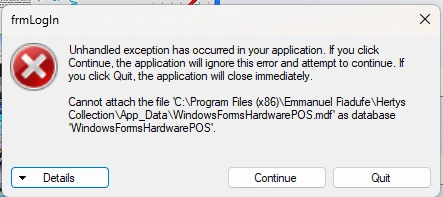
Please in my window application, when I run my application set up this is the error I get, kindly assist.
I have my .mdf database in my App_Data folder, I testeted the connection string and is working but when I run the application sep up then the error popup
Jignesh KumarPosted Apr 19, 2024, 3:43 AM
Hello EMMMANUEL,
This error seems your SQL server instance, username, and password. If any of these three, not correct please check these properties in your connection string and make it correct,
OR
Emmmanuel FIADUFEPosted Apr 19, 2024, 5:46 PM
Thank you team
Sam HobbsPosted Apr 19, 2024, 5:03 PM
It depends on whether you are using Windows Authentication or SQL Server Authentication. A username and password is required for SQL Server Authentication but not Windows Authentication. See:
Also, if you have not connected to the database using Visual Studio's Server Explorer and SQL Server Object Explorer then do that. They can be very helpful.
Emmmanuel FIADUFEPosted Apr 19, 2024, 10:38 AM
Hello Kumar,
Please I did as you said but it didn't work
Emmmanuel FIADUFEPosted Apr 18, 2024, 9:21 AM
Hello Team,
After I successfully run the application and when I tried to save data this is the error I got, kindly assist,
Emmmanuel FIADUFEPosted Apr 18, 2024, 9:08 AM
Hello team,
I found the solution now,
I went to the file system and I created App_Data folder and loaded the .mdf database into it and it works for me.