
I am adding data to a List, save it as a Session and then use it. What I don't want to is to have duplicatres in the list. This is what I use
public List values = new List();
protected void Page_Load(Object sender, EventArgs e)
{

    if (!IsPostBack)
    {
        if (Session["MyList"] == null)
        {
            Session["MyList"] = new List();
        }
    }
}

protected void btnAddClick(object sender, EventArgs e)
{
    if (!string.IsNullOrEmpty(txtActivitate.Text))
    {
        var text = txtActivitate.Text.ToString();
        values = Session["MyList"] as List; // Retrieve the list from the session
        lock(values)
        {
            if (!values.Contains(text))
            {
                values.Add(text);
                Session["MyList"] = values;

                foreach (string value in values)
                {
                    Message.Text += value + "
";
                }

                txtActivitate.Text = string.Empty;
                txtActivitate.Focus();
            }
            else
            {
                txtActivitate.Text = string.Empty;
                txtActivitate.Focus();
            }
        }
    }
}
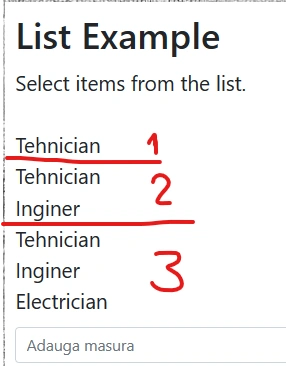
On first click I got the right value entered. On the second click, I get the first value doubled and new value. On third click I get all the previous values plus the new one. What am I doing wrong, please?
Jignesh KumarPosted Nov 1, 2023, 5:02 AM
Hi Marius,
You need to create your Message text before you assign values using for loop. use below one which will resolve your issue
Marius VasilePosted Nov 1, 2023, 3:58 PM
Thank you Jignesh and Vishal, your solution is excellent but due to I can't mark both answers I will mark Jignesh because he was quicker.
Vishal JoshiPosted Nov 1, 2023, 5:32 AM
Hello Marius Vasile,
All you are doing is perfect. you just need to clear the Message before binding the new values after adding instead of appending values to the same Message object.
Please try the below code for the Add button click event to get it to work.
Thanks
Vishal Joshi
Prasad RaveendranPosted Nov 1, 2023, 12:31 AM
I assume, you have resolved this issue. if not, please do let me know