

In this blog I explain that how to initialize the contents of a tab from the HTML return by the server.
1. Create Content
I create a web form Content.aspx to content for a tab initialization.
<%@ Page
Language="C#"
AutoEventWireup="true"
CodeBehind="Content.aspx.cs"
Inherits="JQueryExample.Content"
%>
<!DOCTYPE html PUBLIC "-//W3C//DTD XHTML 1.0 Transitional//EN" "http://www.w3.org/TR/xhtml1/DTD/xhtml1- transitional.dtd">
<html xmlns="http://www.w3.org/1999/xhtml">
<head runat="server">
<title></title>
</head>
<body>
<form id="form1" runat="server">
<div>
It is blog section.
</div>
</form>
</body>
</html>
2. Create function for Initialize
<script type="text/javascript">
$(document).ready(function()
{
$("#tabs").tabs({
fx:{opacity:"toggle"},
}).tabs("url",1,"Content.aspx").tabs("load",0);
});
</script>
Above code has a inbuilt tab() function that tab() function has three argument. url is action. index 1 presents tab index means second tab will be initialize by content and Content.aspx is web form that content will be call. “laod” is a action for load content.
3. Entire Code
<%@ Page Language="C#" AutoEventWireup="true" CodeBehind="TabAjax.aspx.cs" Inherits="JQueryExample.TabAjax" %>
<!DOCTYPE html PUBLIC "-//W3C//DTD XHTML 1.0 Transitional//EN" "http://www.w3.org/TR/xhtml1/DTD/xhtml1- transitional.dtd">
<html xmlns="http://www.w3.org/1999/xhtml">
<head id="Head1" runat="server">
<title></title>
<script src="jquery/js/jquery-1.8.3.js"
type="text/javascript"></script>
<script src="jquery/js/jquery-ui-1.9.2.custom.min.js" type="text/javascript"></script>
<link href="jqueryui/css/smoothness/jquery-ui-1.9.2.custom.min.css" rel="stylesheet" type="text/css" />
<script type="text/javascript">
$(document).ready(function()
{
$("#tabs").tabs({
fx:{opacity:"toggle"},
}).tabs("url",1,"Content.aspx").tabs("load",0);
});
</script>
</head>
<body>
<form id="form1" runat="server">
<div id="tabs">
<ul>
<li><a href="#tabArticle">Article</a></li>
<li><a href="#tabBlog">Blog</a></li>
</ul>
<div id="tabArticle">
It is Article Section.
</div>
<div id="tabBlog">
Blog Section
</div>
</div>
</form>
</body>
</html>
4. Output
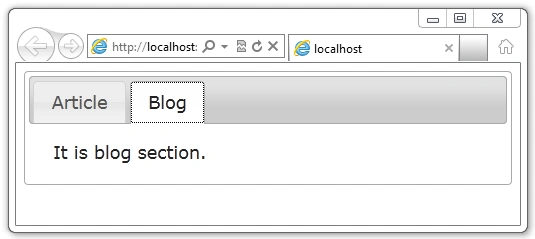
Here uses css and jquery/js file form article Create Tabs Using jQuery and CSS
Join the conversation! Your thoughts help the community grow.