

Introduction
This example demonstrates how to create pagination using LINQ in C# desktop applications.
Implementation
So, lets start implementation of our example.
Step 1 Open your Visual Studio and create a new project.
Step 2 Now, design a form like this.
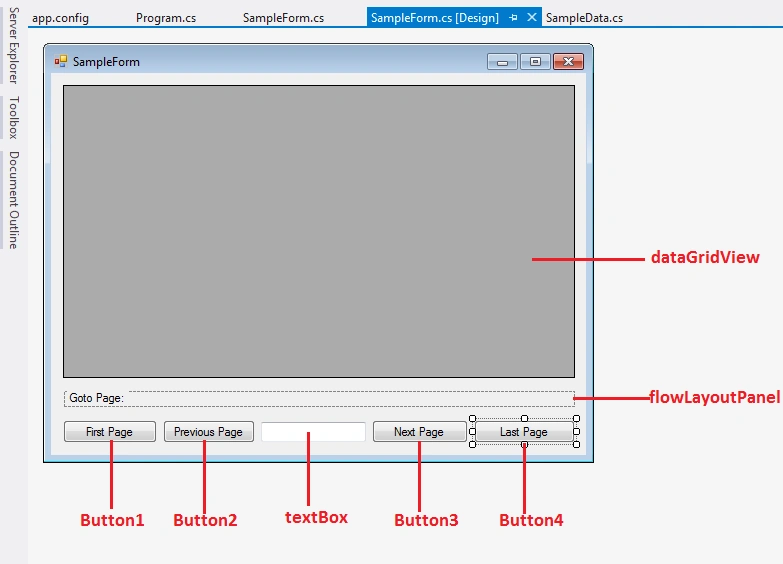
Step 3 Create a class with the name SampleData.cs and write the following code in it.
- using System;
- using System.Collections.Generic;
- using System.Linq;
- using System.Text;
- namespace ConsoleApplication1
- {
- public class SampleData
- {
- public int ID;
- public string Name;
- public string Age;
- public string Address;
- public SampleData()
- {
- }
- }
- }
- List<SampleData> _sampleDataList = new List<SampleData>();
Step 5 Write the following code at the time of constuctor creation.
- int currentPage = 0;
- int currentSize = 10;
- public SampleForm()
- {
- InitializeComponent();
- //i Created a dummy data to use for pagination
- CreateDummy();
- currentPage = 0;
- Paging(currentPage, currentSize);
- }
- private void Paging(int pagenum, int pagesize)
- {
- if (currentPage < 0) { currentPage = 0; return; }
- flowLayoutPanel1.Controls.OfType<Label>().Where(e => e.Tag.ToString() != (pagenum + 1).ToString())
- .ToList().ForEach((element) =>
- {
- element.ForeColor = Color.Black;
- });
- flowLayoutPanel1.Controls.OfType<Label>().Where(e => e.Tag.ToString() == (pagenum + 1).ToString())
- .First().ForeColor = Color.Red;
- textBox1.Text = "Page " + (pagenum + 1) + " of " + (int)(_sampleDataList.Count / pagesize);
- var products = from p in _sampleDataList.Skip(pagenum * pagesize).Take(pagesize)
- select new { ID = p.ID, Name = p.Name, Age = p.Age, Address = p.Address };
- dataGridView1.DataSource = products.ToList();
- }
- private void CreateDummy()
- {
- Enumerable.Range(1, 100).ToList().ForEach((element) =>
- {
- SampleData s = new SampleData();
- s.ID = element;
- s.Name = "FullName" + element;
- s.Age = new Random().Next().ToString();
- s.Address = "Davao";
- _sampleDataList.Add(s);
- });
- Enumerable.Range(1, (_sampleDataList.Count() / currentSize)).ToList().ForEach((element) =>
- {
- Label lbl = new System.Windows.Forms.Label();
- lbl.AutoSize = true;
- lbl.Location = new System.Drawing.Point(3, 0);
- lbl.Name = "lbl" + element;
- lbl.Size = new System.Drawing.Size(61, 13);
- lbl.Text = element.ToString();
- lbl.Tag = element;
- lbl.Click += new EventHandler(lbl_Click);
- this.flowLayoutPanel1.Controls.Add(lbl);
- });
- }
- private void button1_Click(object sender, EventArgs e)
- {
- currentPage = 0;
- Paging(currentPage, currentSize);
- }
- private void button2_Click(object sender, EventArgs e)
- {
- currentPage = (currentPage - currentSize) < 0 ? (currentPage - 1) : 0;
- Paging(currentPage, currentSize);
- }
- private void button3_Click(object sender, EventArgs e)
- {
- currentPage = ((currentPage + 1) * currentSize) < _sampleDataList.Count() ?
- (currentPage + 1) : currentPage;
- Paging(currentPage, currentSize);
- }
- private void button4_Click(object sender, EventArgs e)
- {
- currentPage = (_sampleDataList.Count() / currentSize) - 1;
- Paging(currentPage, currentSize);
- }
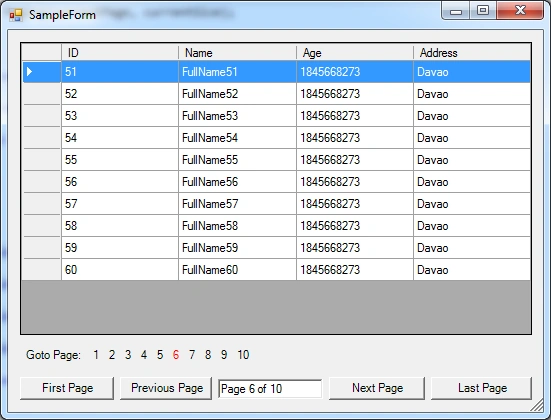
Summary
In a large set of data, pagination is a reliable technique to find the record from the record list.
Join the conversation! Your thoughts help the community grow.