

Steps Involved:
- Open SharePoint 2010 Management Shell by going to Start | All Programs | SharePoint | Microsoft SharePoint 2010 Products | SharePoint 2010 Management Shell (Run as Administrator).
- Run the following script.
Powershell Script:
## Get all the user group information for the current web site using SharePoint 2010 web service in powershell
$uri="http://serverName:10736/sites/ECT/_vti_bin/UserGroup.asmx?wsdl"

## Web Service Reference - http://Site/_vti_bin/UserGroup.asmx
$usergroupWebServiceReference = New-WebServiceProxy -Uri $uri -UseDefaultCredential
[System.Xml.XmlNode]$xmlNode=$usergroupWebServiceReference.GetGroupCollectionFromWeb()

## Creates an GroupCollectionFromWeb.xml file in the D:\ which contains the information about the groups for the current web site
$output = New-Object -TypeName System.IO.StreamWriter -ArgumentList "D:\GroupCollectionFromWeb.xml", $false
$output.WriteLine("<?xml version=""1.0"" encoding=""utf-8"" ?>")
$output.WriteLine($xmlNode.OuterXml)
$output.WriteLine()
$output.Dispose()

Write-Host -ForegroundColor Magenta "Displaying all the group names for the current web site...."
foreach($group in $xmlNode.Groups.Group)
{
Write-Host -ForegroundColor Green $group.Name
}
Output:
Output - GroupCollectionFromWeb.xml: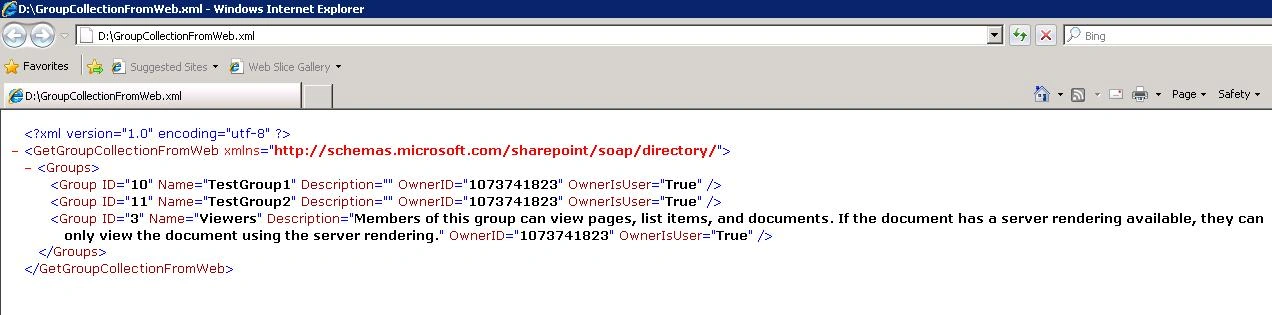
Gowtham RajamanickamPosted Apr 10, 2016, 8:20 AM
Simply sooperb