

LinD3 (DATA-DRIVEN DOCUMENTS).js
- <script src="http://d3js.org/d3.v3.min.js"></script>
- <script src="http://dimplejs.org/dist/dimple.v2.1.2.min.js"></script>
Source code
- <!DOCTYPE html>
- <html>
- <head lang="en">
- <meta charset="UTF-8">
- <title>Line chart using D3.js and Dimple.js</title>
- </head>
- <body>
- <div id="abhichart"></div>
- </body>
- <script src="http://d3js.org/d3.v3.js"></script>
- <script src="http://dimplejs.org/dist/dimple.v2.1.2.min.js"></script>
- <script>
- var svg = dimple.newSvg("#abhichart", 1500, 300),
- chart = null,
- s1 = null,
- s2 = null,
- x = null,
- y1 = null,
- y2 = null,
- data = [{
- "Subjects": "Python",
- "Value 1": 10000,
- "Year 1": 2014,
- "Value 2": 100,
- "Year 2": 2015
- }, {
- "Subjects": "Java",
- "Value 1": 1000,
- "Year 1": 2014,
- "Value 2": 300000,
- "Year 2": 2015
- }, {
- "Subjects": "C",
- "Value 1": 120000,
- "Year 1": 2014,
- "Value 2": 140000,
- "Year 2": 2015
- }];
- chart = new dimple.chart(svg, data);
- x = chart.addCategoryAxis("x", "Subjects");
- y1 = chart.addMeasureAxis("y", "Value 1");
- y2 = chart.addMeasureAxis("y", "Value 2");
- s1 = chart.addSeries("Year 1", dimple.plot.line, [x, y1]);
- s2 = chart.addSeries("Year 2", dimple.plot.line, [x, y2]);
- chart.addColorAxis("Value 1", ["green", "yellow", "red"]);
- chart.draw();
- </script>
- </html>
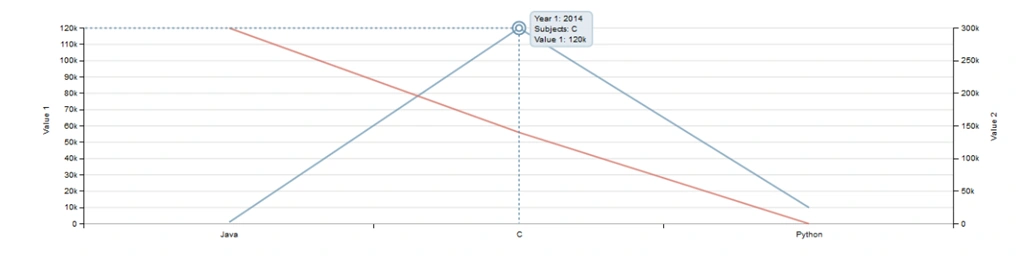
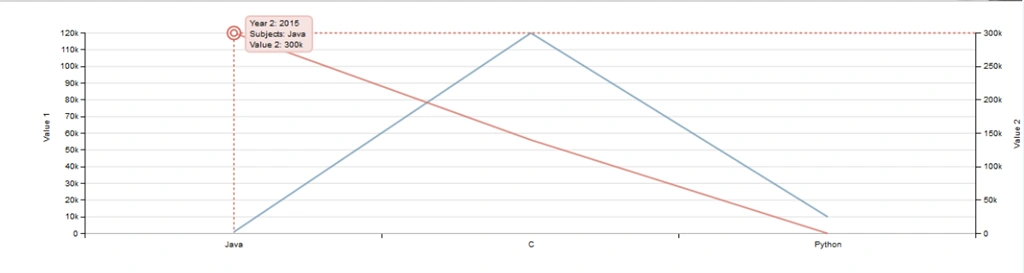
Ravi SharmaPosted Mar 28, 2015, 10:53 PM
Thanks for sharing this, I'm looking for something like this :)
Abhijeet SinghPosted Mar 27, 2015, 11:04 AM
Thanks Abhishek , I will keep your suggestion in my mind. :) :)
Abhishek JaiswalPosted Mar 27, 2015, 9:22 AM
One of the best use of D3.JS! good work abhijeet, In spite of this i'll also suggest u to take some hands on Nvd3.js. :)