

Introduction
This post will show you how to add and dynamically create ASP.NET Server Controls and place the controls into an HTML DIV server tag. Create your ASP.NET web application [project] and integrate your required theme(template). As per your requirement, create a web form and design page layout and create a container div with id="myFormContainer" and div as a server control-runat="server". In this div going to add child div, label, textbox, button, etc. controls dynamically.
Create Dynamic ASP.NET Server Control
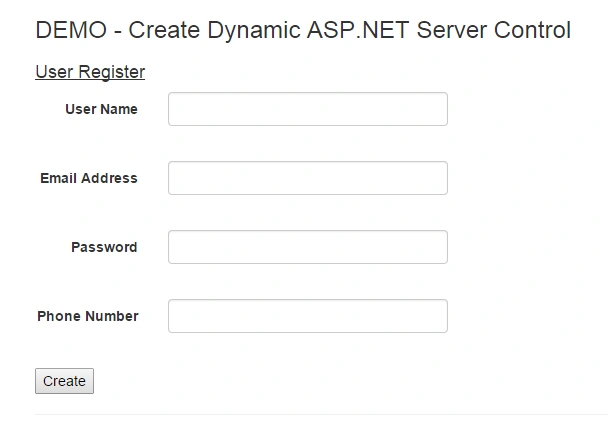
All controls list retrieved from "Controls" json object (List). You can create a json file and deserialize json object with C# class object, easily create number of controls dynamically with required attributes, e.g., Id, text, etc. You can also try to control list retrieved from database table.
Classes, Methods and Events
Step 1: Create Basic Classes
- public class Control
- {
- public string ID { get; set; }
- public string LabelText { get; set; }
- }
- public class ControlList
- {
- public List<control> Controls { get; set; }
- }
Step 2: Controls List (Get from json Object or Database Table)
- // create the div to add form elements from a controls list
- string json = @"{Controls:[{ID:'UserName', LabelText:'User Name'},
- {ID:'EmailId', LabelText:'Email Address'},{ID:'Password', LabelText:'Password'},
- {ID:'Phone', LabelText:'Phone Number'}]}";
- var controls = new System.Web.Script.Serialization.JavaScriptSerializer().Deserialize<controllist>(json);
Step 3: Create Method to Bind Controls
- /// <summary>
- /// Create & Add Controls to the container div
- /// </summary>
- /// <param name="controls"></param>
- private void CreateControls(ControlList controls)
- {
- foreach (var control in controls.Controls)
- {
- //Create Group Container Div
- HtmlGenericControl div = new HtmlGenericControl("div");
- div.Attributes.Add("class", "form-group");
- // create label and add to the div
- div.Controls.Add(new Label() { Text = control.LabelText,
- AssociatedControlID = control.ID, CssClass = "col-md-2 control-label" });
- //create the div to add controls eg. textbox, checkbox etc.
- HtmlGenericControl divInner = new HtmlGenericControl("div");
- divInner.Attributes.Add("class", "col-md-10");
- //Create TextBox
- divInner.Controls.Add(new TextBox() { ID = control.ID, CssClass = "form-control" });
- //Create Validator
- divInner.Controls.Add(new RequiredFieldValidator()
- { ControlToValidate = control.ID, CssClass = "text-danger",
- ErrorMessage = "The user name field is required." });
- div.Controls.Add(divInner);
- Container.Controls.Add(div);
- }
- //create button with event and add to the div
- var button = new Button { ID = "btnClick", Text = "Create" };
- button.Click += btnClick_OnClick;
- Container.Controls.Add(button);
- }
Step 4: Call CreateControl() Method on OnInit Event
- /// <summary>
- /// Load Controls on OnInit event
- /// </summary>
- /// <param name="e"></param>
- override protected void OnInit(EventArgs e)
- {
- // create the div to add form elements from a controls list
- string json = @"{Controls:[{ID:'UserName', LabelText:'User Name'},
- {ID:'EmailId', LabelText:'Email Address'},{ID:'Password', LabelText:'Password'},
- {ID:'Phone', LabelText:'Phone Number'}]}";
- var controls = new System.Web.Script.Serialization.JavaScriptSerializer().Deserialize<controllist>(json);
- CreateControls(controls); // Method with controls list param
- }
Deepak VermaPosted May 2, 2018, 7:27 AM
Great concept...... Thanks for sharing
Ram RatanPosted May 6, 2015, 7:31 AM
Interesting one!!