

In this blog, we will discuss how to write a program that will convert the Celsius temperature into Fahrenheit and vice-versa.
Temperature is measured by using different units, like Celsius, Fahrenheit, and Kelvin. Here, we will see how to convert a Celsius temperature to Fahrenheit temperature and vice-versa.
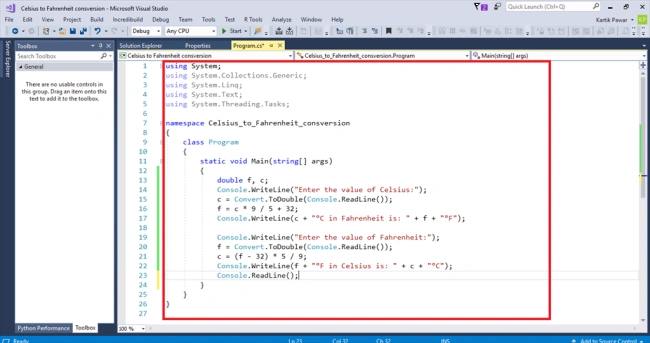
First, open Visual Studio IDE and then create a project in Console app. Write the following code in the project.
Temperature is measured by using different units, like Celsius, Fahrenheit, and Kelvin. Here, we will see how to convert a Celsius temperature to Fahrenheit temperature and vice-versa.
First, open Visual Studio IDE and then create a project in Console app. Write the following code in the project.
- using System;
- using System.Collections.Generic;
- using System.Linq;
- using System.Text;
- using System.Threading.Tasks;
- namespace Celsius_to_Fahrenheit_consversion {
- class Program {
- static void Main(string[] args) {
- double f, c;
- Console.WriteLine("Enter the value of Celsius:");
- c = Convert.ToDouble(Console.ReadLine());
- f = c * 9 / 5 + 32;
- Console.WriteLine(c + "°C in Fahrenheit is: " + f + "°F");
- Console.WriteLine("Enter the value of Fahrenheit:");
- f = Convert.ToDouble(Console.ReadLine());
- c = (f - 32) * 5 / 9;
- Console.WriteLine(f + "°F in Celsius is: " + c + "°C");
- Console.ReadLine();
- }
- }
- }
Then, a screen will appear like this.
After writing the code, click on the "Start" button to run your program. The output of the screen will appear like this.
After writing the code, click on the "Start" button to run your program. The output of the screen will appear like this.

We can insert different values for Celsius and Fahrenheit. The output of the program will be like the below screen.

This is how we create a C# program that will calculate both Celsius and Fahrenheit temperatures.
Join the conversation! Your thoughts help the community grow.