

Introduction
AngularJS Controllers follows MVC ( Model-View-Controller ) pattern. In the MVC pattern in AngularJS, a Controller controls the interaction between the View and Model. View handles the layout while the Model handles business logic.
A Controller is defined using ng-controller in an AngularJS application. AgnularJS applications depend on Controller which controls the flow of data. Each Controller accepts $Scope as a parameter which refers to the application or module that the Controller is needed to control.
CSS
- <style>
- .input { border-radius: 5px; text-align: center; padding-left: 10px;
- border: 1px solid gray; margin: 5px; background-color: lightgray;
- width: 200px;
- }
- </style>
JS
- <script>
- var app = angular.module("App", [])
- app.controller("AjController", function ($scope) {
- $scope.message = "Please enter your name and age";
- $scope.person = {
- Name: null,
- Age: null,
- Show: function () {
- var personObj = $scope.person;
- $scope.NameAndAge = "Hello, " + personObj.Name + " you are " + personObj.Age + " year old.";
- $scope.disabled = true;
- }
- };
- });
- </script>
- <body ng-app="App" style="padding:15% 10% 15% 40%">
- <div style="text-align:center; border:solid 2px gray;width:50%">
- <h2 style="text-decoration: underline;color:dodgerblue">AngularJs - Controllers</h2>
- <div ng-controller="AjController"> <span>{{message}}</span>
- <hr /> <input type="text" ng-disabled={{ "disabled"}} ng-model="person.Name" class="input" placeholder="Enter your Name" /> <br /> <input type="text" ng-disabled={{ "disabled"}} ng-model="person.Age" class="input" placeholder="Enter your Age" /> <br /> <button ng-model="all" ng-click="person.Show()"> Show</button>
- <hr /> <span ng-show="person.Name===''||person.Age===''?false:true">{{NameAndAge}}
- </span> </div>
- <div>
- </body>
AjController is an Angular controller defined with $scope as argument. $scope refers to the application which is using the AjController. $scope.person is the property of AjController. Name, Age, and Show is the property of $scope.person object.
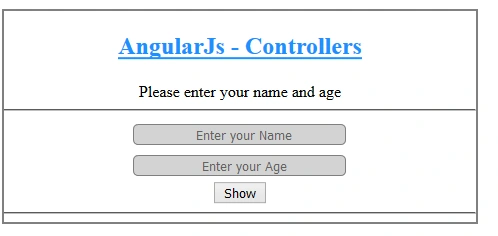
Figure 1.1
Put your name and age and click the "Show" button.
Put your name and age and click the "Show" button.
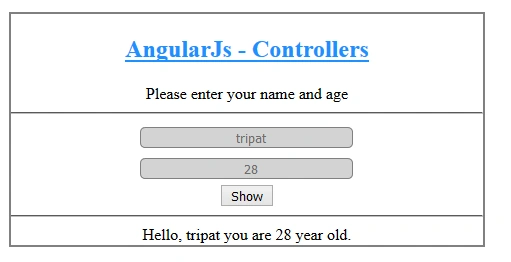
Figure 1.2
Summary
In this blog, I discussed how we can use ternary operator using AngularJS and in which directives of AngularJS we can use them.
Nikhil SanganiPosted Mar 7, 2018, 10:24 AM
Good One... Keep it up...
Upendra Pratap ShahiPosted Mar 7, 2018, 10:03 AM
Nice one ...keep it up...........
Naresh SinghalPosted Mar 7, 2018, 1:41 AM
Very good ......more likes if you do same thing using Angular 5 or above...