

1. Creating MVC Application
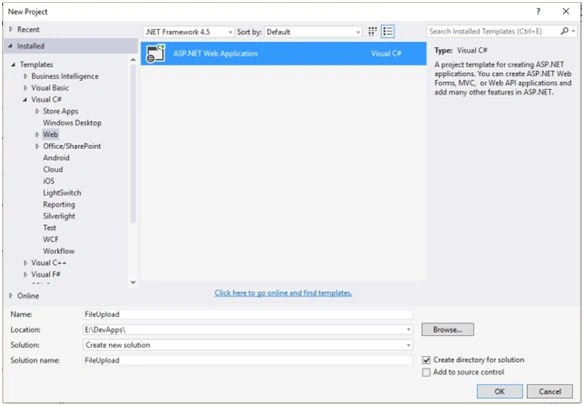
Let us implement these in a sample Application. Open Visual Studio. Go to File->New->Project. Give a suitable name to the Application. Click OK.
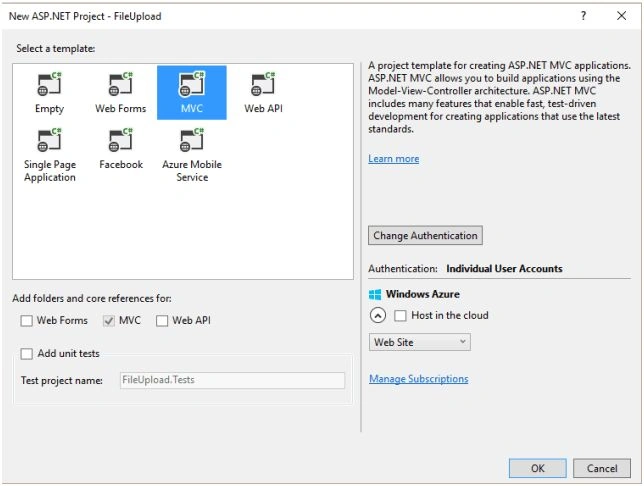
Select MVC Template. Click OK.
2. Adding Folder
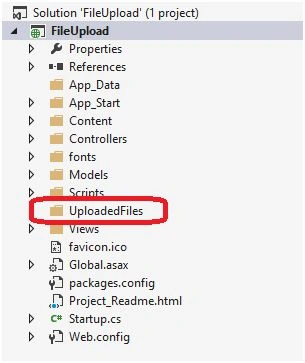
We will add a folder to store the files in the application. Here, I have added a folder to the application.
3. Adding Controller
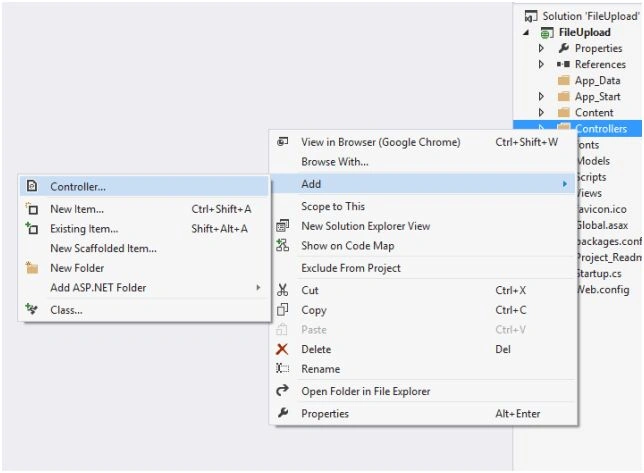
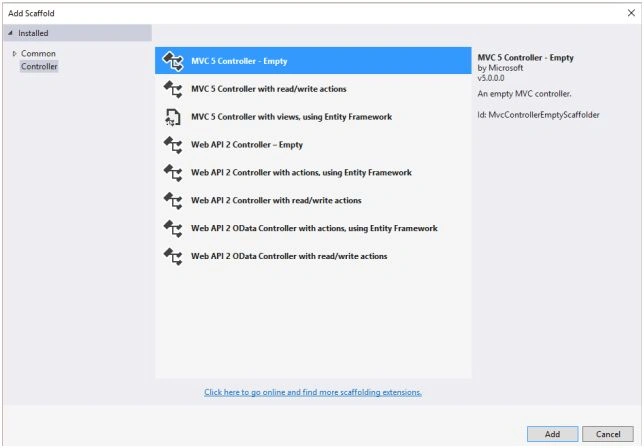
Let us add a controller. Right-click on the Controller. Add->Controller.
Select MVC 5 Controller -Empty. Click Add.
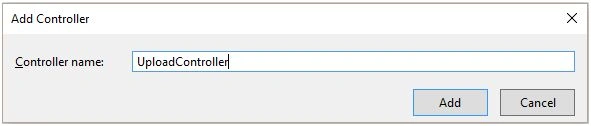
Give a suitable name to the controller.
Write the following code in the controller.
using System;
using System.Collections.Generic;
using System.IO;
using System.Linq;
using System.Web;
using System.Web.Mvc;
namespace FileUpload.Controllers
{
    public class UploadController: Controller
    {
        // GET: Upload
        public ActionResult Index()
        {
            return View();
        }
        [HttpGet]
        public ActionResult UploadFile()
        {
            return View();
        }
        [HttpPost]
        public ActionResult UploadFile(HttpPostedFileBase file)
        {
            try
            {
                if (file.ContentLength > 0)
                {
                    string _FileName = Path.GetFileName(file.FileName);
                    string _path = Path.Combine(Server.MapPath("~/UploadedFiles"), _FileName);
                    file.SaveAs(_path);
                }
                ViewBag.Message = "File Uploaded Successfully!!";
                return View();
            }
            catch
            {
                ViewBag.Message = "File upload failed!!";
                return View();
            }
        }
    }
}
4. Adding View
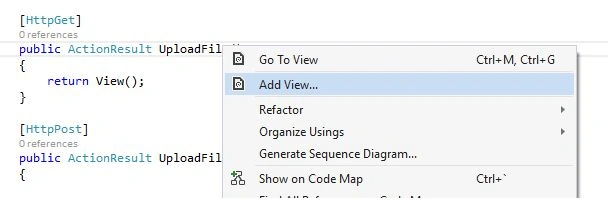
Right-click on UploadFileActionResult. Go to Add View.
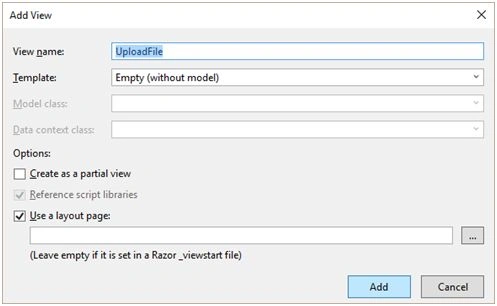
Select the empty template. Click add.
Write the following code in the View.
@{
    ViewBag.Title = "UploadFile";
}
<h2>UploadFile</h2>
@using(Html.BeginForm("UploadFile","Upload", FormMethod.Post, new { enctype="multipart/form-data"}))
{
    <div>
        @Html.TextBox("file", "", new {  type= "file"}) <br />
        <input type="submit" value="Upload" />
        @ViewBag.Message
    </div>
}
5. Browse the Application
Let us now run the Application and check if it is working fine or not. Browse the Application.
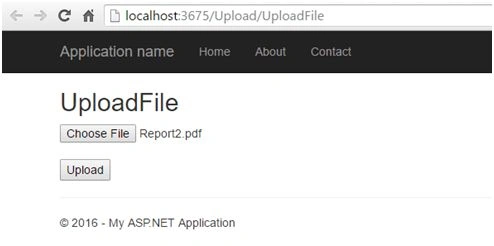
Click upload. I have debugged the code to verify that the file gets uploaded successfully.
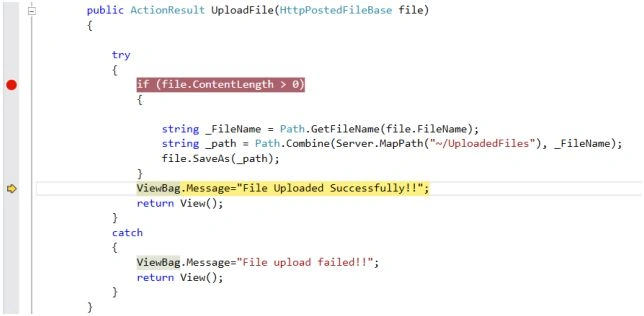
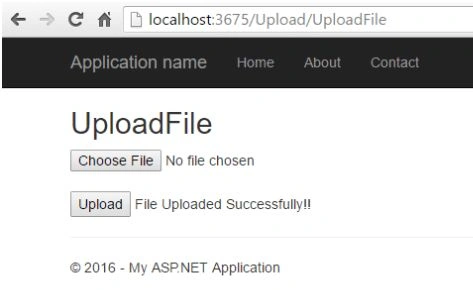
The code is working as per the expectations, as it hits the success message. We should get this message on the View, as well.
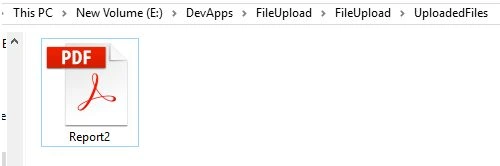
We will verify the file uploaded by opening the folder in the Application’s directory.
Summary
Hence, we have just learned how to upload the file in ASP.NET MVC. I hope this post is useful to developers.
Baba AlexanderPosted Jul 7, 2023, 10:21 AM
It does not work
MuhammadSaqib AminPosted Dec 16, 2022, 10:32 AM
https://youtu.be/fWx_eWWA1lw
Hùng MinhPosted Jul 14, 2021, 6:05 PM
It work. thank you so much!
Imran AliPosted Jun 23, 2021, 12:58 PM
How can view upload file
Numan MazharPosted Dec 3, 2020, 3:23 AM
How can we upload files in Live Location Means Hosting or cloud server?
Ankit KumarPosted Nov 29, 2018, 4:15 AM
Just wondering how file will save, if - if condition could not satisfy. it will do nothing, but will show message File Save Successful.
Bhavesh JadavPosted Oct 4, 2018, 1:25 AM
Great............
Jeffrey ScottPosted Jun 30, 2018, 8:22 AM
Hi. I put in your code as shown, adding the view code to the HttpPost part of the method and I got the following error message: Server Error in '/' Application.The resource cannot be found.Description: HTTP 404. The resource you are looking for (or one of its dependencies) could have been removed, had its name changed, or is temporarily unavailable. Please review the following URL and make sure that it is spelled correctly. Requested URL: /Upload/UploadFile Do You Know What I'm Doing Wrong? Thanks.
Meta PhalPosted Apr 23, 2018, 10:42 AM
Hi, now your code worked for me ! and now i want to display it in Index View and can download too ! how to do it ?
siraz MohammadPosted Mar 6, 2018, 1:46 AM
How to send this file to the database using entityframework
Miran TaslidzaPosted Mar 1, 2018, 11:05 AM
Respect and nice regards. The application is great and works, just have a small problem when I load a bit larger file, 4k image or video error because the file is too large, how to fix it. Thank you in advance.
Martin BomarPosted Dec 13, 2017, 1:52 PM
Hi, how can I get the URL and filename and/or file extension from the uploaded file, so I can save those strings in an Oracle database?
Ronald AndrewPosted Nov 22, 2017, 5:28 AM
I have re written the above code, but when i run, it brings the HttpPostedFileBase file as null, How can i pick the file details from the Form?
Ahmed SalimPosted Nov 14, 2017, 6:20 PM
Working fine thank you
Ravitheja GPosted Aug 8, 2017, 1:54 AM
Can i know how we can implement the security feature while saving the file
Sally PepinPosted Jun 27, 2017, 2:25 PM
It worked. thanks. How can i put each upload into a database with an automatic ID?
blauge reskroogePosted Jun 5, 2017, 8:34 AM
Isn't working, doesn't execute the try block and shows "File upload failed!!"
Santhakumar MunuswamyPosted Jun 25, 2016, 2:19 AM
Thank you for nice article
Vignesh ManiPosted Jun 18, 2016, 3:19 PM
Good one
Humayun Kabir MamunPosted Jun 18, 2016, 12:51 PM
Nice...