

Introduction
HTTP.sys is a Windows-based web server for ASP.NET Core. It is an alternative to Kestrel Server and it has some features that are not supported by Kestrel. It is built on HTTP.sys Kernel mode driver. It cannot be used with IIS Express or IIS due to it is incompatibility with the ASP.NET Core modules.
Following are the features supported by HTTP.sys.
- Windows Authentication
- Response caching
- WebSockets
- Direct file transmission
- Port sharing
- HTTPS with SNI (Server Name Indication)
- HTTP/2 over TLS
- It supports Windows 7 and Windows Server 2008 R2 and later
It is very useful for deployments where we need to expose the server directly to the internet without IIS. It is built on HTTP.sys so it does not require a reverse proxy server for protection against attacks. HTTP.sys provides robustness, security and scalability of web server and it is mature technology which protects against many kinds of attacks. This web server is a good choice for internal deployments when the Windows authentication kind of feature is used that is not available with the Kestrel Server.
Configure Windows Server
Following are the items required to configure this Windows server.
- Install the version of the .NET framework on which our application runs
- Required preregistered URL prefixes to bind HTTP.sys and set up SSL certificate. If we do not reregister the URL, our application needs to be run with administrator privileges. Our application can run without administrator privileges only if it binds to the localhost using HTTP with a port number greater than 1024.
- We need to open the firewall ports to allow us to reach HTTP.sys.
Configure ASP.net Core application
Following are the steps to configure the ASP.NET application for HTTP.sys.
- The package Microsoft.AspNetCore.Server.HttpSys is required for the HTTP.sys web server, so it needs to be referenced in the project. If we use Microsoft.AspNetCore.All meta packages, we need not install any other packages.
- The next step is to configure the HTTP.sys server using the UseHttpSys extension method of WebHostBuilder in the main method of the Program class. Here, we can also specify HTTP.sys options.
Program. cs
public class Program
{
    public static void Main(string[] args)
    {
        BuildWebHost(args).Run();
    }
    public static IWebHost BuildWebHost(string[] args) =>
        WebHost.CreateDefaultBuilder(args)
            .UseStartup<Startup>()
            .UseHttpSys(options =>
            {
                options.Authentication.Schemes = AuthenticationSchemes.None;
                options.Authentication.AllowAnonymous = true;
                options.MaxConnections = 100;
                options.MaxRequestBodySize = 30000000;
                options.UrlPrefixes.Add("http://localhost:5000");
            })
            .Build();
}
HTTP.sys options
- Maximum client connections: The maximum number of concurrent open TCP connections for the application using the MaxConnections property. The connection can be unlimited if this property is set to null.
- Maximum request body size: We can override the value of the maximum request body size by using the MaxRequestBodySize property. The default value for maximum request body size is 30,000,000 bytes (28.6 MB approximately). We can also override the value by using the RequestSizeLimit attribute on the action method. This is the recommended way.
[RequestSizeLimit(200000000)]
public IActionResult Index()
{
    return View();
}
Configure URLs and ports to listen on
ASP.net core application binds to "http://localhost:5000" by default. We can configure URL prefixes and Port by using one of the following methods.
- Using the "UseUrl" extension method
- The URL command-line argument
- The ASPNETCORE_URLS environment variable
- The UrlPrefixes property on HttpSysOptions
The main advantage of UrlPrefixes is that we get an error message immediately if we try to add a prefix in the wrong format. The main advantage of the "UseUrls" method is that we can more easily switch between HTTP.sys and Kestrel.
Authentication
It exposes the HTTP.sys authentication configurations. It contains two properties.
- Schemes: It defines authentication type none, basic, NTLM, etc.
- AllowAnonymous: It allows an anonymous user if it is set to true.
It can be modified at any time before disposing of the listener.
- MaxAccepts: It is the maximum number of concurrent accepts.
- EnableResponseCaching: It attempts kernel-mode caching for responses with eligible headers.
- RequestQueueLimit: It allows to user set / gets the maximum number of requests that will be queued up in Http.Sys server.
- ThrowWriteExceptions: If it is set to true, it should throw exceptions when the response body writes fail due to client disconnects. The default value is set to false.
- Timeouts: It exposes the HTTP.sys timeout configuration. It may be modified at any time before disposing of the listener.
Both HTTP.sys and IIS rely on the HTTP.sys kernel-mode driver to listen for and process requests. IIS provides an easy way to configure the application whereas HTTP.sys servers everything we need to configure by ourselves. The netsh.exe tool can help us to configure HTTP.sys. We can assign SSL certificates and reserve URL prefixes by using this tool. To run this tool, required administrative privileges.
Some third-party tools can be used to configure the HTTP.sys server. These tools are not provided by Microsoft and these tools run as administrators by default
- http.sys Manager: It provides UI for configuring SSL, Options, certificate trust list, reservations, and prefixes.
- HttpConfig: It is also able to configure SSL and URL prefixes. It exposes a few more configuration options than HTTP.sys Manager. It cannot create a new CTL (Certificate Trust List) but can be assigned to an existing one.
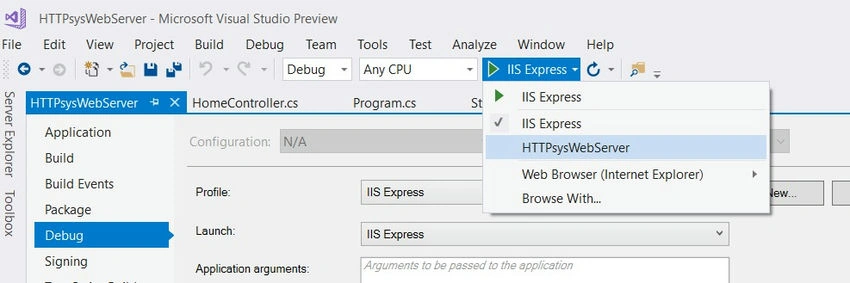
The default launch profile is IIS Express in Visual Studio. To run the application as a console application, we need to manually change the selected profile or alternatively run the project using CLI.
Summary
Http. sys web server introduced with .net core framework 2.0. It is an alternative of the Kestrel server. It runs only with Windows. It cannot be used with IIS (or IIS Express) as it is incompatible with the ASP.NET Core Module.
Terry RemsikPosted Mar 16, 2020, 11:12 AM
Is there an update to at least .NET core 2.2 ? Thank you so much!
AKshay RautPosted Jan 26, 2020, 8:37 PM
This HTTP.sys is not new. In fact IIS also uses HTTP.sys to run.
Tridip BhattacharjeePosted Dec 21, 2017, 3:31 AM
Can you please tell me what is reverse proxy and what it does ? when people use reverse proxy ? when we use IIS as web server then how reverse proxy can be used with IIS ? please clear my few points. thanks