

Introduction
Zoom provides a Server-to-Server OAuth (S2S OAuth) authentication method for secure API interactions between your application and Zoom services. This authentication method is recommended for server-based applications that do not require user authorization. This article will cover,
- Setting up a Server-to-Server OAuth app in Zoom Marketplace
- Generating an access token
- Implementing authentication in an ASP.NET Core Web API
- Creating Zoom meetings using the API
Prerequisites
Before you start, make sure you have,
- A Zoom Developer Account (Zoom Marketplace)
- An ASP.NET Core Web API project (minimum .NET 6)
- HttpClient for making API calls
- Postman or any API testing tool
Create a Server-to-Server OAuth App in Zoom
We'll first create an OAuth app in Zoom, enter the required details, and obtain all the necessary credentials for the next steps.
- Go to Zoom App Marketplace: Zoom Marketplace
- Click Develop > Build App.
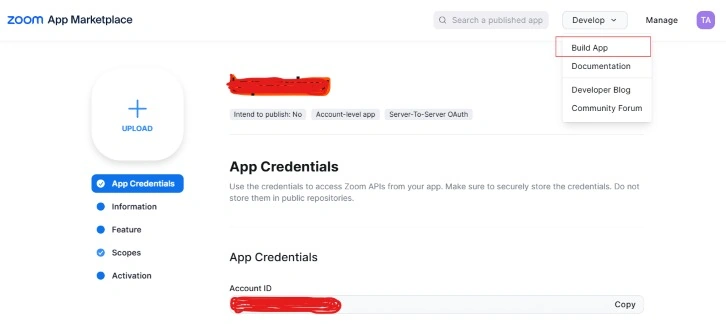
- Choose Server-to-Server OAuth.
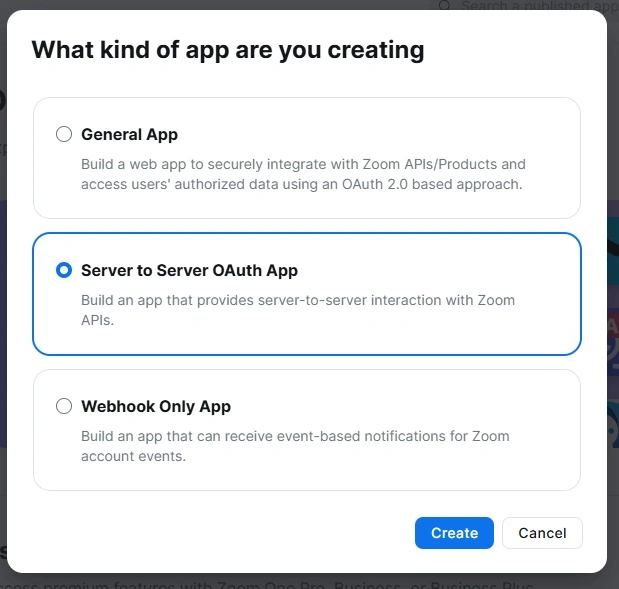
- Enter the required details (App Name, Description, Company Name, etc.).
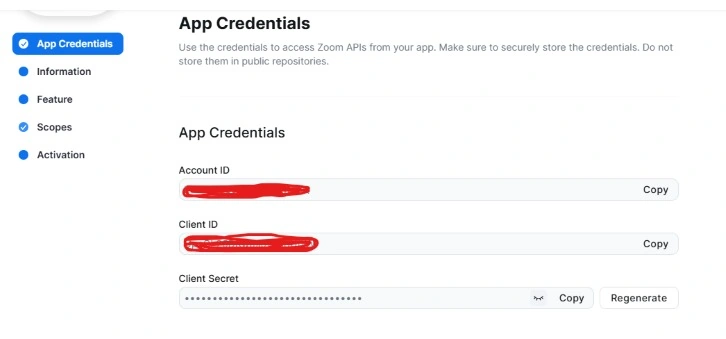
- Generate Client ID, Client Secret, and Account ID.
- Set Scopes: Add permissions for required API access (e.g., meeting:read, meeting:write, user:read).
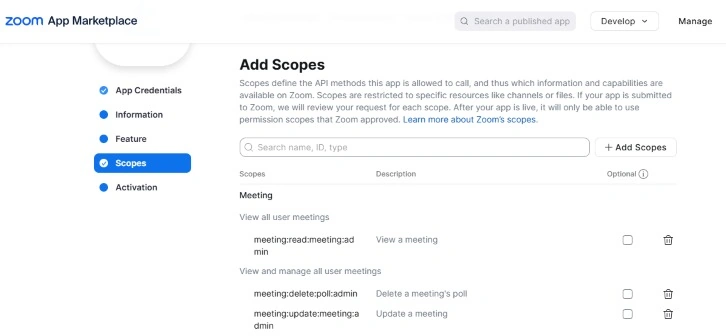
- Save the app and keep the credentials secure.
Configure ASP.NET Core Web API
Now we will create a Web API project and implement the zoom authentication process there.
Create an ASP.NET Core Web API project
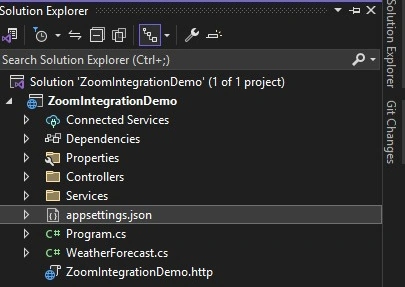
Add Zoom Credentials to appsettings.json
{
  "ZoomSettings": {
    "ClientId": "your-client-id",
    "ClientSecret": "your-client-secret",
    "AccountId": "your-account-id",
    "AuthUrl": "https://zoom.us/oauth/token",
    "ApiBaseUrl": "https://api.zoom.us/v2/"
  }
}
Implement Zoom Authentication Service
We need a service to obtain an OAuth access token from Zoom. Now we will create a Services folder and inside that folder add a class ZoomAuthService as given below.
   public class ZoomAuthService
   {
       private readonly IConfiguration _configuration;
       private string _accessToken;
       private DateTime _tokenExpiry;

       public ZoomAuthService(IConfiguration config)
       {
           _configuration = config;
       }

       public async Task<string> GetAccessTokenAsync()
       {
           string zoomTokenUrl = _configuration["ZoomSettings:OAuthEndpoint"];
           string clientId = _configuration["ZoomSettings:ClientId"];
           string clientSecret = _configuration["ZoomSettings:ClientSecret"];
           string encodedCredentials = Convert.ToBase64String(Encoding.UTF8.GetBytes($"{clientId}:{clientSecret}"));

           using (HttpClient client = new HttpClient())
           {
               client.DefaultRequestHeaders.Authorization = new AuthenticationHeaderValue("Basic", encodedCredentials);
               client.DefaultRequestHeaders.Accept.Add(new MediaTypeWithQualityHeaderValue("application/json"));

               var requestData = new List<KeyValuePair<string, string>>
               {
                   new KeyValuePair<string, string>("grant_type", "account_credentials"),
                   new KeyValuePair<string, string>("account_id",  _configuration["ZoomSettings:AccountId"])
               };

               var requestContent = new FormUrlEncodedContent(requestData);
               var response = await client.PostAsync(zoomTokenUrl, requestContent);
               var responseString = await response.Content.ReadAsStringAsync();

               if (response.IsSuccessStatusCode)
               {
                   var tokenResponse = JsonConvert.DeserializeObject<ZoomTokenResponse>(responseString);
                   return tokenResponse.access_token;
               }
               return null;
           }
       }
   }
   public class ZoomTokenResponse
   {
       public string access_token { get; set; }
       public int expires_in { get; set; }
   }
Join the conversation! Your thoughts help the community grow.