

Service Accounts are used for Server to Server communication so the user doesn't need to interact for authentication.
Section 1 Generate Keys for Google Service Account
If you haven’t generated keys yet, follow the steps to generate one or skip to the next section.
Go to https://console.developers.google.com/permissions/serviceaccounts
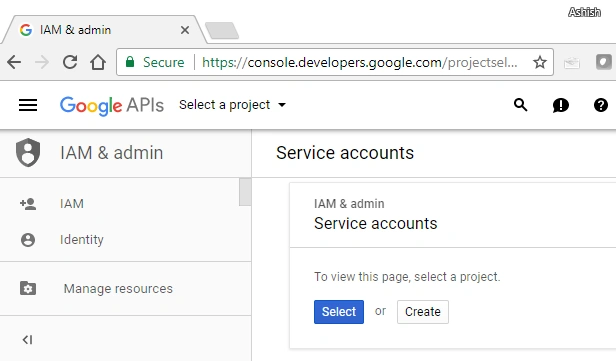
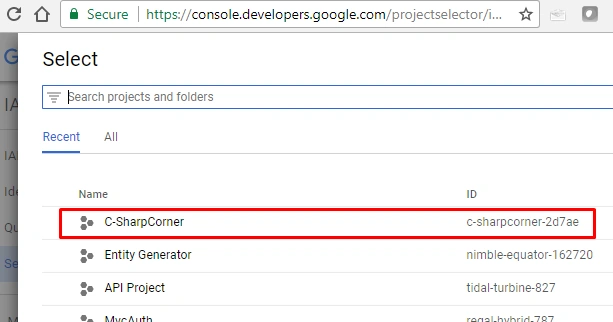
Select project for which you want the service account.
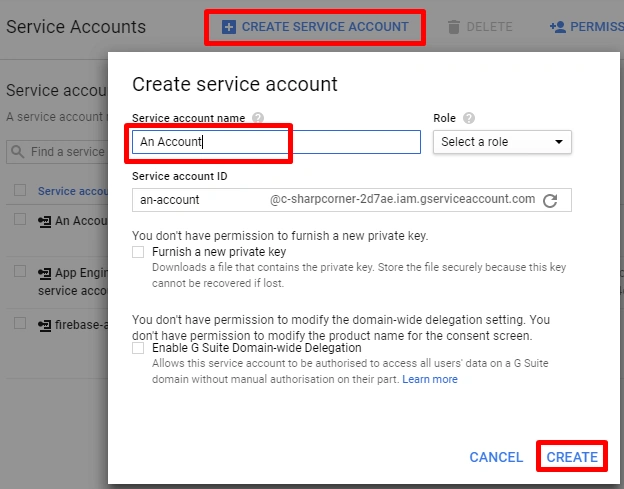
Create a new service account here. You can add roles and permissions as per your use cases.
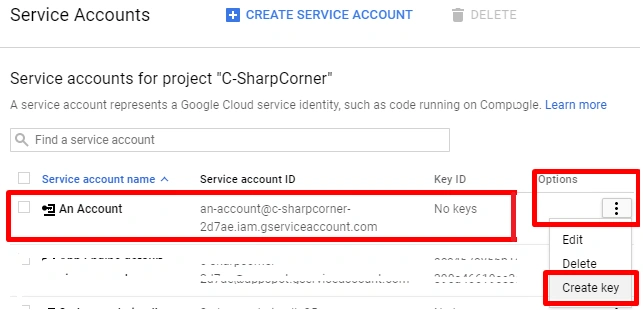
Now, besides your account name, click Options >> Create Key.
Select your desired format and hit "Create".
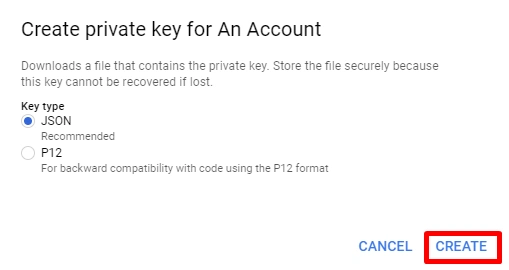
I have generated both the keys for demo.

Section 2 Generate Access Tokens
Now, let's retrieve Acess Token from the above-generated keys. I have taken Console Application here. Install Google.Apis.Auth NuGet package. It will add all the required dependencies.
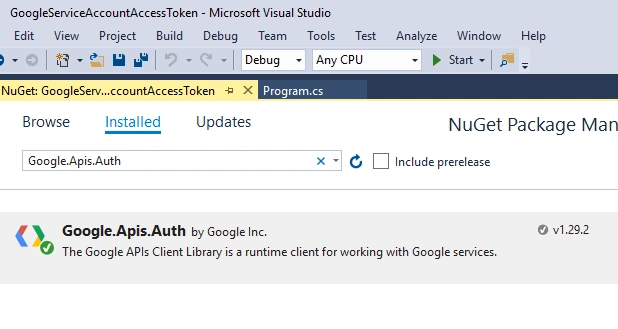
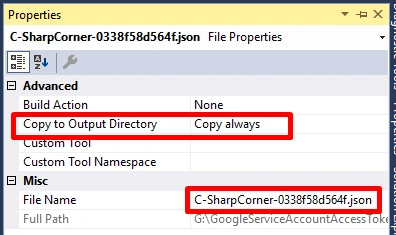
Add key files to your project and set "Copy to Output Directory" as "Copy Always" or "Copy if newer".
Generate token from JSON key
Write the below code where jsonKeyFilePath is the path to your JSON key file, and scopes takes all the scopes you required in your access token.
Write the below code where jsonKeyFilePath is the path to your JSON key file, and scopes takes all the scopes you required in your access token.
- /// <summary>
- /// Get Access Token From JSON Key Async
- /// </summary>
- /// <param name="jsonKeyFilePath">Path to your JSON Key file</param>
- /// <param name="scopes">Scopes required in access token</param>
- /// <returns>Access token as string Task</returns>
- public static async Task<string> GetAccessTokenFromJSONKeyAsync(string jsonKeyFilePath, params string[] scopes)
- {
- using (var stream = new FileStream(jsonKeyFilePath, FileMode.Open, FileAccess.Read))
- {
- return await GoogleCredential
- .FromStream(stream) // Loads key file
- .CreateScoped(scopes) // Gathers scopes requested
- .UnderlyingCredential // Gets the credentials
- .GetAccessTokenForRequestAsync(); // Gets the Access Token
- }
- }
- /// <summary>
- /// Get Access Token From JSON Key
- /// </summary>
- /// <param name="jsonKeyFilePath">Path to your JSON Key file</param>
- /// <param name="scopes">Scopes required in access token</param>
- /// <returns>Access token as string</returns>
- public static string GetAccessTokenFromJSONKey(string jsonKeyFilePath, params string[] scopes)
- {
- return GetAccessTokenFromJSONKeyAsync(jsonKeyFilePath, scopes).Result;
- }
- class TestJSONKey
- {
- public static void GetTokenAndCall()
- {
- var token = GoogleServiceAccount.GetAccessTokenFromJSONKey(
- "Keys/C-SharpCorner-0338f58d564f.json",
- "https://www.googleapis.com/auth/userinfo.profile");
- WriteLine(new HttpClient().GetStringAsync($"https://www.googleapis.com/plus/v1/people/110259743757395873050?access_token={token}").Result);
- }
- }
- class Program
- {
- static void Main(string[] args)
- {
- // Testing with JSON key
- TestJSONKey.GetTokenAndCall();
- }
- }
Generate token from P12 key
Write the below code where p12KeyFilePath is the path to your JSON key file. You can get serviceAccountEmail from Google Developer Console. The keyPassword will be asked while generating key. By default, it is "notasecret" and scopes takes all the scopes you require in your access token.
- /// <summary>
- /// Get Access Token From P12 Key Async
- /// </summary>
- /// <param name="p12KeyFilePath">Path to your P12 Key file</param>
- /// <param name="serviceAccountEmail">Service Account Email</param>
- /// <param name="keyPassword">Key Password</param>
- /// <param name="scopes">Scopes required in access token</param>
- /// <returns>Access token as string Task</returns>
- public static async Task<string> GetAccessTokenFromP12KeyAsync(string p12KeyFilePath, string serviceAccountEmail, string keyPassword = "notasecret", params string[] scopes)
- {
- return await new ServiceAccountCredential(
- new ServiceAccountCredential.Initializer(serviceAccountEmail)
- {
- Scopes = scopes
- }.FromCertificate(
- new X509Certificate2(
- p12KeyFilePath,
- keyPassword,
- X509KeyStorageFlags.Exportable))).GetAccessTokenForRequestAsync();
- }
- /// <summary>
- /// Get Access Token From P12 Key
- /// </summary>
- /// <param name="p12KeyFilePath">Path to your P12 Key file</param>
- /// <param name="serviceAccountEmail">Service Account Email</param>
- /// <param name="keyPassword">Key Password</param>
- /// <param name="scopes">Scopes required in access token</param>
- /// <returns>Access token as string</returns>
- public static string GetAccessTokenFromP12Key(string p12KeyFilePath, string serviceAccountEmail, string keyPassword, params string[] scopes)
- {
- return GetAccessTokenFromP12KeyAsync(p12KeyFilePath, serviceAccountEmail, keyPassword, scopes).Result;
- }
- class TestP12Key
- {
- public static void GetTokenAndCall()
- {
- var token = GoogleServiceAccount.GetAccessTokenFromP12Key(
- "Keys/C-SharpCorner-e0883ada1a3f.p12",
- "[email protected]",
- "notasecret",
- "https://www.googleapis.com/auth/userinfo.profile"
- );
- WriteLine(new HttpClient().GetStringAsync($"https://www.googleapis.com/plus/v1/people/110259743757395873050?access_token={token}").Result);
- }
- }
- class Program
- {
- static void Main(string[] args)
- {
- // Testing with JSON key
- TestJSONKey.GetTokenAndCall();
- // Testing with P12 key
- TestP12Key.GetTokenAndCall();
- }
- }
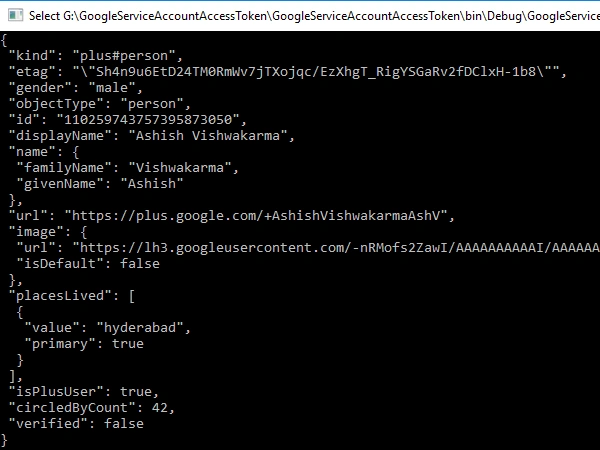
You will get a response like this.
You can change the scopes and use access token according to your need. Before making API call, just make sure to enable the same in Google Developer Console for he given project.
For complete code, check my GitHub repo.
Santosh PisipatiPosted Nov 29, 2021, 11:47 AM
Can we generate openssl certificates using C# without using google dll's ? I mean can we create C:\>openssl genrsa -out ca.key 2048C:\>openssl req -new -x509 -days 1826 -key ca.key -out ca.crt [Note: use unique Common Name (e.g. server FQDN or YOUR name) []:gdgcloudcalgary.com] C:\>openssl genrsa -out ia.key 2048 C:\>openssl req -new -key ia.key -out ia.csr [Note: use unique Common Name (e.g. server FQDN or YOUR name) []:GDG Cloud] C:\>openssl x509 -req -days 730 -in ia.csr -CA ca.crt -CAkey ca.key -set_serial 01 -out ia.crt C:\>openssl pkcs12 -export -out ia.p12 -inkey ia.key -in ia.crt -chain -CAfile ca.crt certificates
Thomas WilliamsPosted Aug 26, 2019, 9:43 AM
Really great help, there is a problem with the implementation though, where the code might hang. The issue has been addressed at https://github.com/googleapis/google-api-dotnet-client/issues/590 - see above at "Generate token from JSON key" at the command GetAccessTokenForRequestAsync() add .ConfigureAwait(false) this fixed it for me.