

Introduction
React is an Open Source JavaScript library. It is used for developing scalable, simple, and fast front-ends for web & mobile applications. It handles the view layer of mobile and web applications. React is flexible and can be used in any application.
Description
In this article, We learn about React Components. Also, we know the steps to create React Components and how to render React Components. Here, we discuss React Function Components with some examples. Also, How to work on React on both Desktop and Mobile platforms.
Please visit the React articles to understand the beginning.
- Part 1: React Tutorial For Beginners - Introduction
- Part 2: React Tutorial For Beginners - Steps to Install and Setup React
- Part 3: React Tutorial For Beginners - React Element with and without JSX
The below React articles are for a basic understanding of React sample applications.
- Create & Download Area Chart using React Apexcharts with Bootstrap
- React Apexcharts: Create & Download Column Bar Chart with Bootstrap
- Create Animated ATM Cards Using React With Bootstrap
What is the React Component?
- React Components are the building blocks of the React application.
- React Components allow us to split the UI into independent and reusable parts.
- React app will have many components like header component, navbar component, footer component and content component.
- React Component is a JavaScript class or function that accepts inputs, which are properties(props).
- It returns a React element that describes how a section of the User Interface should appear.
- React components can be created as a Function Component or Class Component.
React Component consists of the following parts.
- Template using HTML
- User Interactivity using JS
- Applying Styles using CSS
Create React Function Without Arrow function
Create a Javascript function that takes an Object and returns a container that displays Employee Information.
in index.js,
- Create Function component
- Call that Function component and assign it to an element
- Render the element
Add below code in index.js
import React from 'react';
import ReactDOM from 'react-dom';
import './index.css';

// Without Arrow function
function GetEmployee(employee) {
    return (
        <div>
            <h2>Employee Details</h2>
            <p>
                <label> Employee ID : <b>{employee.Id}</b> </label>
            </p>
            <p>
                <label> Employee Name : <b>{employee.Name}</b> </label>
            </p>
            <p>
                <label> Employee Location : <b>{employee.Location}</b> </label>
            </p>
            <p>
                <label> Employee Salary : <b>{employee.Salary}</b> </label>
            </p>
            <br />
            <h2>Employee Details In Table</h2>
            <table>
                <thead>
                    <tr>
                        <th scope="col">Employee ID</th>
                        <th scope="col">Employee Name</th>
                        <th scope="col">Employee Location</th>
                        <th scope="col">Employee Salary</th>
                    </tr>
                </thead>
                <tbody>
                    <tr>
                        <td>{employee.Id}</td>
                        <td>{employee.Name}</td>
                        <td>{employee.Location}</td>
                        <td>{employee.Salary}</td>
                    </tr>
                </tbody>
            </table>
        </div>
    );
}

const element = (
    <GetEmployee Id="101" Name="Satyaprakash" Location="Bengaluru" Salary="12000" />
);

ReactDOM.render(element, document.getElementById('root'));
Code Description
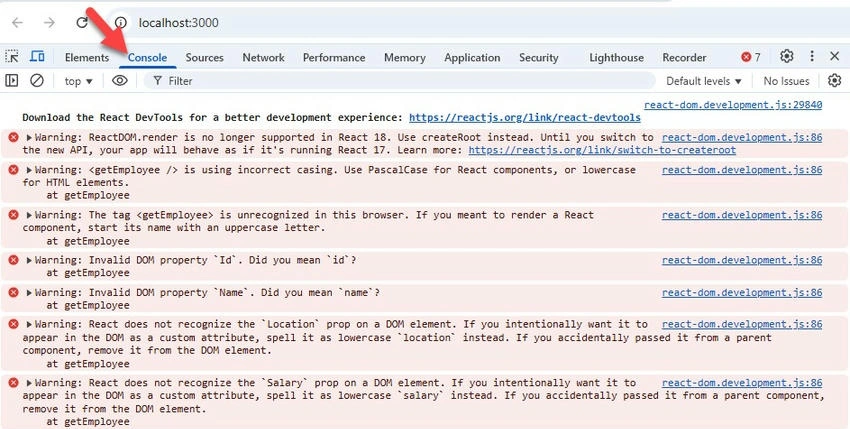
Here is a function called GetEmployee() with the parameter employee. Here, the employee is the object that contains properties like ID, name, salary, and location. If the component does not start with a capital letter, then react does not recognize that is a component.
We can call a function component and assign it to an element by writing below.
const element = (
    <GetEmployee Id="101" Name="Satyaprakash" Location="Bengaluru" Salary="12000" />
);
This element can be rendered as shown below, and the root is the div element in index.html,
ReactDOM.render(element, document.getElementById('root'));
Add code in index.css
table, th, td {
    border: 1px solid black;
    color: red;
}

p {
    color: red;
}
Add code in index.html
<!DOCTYPE html>
<html lang="en">
<head>
    <meta charset="utf-8" />
    <link rel="icon" href="%PUBLIC_URL%/favicon.ico" />
    <meta name="viewport" content="width=device-width, initial-scale=1" />
    <meta name="theme-color" content="#000000" />
    <meta name="description" content="Web site created using create-react-app" />
    <link rel="apple-touch-icon" href="%PUBLIC_URL%/logo192.png" />
    <link rel="manifest" href="%PUBLIC_URL%/manifest.json" />
    <title>React Tutorial For Beginners</title>
</head>
<body>
    <noscript>You need to enable JavaScript to run this app.</noscript>
    <div id="root"></div>
</body>
</html>
Here, root is the div element used in index.js.
<div id="root"></div>
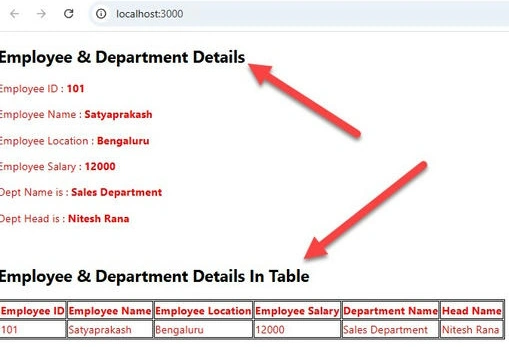
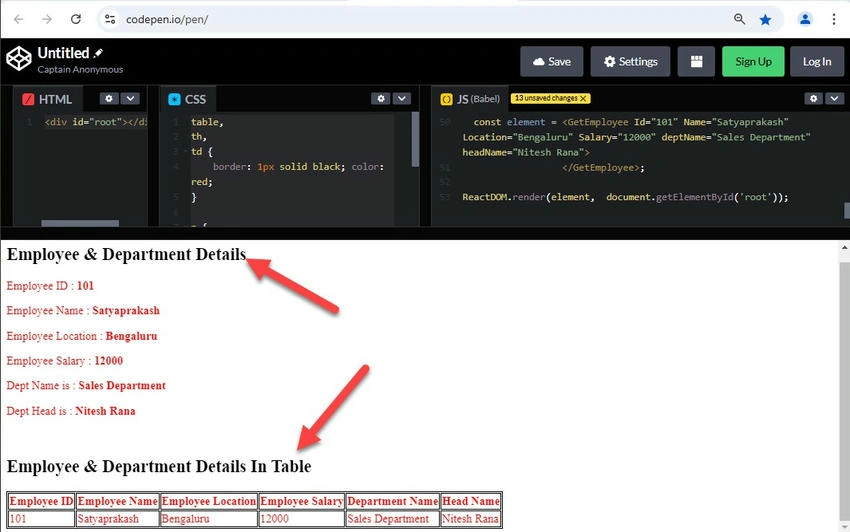
Output
Run the React app using the command >> npm start.
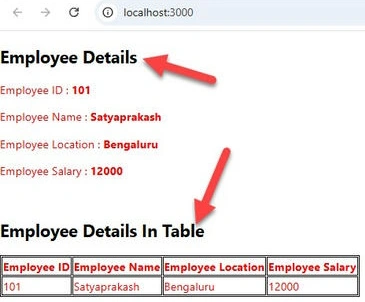
In the above example, we have created React elements that represent DOM tags. Elements can also represent user-defined components. When React sees an element representing a user-defined component, it passes JSX attributes to this component as a single object. We call this object “props”.
Create React Function With Arrow function
A function can also be created using the Arrow function. Let's modify the same code using the Arrow function.
Modify index.js
import React from 'react';
import ReactDOM from 'react-dom';
import './index.css';

// With Arrow function
const GetEmployee = (employee) => {
    return (
        <div>
            <h1>Employee Details</h1>
            <p>
                <label> Employee ID : <b>{employee.Id}</b> </label>
            </p>
            <p>
                <label> Employee Name : <b>{employee.Name}</b> </label>
            </p>
            <p>
                <label> Employee Location : <b>{employee.Location}</b> </label>
            </p>
            <p>
                <label> Employee Salary : <b>{employee.Salary}</b> </label>
            </p>
            <br />
            <h1>Employee Details In Table</h1>
            <table>
                <thead>
                    <tr>
                        <th scope="col">Employee ID</th>
                        <th scope="col">Employee Name</th>
                        <th scope="col">Employee Location</th>
                        <th scope="col">Employee Salary</th>
                    </tr>
                </thead>
                <tbody>
                    <tr>
                        <td>{employee.Id}</td>
                        <td>{employee.Name}</td>
                        <td>{employee.Location}</td>
                        <td>{employee.Salary}</td>
                    </tr>
                </tbody>
            </table>
        </div>
    );
};

const element = (
    <GetEmployee Id="101" Name="Satyaprakash" Location="Bengaluru" Salary="12000" />
);

ReactDOM.render(element, document.getElementById('root'));
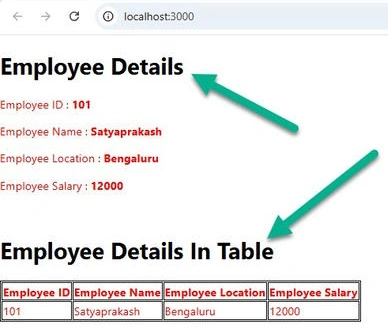
The function can also be created using the Arrow function.
var GetEmployee= (employee) => {
    return <div>
Always start component names with a capital letter. React treats components starting with lowercase letters as DOM tags. For example, <div /> represents an HTML div tag, but <GetEmployee /> represents a component. Components can refer to other components in their output. We can use the same component abstraction for any level of detail.
Output
Join the conversation! Your thoughts help the community grow.