

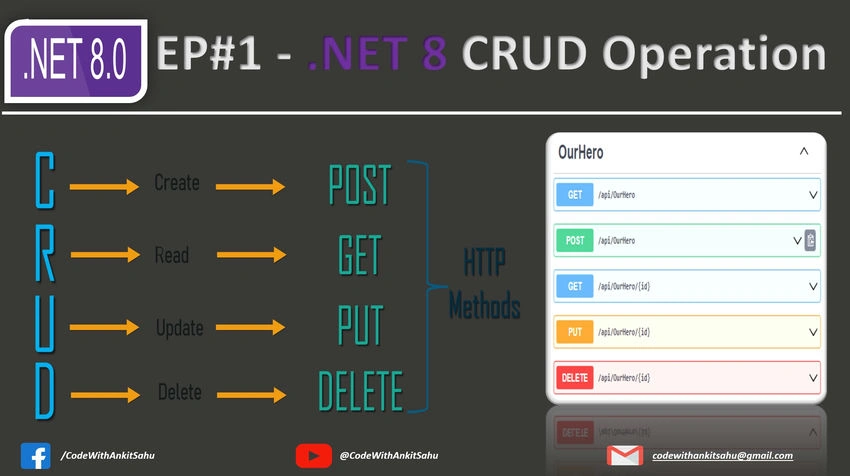
Introduction
Creating a CRUD (Create, Read, Update, Delete) API in .NET 8 with an In-memory collection is a common scenario in web development. In this article, We'll walk through building a complete .NET 8 Web API with a real-world use case.
Prerequisites
Visual Studio or Visual Studio Code (with .NET 8 SDK installed).
What is an API?
- API stands for Application Programming Interface.
- It defines the rules that you must follow to communicate with other software systems.
- Developers expose APIs so that other applications can communicate with their applications programmatically.
What is RESTful API?
- RESTful API is an interface that two computer systems use to exchange information securely over the internet.
- Most business applications have to communicate with other internal and third-party applications to perform various tasks.
CRUD Operations?
CRUD stands for "Create, Read, Update, and Delete,"
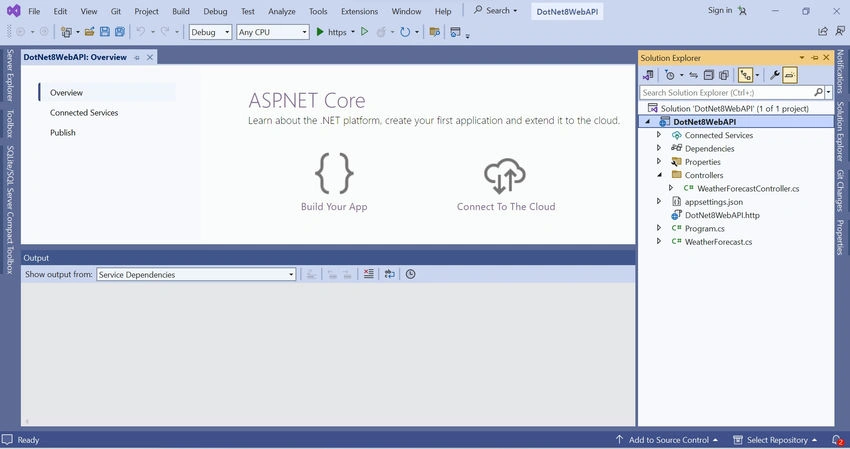
.Net 8 WEB API
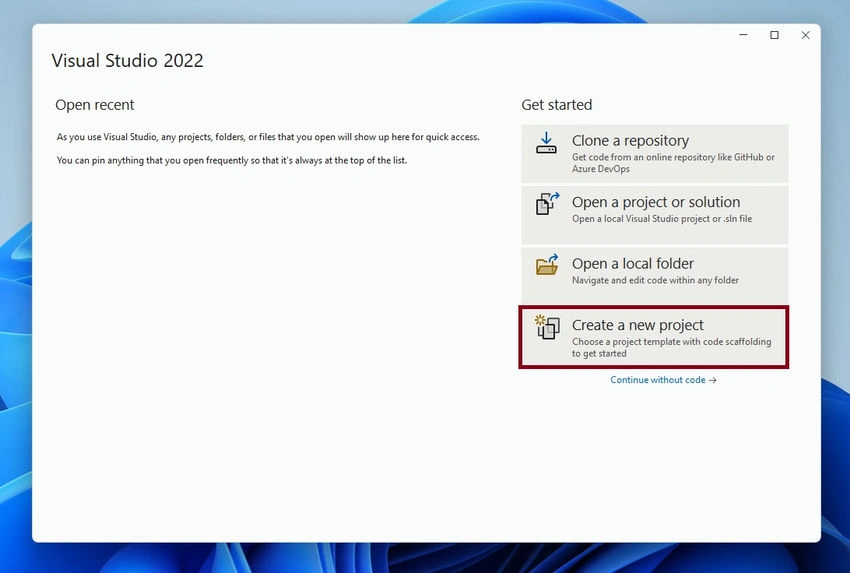
Step 1. Open a visual studio and click on "Create a new project".
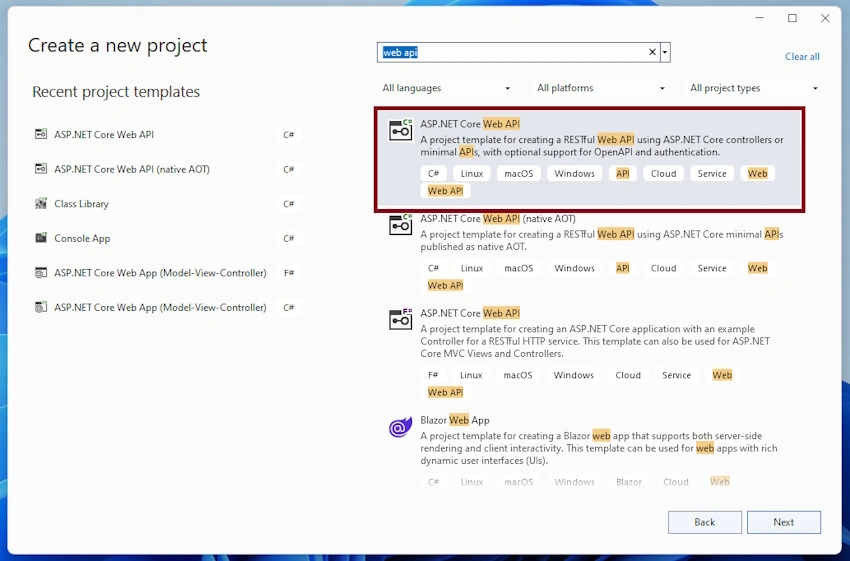
Step 2. Select the "ASP .NET Core Web API" template and click on the "Next" button.
Step 3. Enter the "Project Name" & select the "Location" and click the "Next" button.
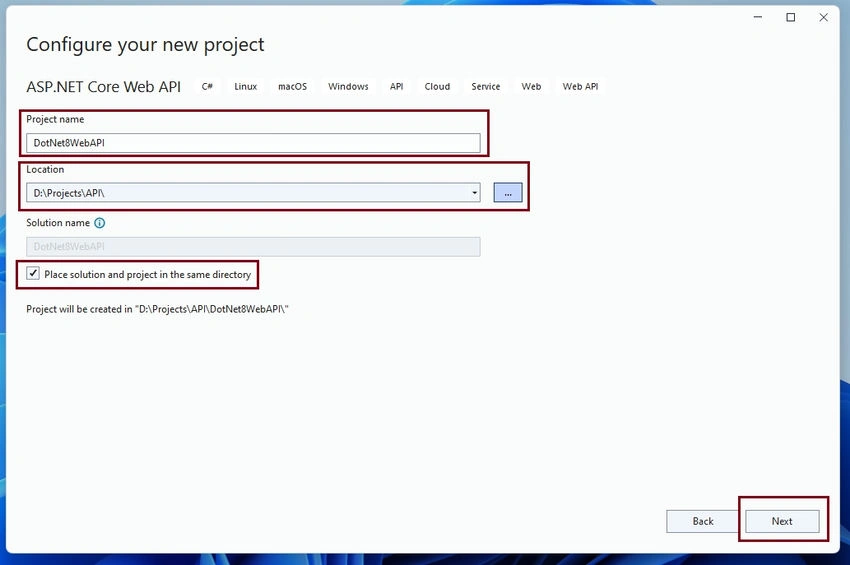
Step 4
- Select Framework 6.0 or greater. I am selecting .Net 8.0 (Long-Term Support)
- "Configuration for HTTPS" should be checked - It will run our application in HTTPS protocol.
- "Enable Open API Support" should be checked - It will configure Swagger for you.
- "Use Controller" should be checked - It will help to create a controller-based API.
- Click on "Next" to proceed.
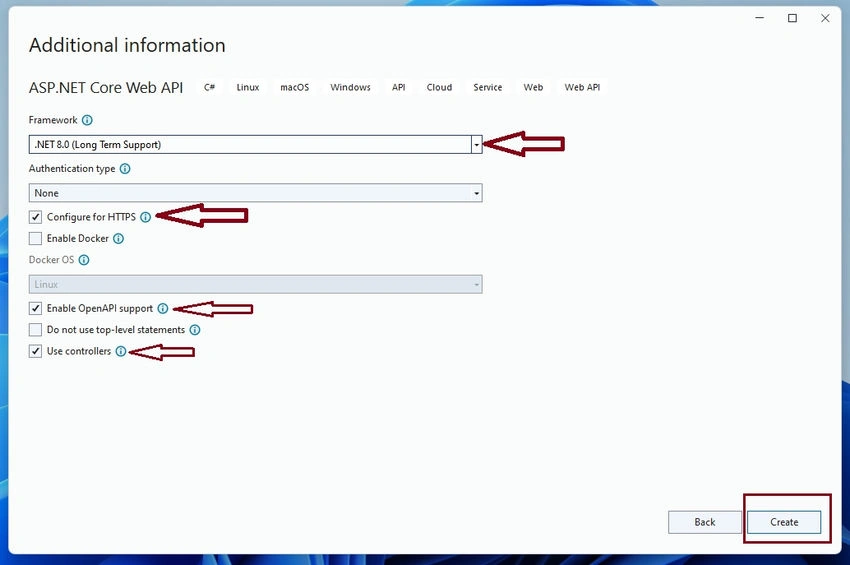
It will generate a web API scaffolding with a predefined WeatherForecastController API.
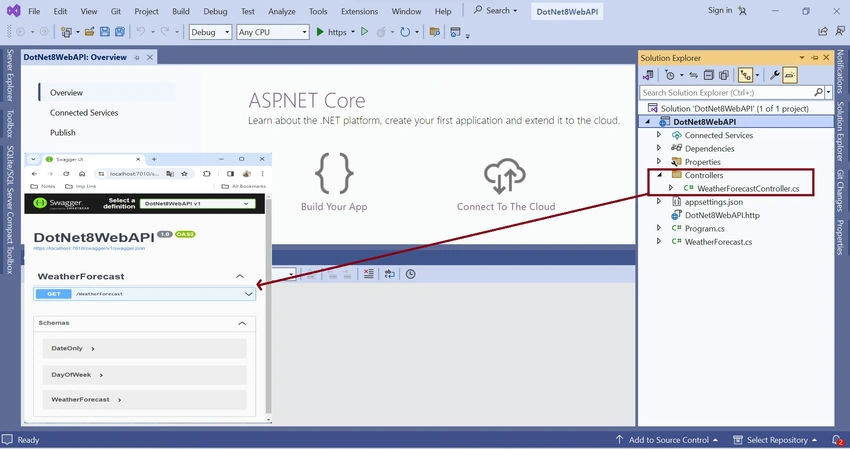
Step 5. Let's delete the existing WeatherForecast Controller and add a new OurHeroController to this project.
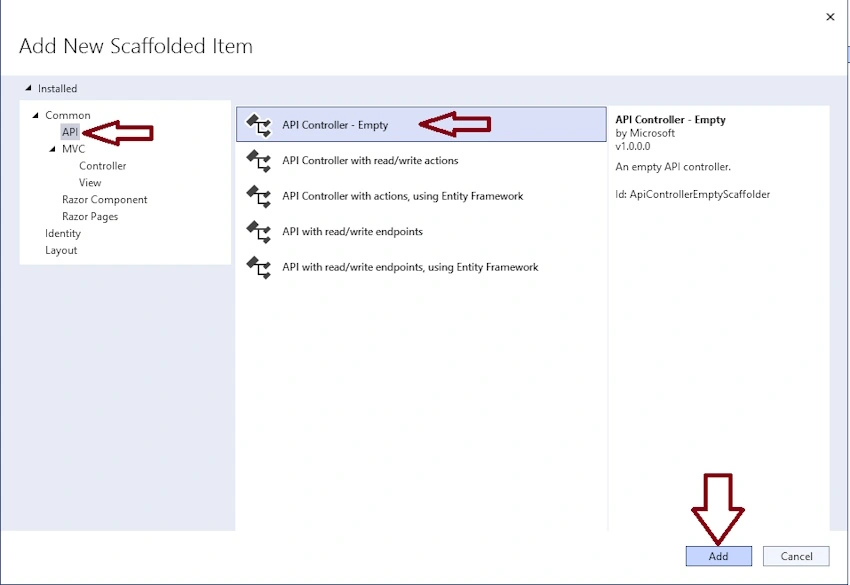
- Right-click on the Controller folder ( go to Open Solution Explorer and select Controller folder).
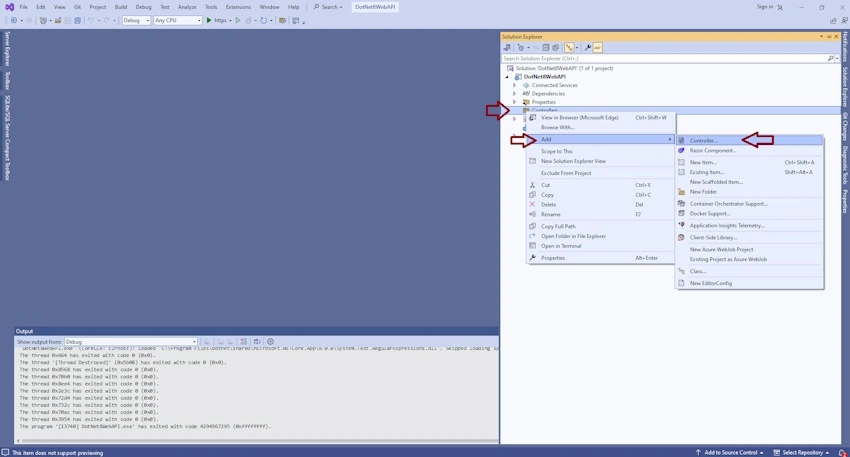
- Select API -> "API Controller - Empty" and click on the "Add" button.
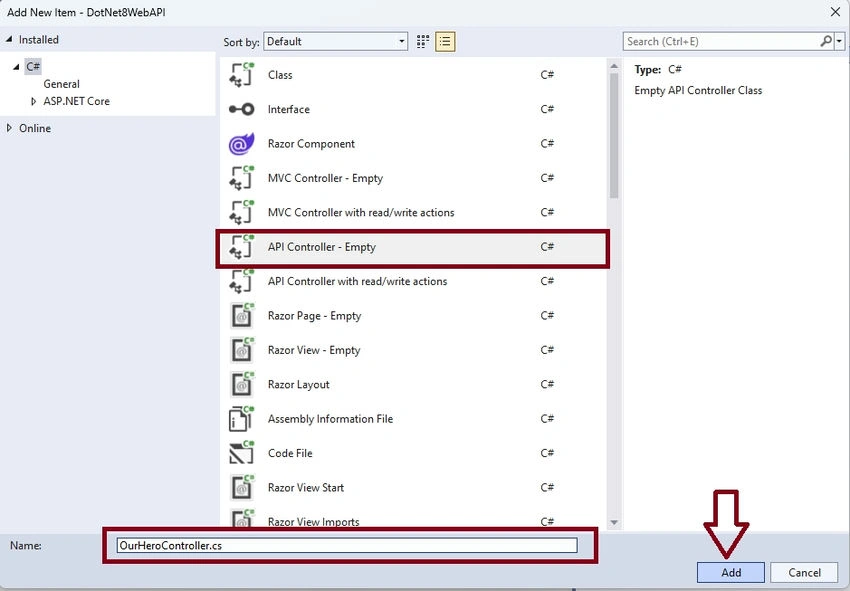
- Enter the Controller name and click on the Add button to generate a template for this.
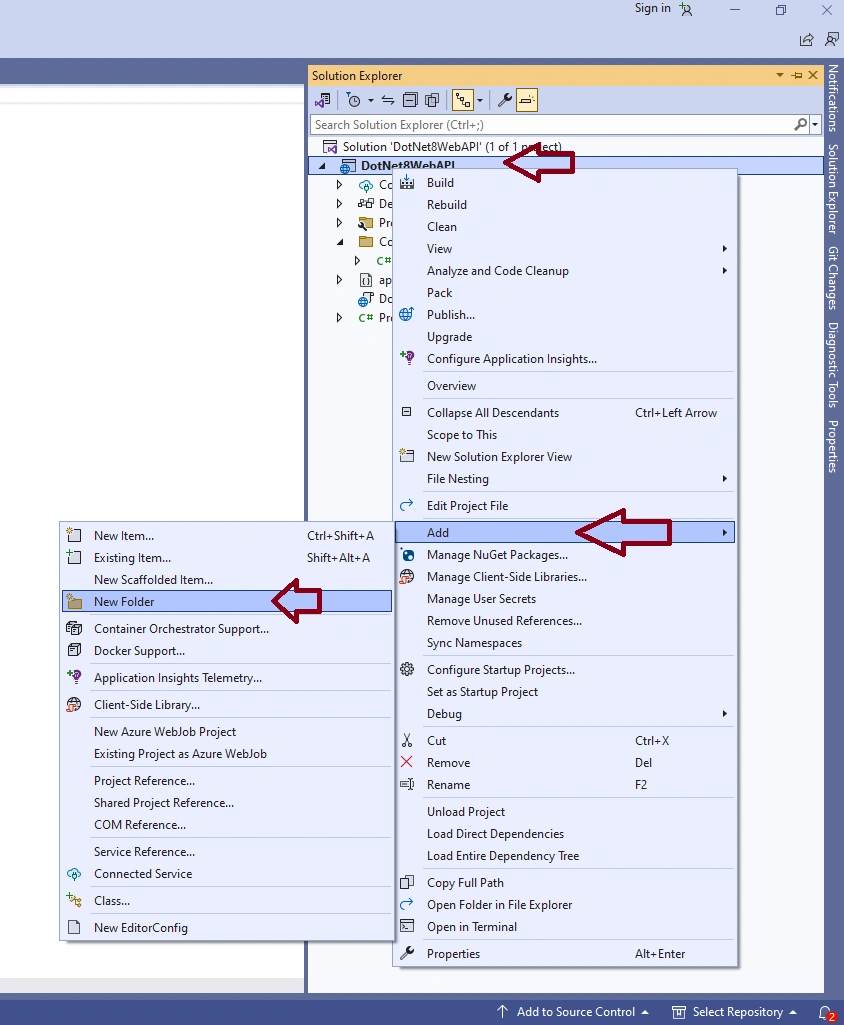
Step 6. Let's add the below folder to our solution.
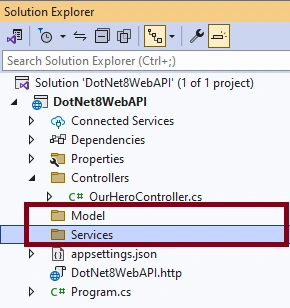
- Model
- Services
Right-click on Solution -> Add -> New Forder
Like this
Step 7. Add OurHero Model in the model folder.
Select a Model folder and press Ctrl +Shift +A to generate a C# class.
or
Right-click on Model folder -> Add -> New Item -> Enter Class(Model Name like OurHero.cs) Name and press the Add button.
// OurHero.cs

namespace DotNet8WebAPI.Model
{
    public class OurHero
    {
        public int Id { get; set; }
        public required string FirstName { get; set; }
        public string LastName { get; set; } = string.Empty;
        public bool isActive { get; set; } = true;
    }
}
AddUpdateOurHero.cs model is being used to add or update our hero list.
//AddUpdateOurHero.cs
namespace DotNet8WebAPI.Model
{
    public class AddUpdateOurHero
    {
        public required string FirstName { get; set; }
        public string LastName { get; set; } = string.Empty;
        public bool isActive { get; set; } = true;
    }
}
Step 8. Create Service files.
- IOurHeroService: Interface
- In this file, we are going to define ourHero business logic.
- OurHeroService: Class,
- we are going to implement IOurHeroService methods.
// IOurHeroService.cs

using DotNet8WebAPI.Model;

namespace DotNet8WebAPI.Services
{
    public interface IOurHeroService
    {
        List<OurHero> GetAllHeros(bool? isActive);

        OurHero? GetHerosByID(int id);

        OurHero AddOurHero(AddUpdateOurHero obj);

        OurHero? UpdateOurHero(int id, AddUpdateOurHero obj);

        bool DeleteHerosByID(int id);
    }
}
// OurHeroService.cs

using DotNet8WebAPI.Model;

namespace DotNet8WebAPI.Services
{
    public class OurHeroService : IOurHeroService
    {
        private readonly List<OurHero> _ourHeroesList;
        public OurHeroService()
        {
            _ourHeroesList = new List<OurHero>()
            {
                new OurHero(){
                Id = 1,
                FirstName = "Test",
                LastName = "",
                isActive = true,
                }
            };
        }

        public List<OurHero> GetAllHeros(bool? isActive)
        {
            return isActive == null ? _ourHeroesList : _ourHeroesList.Where(hero => hero.isActive == isActive).ToList();
        }

        public OurHero? GetHerosByID(int id)
        {
            return _ourHeroesList.FirstOrDefault(hero => hero.Id == id);
        }

        public OurHero AddOurHero(AddUpdateOurHero obj)
        {
            var addHero = new OurHero()
            {
                Id = _ourHeroesList.Max(hero => hero.Id) + 1,
                FirstName = obj.FirstName,
                LastName = obj.LastName,
                isActive = obj.isActive,
            };

            _ourHeroesList.Add(addHero);

            return addHero;
        }

        public OurHero? UpdateOurHero(int id, AddUpdateOurHero obj)
        {
            var ourHeroIndex = _ourHeroesList.FindIndex(index => index.Id == id);
            if (ourHeroIndex > 0)
            {
                var hero = _ourHeroesList[ourHeroIndex];

                hero.FirstName = obj.FirstName;
                hero.LastName = obj.LastName;
                hero.isActive = obj.isActive;

                _ourHeroesList[ourHeroIndex] = hero;

                return hero;
            }
            else
            {
                return null;
            }
        }
        public bool DeleteHerosByID(int id)
        {
            var ourHeroIndex = _ourHeroesList.FindIndex(index => index.Id == id);
            if (ourHeroIndex >= 0)
            {
                _ourHeroesList.RemoveAt(ourHeroIndex);
            }
            return ourHeroIndex >= 0;
        }
    }
}
In the service file, we are using the in-memory collection to store all _ourHeroesList data.
private readonly List<OurHero> _ourHeroesList;
public OurHeroService()
{
    _ourHeroesList = new List<OurHero>()
    {
        new OurHero(){
        Id = 1,
        FirstName = "Test",
        LastName = "",
        isActive = true,
        }
    };
}
Step 9. Register OurHeroService service in the Program.cs file as a Singleton.
//*********************** Add services to the container.***********************
builder.Services.AddSingleton<IOurHeroService, OurHeroService>();
//*********************** Add services to the container end.***********************
In .Net 8, we can register our service.
- AddSingleton: a single object present across the application
- AddScoped: One request for one instance (if we are injecting the same service more than once, then it will share the same instance.)
- AddTransient: always create a new instance (if we are injecting the same service more than once, then it will provide a new instance every-time.)
// Program.cs

using DotNet8WebAPI.Services;

var builder = WebApplication.CreateBuilder(args);

//*********************** Add services to the container.***********************
builder.Services.AddSingleton<IOurHeroService, OurHeroService>();
//*********************** Add services to the container end.***********************


builder.Services.AddControllers();
// Learn more about configuring Swagger/OpenAPI at https://aka.ms/aspnetcore/swashbuckle
builder.Services.AddEndpointsApiExplorer();
builder.Services.AddSwaggerGen();

var app = builder.Build();

// Configure the HTTP request pipeline.
if (app.Environment.IsDevelopment())
{
    app.UseSwagger();
    app.UseSwaggerUI();
}

app.UseHttpsRedirection();

app.UseAuthorization();

app.MapControllers();

app.Run();
Step 10. Inject IOurHeroService in OurHeroController.
- Open OurHeroController file
- Add a Contractor
- inject IOurHeroService in the Contractor
// OurHeroController.cs
using DotNet8WebAPI.Services;
using Microsoft.AspNetCore.Http;
using Microsoft.AspNetCore.Mvc;

namespace DotNet8WebAPI.Controllers
{
    [Route("api/[controller]")]
    [ApiController]
    public class OurHeroController : ControllerBase
    {
        private readonly IOurHeroService _heroService;

        public OurHeroController(IOurHeroService heroService)
        {
            _heroService = heroService;
        }
    }
}
Step 11. Add Get API in OurHeroController.
// OurHeroService.cs

[HttpGet]
public IActionResult Get([FromQuery] bool? isActive = null)
{
    return Ok(_heroService.GetAllHeros(isActive));
}
HttpGet. it makes this method a GET method
- IActionResult: It represents a return type to the action method.
- [FromQuery]: indicate getting this value from API Query String
- _heroService.GetAllHeros(isActive): get all OurHero data from OurHeroService
- Ok(object): sending data with 200 status codes.
Step 12. Add other action method
- Get ID - to fetch OurHero by ID
- Post - Add new OurHero
- Put - Update OurHero
- Delete- delete OurHero by ID
using DotNet8API.Model;
using DotNet8API.services;
using Microsoft.AspNetCore.Mvc;

namespace DotNet8API.Controllers
{
    [Route("api/[controller]")]
    [ApiController]
    public class OurHeroController : ControllerBase
    {
        private readonly IOurHeroService _heroService;

        public OurHeroController(IOurHeroService heroService)
        {
            _heroService = heroService;
        }

        [HttpGet]
        public IActionResult Get([FromQuery] bool? isActive = null)
        {
            return Ok(_heroService.GetAllHeros(isActive));
        }

        [HttpGet]
        [Route("{id}")]
        public IActionResult Get(int id)
        {
            var hero = _heroService.GetHerosByID(id);
            if (hero == null)
            {
                return NotFound();
            }
            return Ok(hero);
        }

        [HttpPost]
        public IActionResult Post(AddUpdateOurHero heroObject)
        {
            var hero = _heroService.AddOurHero(heroObject);

            if (hero == null)
            {
                return BadRequest();
            }

            return Ok(new
            {
                message = "Super Hero Created Successfully!!!",
                id = hero!.Id
            });
        }

        [HttpPut]
        [Route("{id}")]
        public IActionResult Put([FromRoute] int id, [FromBody] AddUpdateOurHero heroObject)
        {
            var hero = _heroService.UpdateOurHero(id, heroObject);
            if (hero == null)
            {
                return NotFound();
            }

            return Ok(new
            {
                message = "Super Hero Updated Successfully!!!",
                id = hero!.Id
            });
        }

        [HttpDelete]
        [Route("{id}")]
        public IActionResult Delete([FromRoute] int id)
        {
            if (!_heroService.DeleteHerosByID(id))
            {
                return NotFound();
            }

            return Ok(new
            {
                message = "Super Hero Deleted Successfully!!!",
                id = id
            });
        }
    }
}
Step 13. Run our API project.
Visual Studio
Press the F5 keyboard shortcut to run our app.
DOT NET CLI cmd
- Open our project in cmd
- Run "dotnet run" cmd to launch our project.
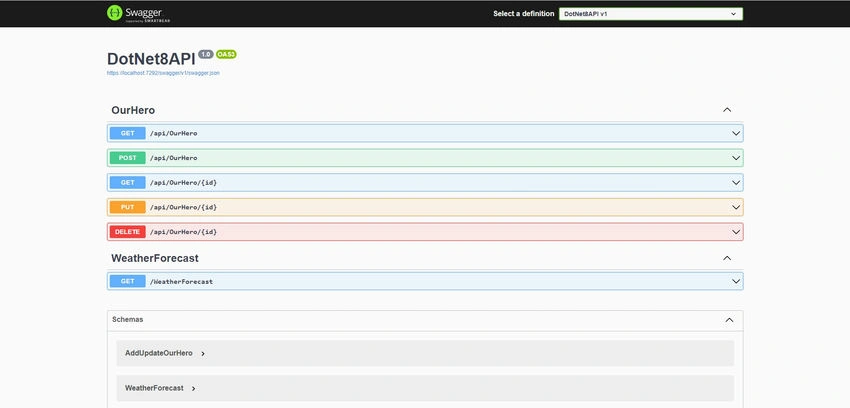
Swagger shows all API lists.
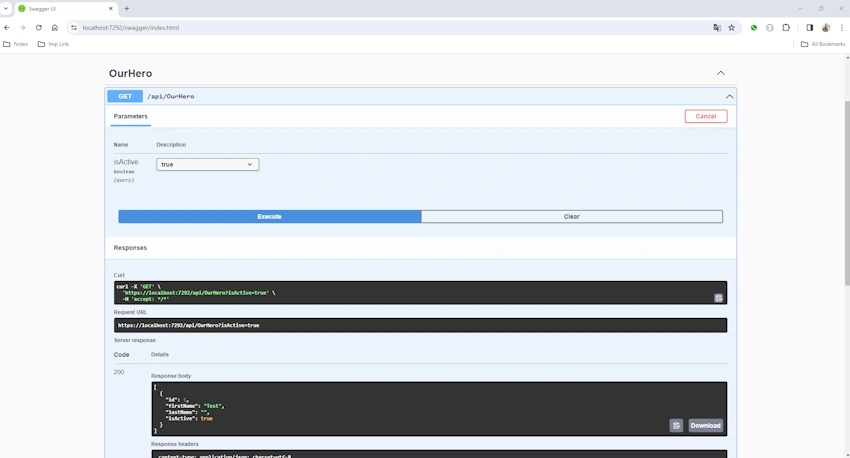
Run get our heros API.
- Open "/api/OurHero"
- Click on "Try it out"
- select isActive if required
- Click on the "Execute" button to send a request.
Summary
That's it! You've created a complete .NET 8 Web API for CRUD operations with an In-memory database. You can now integrate this API into your front-end application.
Comment your query if anything is not working for you.
Thanks for reading.
Atul GatePosted Jan 25, 2025, 5:43 PM
It's very useful for beginners.
Ankit SahuPosted Dec 22, 2023, 12:51 PM
Thank you ??