

Introduction
Most of us have used Windows Calculator before. In this article I have generated a Windows application to act as Microsoft Windows Standard Calculator.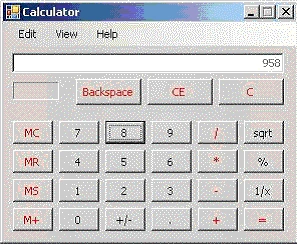
The Program
The program is a Windows Forms application with Visual Studio 2005 C# language.
It contains just one class holds the interface of the application (the form) and also holds the business logic.
This class is named "MainForm".
The form consists of
- 10 numbers buttons (0-9) numbers.
- The memory handling buttons.
- The primitive operations buttons (plus, minus, multiply and division).
- Other operations buttons like Square root and etc..
- The Delete, C and CE buttons.
- The display Text Box.
Event Handling
Entering Numbers
Entering numbers event handling is put in one method which displays each button number.
I made a small trick to make this function to work.
I named each button with the name "btn" and added the number after the text btn to let "btn9" is the name of the button that enters the number 9 to the screen.
Primitive Operations
I also made the event handling of all the basic operations in one method.
To do so, I made an enumeration to hold the current operation the user wants to do. It is addition, multiplication, division or subtraction.
The class holds the operation into a variable and then uses this information when it tries to calculate the final result.
Finally
I am trying to stop talking about the program and let you enjoy reading the code and try to calculate whatever you want.
mojahid islamPosted Sep 13, 2010, 4:40 AM
thank you very much for making this calculator
prem kumarPosted Aug 18, 2010, 9:21 AM
i have tried lot of websites to create a calculator. Most of the coding contained errors. Buts yours is simply great without any error and working well.
rajesh oPosted Aug 6, 2010, 7:39 AM
i had to do this as a mini project for my course in dot net .it really helped me a lot thanks
Amr AdelPosted Jul 20, 2010, 1:17 AM
I would like to thank .. Because u helped me to found a standered calculator like this.. thank you agian for your efforts :)
Amr AdelPosted Jul 20, 2010, 1:06 AM
i 'm really would like to thank you bashmohands Khaled because u helped me in my search for 2 day i was looking at a calculator like this. And finally i found but i have to confessed that the Calculator is not simple as i expected i have to understand alot of command here ... << Amr Adel >>
budi setiawanPosted Feb 4, 2010, 7:53 PM
thx
Ruben AbregoPosted Sep 18, 2009, 12:49 PM
Hi... If the firstOperant = 0 you ara asigning the value of the second one to the first. Thi is a error for Division Operation. 0 divided for Any number = 0 In you calculator, 0 divided for any number = the same number
Satya DevPosted Nov 28, 2007, 9:54 AM
Khaled, Nice GUI and good work. But one suggestion, if you don't mind. We already have a calculator from Microsoft. So, if you work on a GUI tool or some other general component or some thing that is not currently available or atleast not so popular that would definietely draw attention of many more people. Please don't think that I am discouragaing you or any thing. Just an advice. Once again great job.
Chitkaran SinghPosted Nov 18, 2007, 2:22 PM
Good One buddy... I also made one like this... but had a different life of thoughts and implementation
Ahsan MurshedPosted Nov 16, 2007, 10:42 PM
Very nice calculator. very helpful for me.