

Abstract
The ASP.NET AJAX Toolkit is a new and powerful control in ASP.NET 2.0. It is designed for you to develop web applications that are more responsive, faster, and put fewer loads on the network, while using the .NET-based
Introduction
It is an acronym for a couple of technologies that make it possible for developers to update a web page content at the control level without having to do a complete page refresh. For more details about ASP.NET AJAX please go to (http://ajax.asp.net/). The Codeplex team have made amazing controls that makes the life a lot easier for an ASP.NET programmer (more sleep and spending time with family & friends). These amazing controls are so called "ASP.NET AJAX Toolkit".
System Requirements
- This application requires the user to have a copy of Visual Studio.NET 2005 (or you can download express edition at http://msdn.microsoft.com/vstudio/express/ )
- ASP.NET AJAX 1.0 RC (http://ajax.asp.net/default.aspx?tabid=47&subtabid=471)
- ASP.NET AJAX Toolkit (http://ajax.asp.net/default.aspx?tabid=47&subtabid=471)
- SQL 2005 database(with sample AdventureWorks database)
The article assumes a familiarity with C#, as well as with using Visual Studio.NET 2005 to create ASP.NET applications. Elementary knowledge of ASP.NET AJAX extension library, Asynchronies Post back, ADO.NET and HTML would be beneficial but not absolutely necessary to fully understand the content of this article.
Advantage to use CollapsiblePanel
In the usual design way, if you want to show information between 2 objects. You would usually use Http Post as Figure 1 or Post back as Figure 2
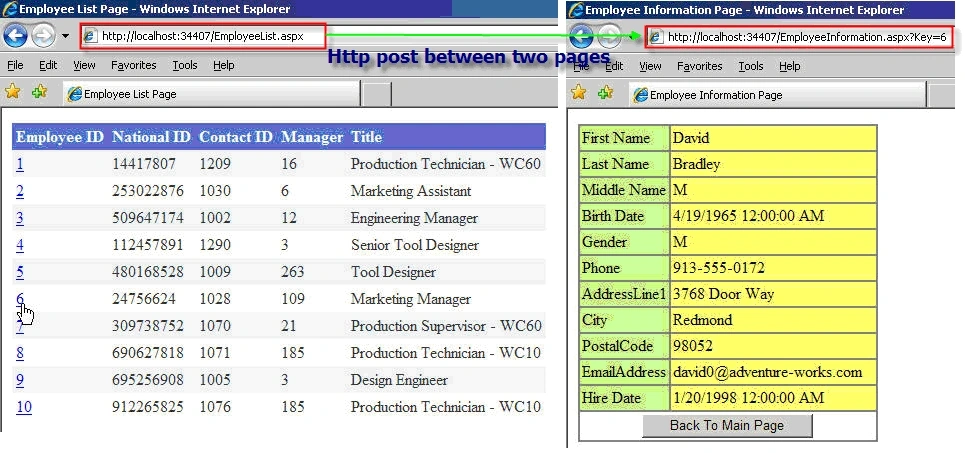
Figure 1 HTTP Post between two pages
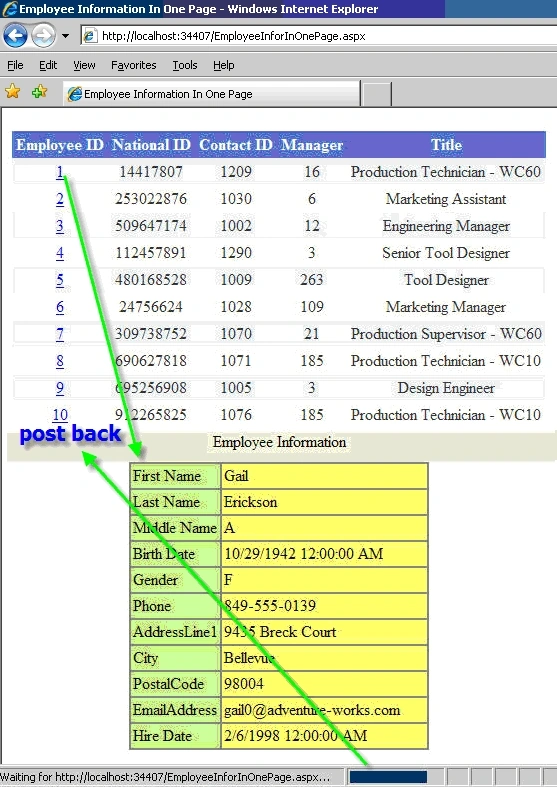
Figure 2. Get detail by Post back
Of course there is nothing wrong with these two designs, but what if we can make it better and faster?
Now let's see how CollapsiblePanel can make it better, with CollapsiblePanel, you don't have to worry about the table or controls are too long for the page. You can always collapse and expand to save space as Figure 3.
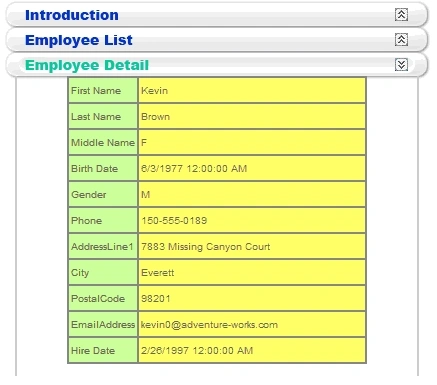
Figure 3. Easy to collapse and expand
There is no page refresh when button click event fire up as Figure 4
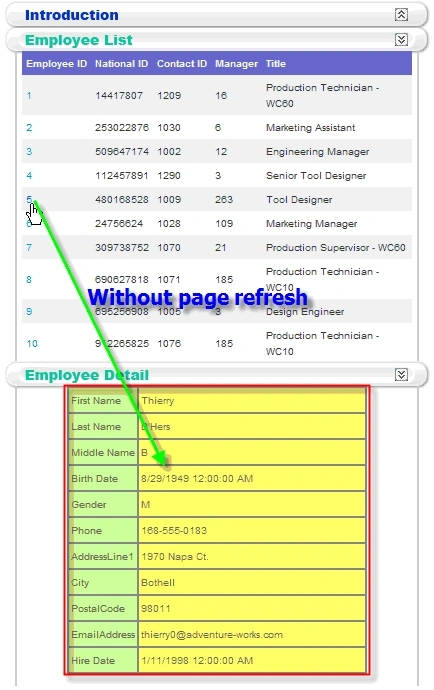
Figure 4 no page refresh when Employee ID click
Create CollapsiblePanel on ASP.NET page
**Please download the code and walkthrough it with each step
Step 1. Create ASP.NET project
Step 2. Ensure toolbox has
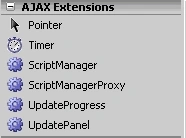
Figure 5.
If you dont see the AJAX Extensions in Toolbox, then you need to manually add new registry as below
[HKEY_LOCAL_MACHINE\SOFTWARE\Microsoft\.NETFramework\AssemblyFolders\ASP.NET
Step 3. Import
Right click on Toolbox and select Add Tab as Figure 6.
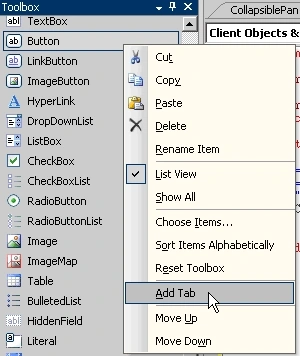
Figure 6. Add new tab in Toolbox
Type "AJAX Control Toolkit" in the blank tab name as Figure 7.
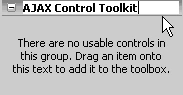
Figure 7. Insert name to the blank new tab
Under .NET Framework Components tab, please click Browse to AjaxControlToolkit.dll from the directory you installed before as Figure 8.
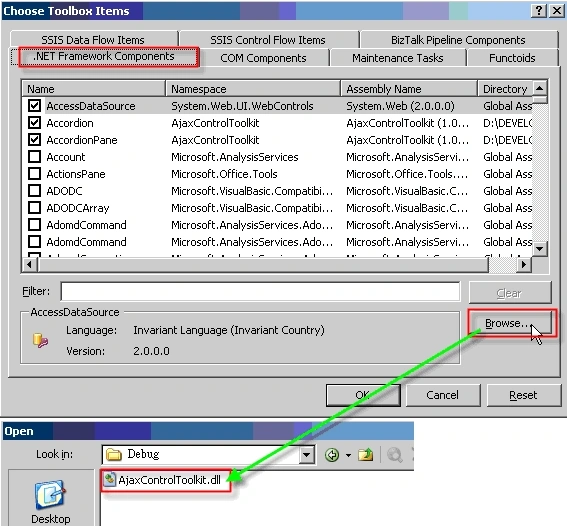
Figure 8. Browse to AjaxControlToolkit.dll
Now you should see all the
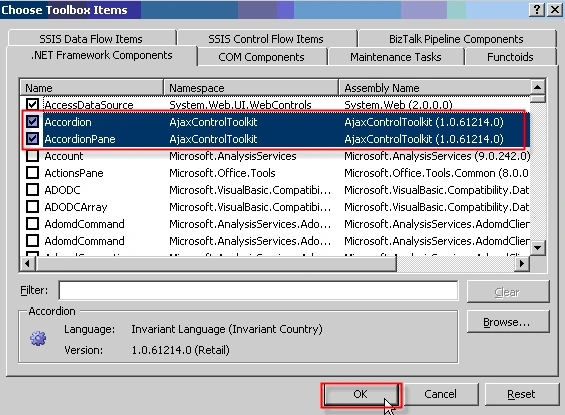
You should have
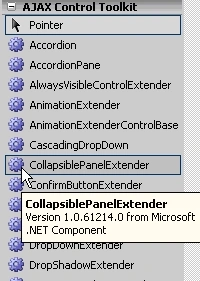
Figure 10.
Step 4. Drag and Drop ScriptManager to aspx page
To use most of ASP.NET AJAX Control, you need ScriptManager in the page as Figure 11.
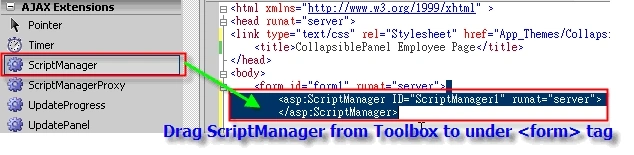
Figure 11 Drag ScriptManager to asp,net page
Step 5. Create panel for Introduction title and panel for Introduction content
<asp:Panel ID="panelTitleIntroduction" runat="server" Height="25px" Width="405px">
<img id="imgBackgroundIntroduction" src="App_Themes/CollapsiblePanel/images/BackgroundIntroduction.png" />
</asp:Panel>
<asp:Panel ID="panelContentIntroduction" runat="server" Height="160px" Width="415px">
.....
<span style="font: 18px 'Lucida Grande', LucidaGrande, Verdana, sans-serif; color: #2d4c78;">The CollapsiblePanel is one of
.....
</asp:Panel>
Step 6. Create panel for Employee List title and panel for Employee List content
<asp:Panel ID="panelTitleEmployeeList" runat="server" Height="25px" Width="405px">
<img id="imgBackgroundEmployeeList" src="App_Themes/CollapsiblePanel/images/BackgroundEmployeeList.png" />
</asp:Panel>
<asp:Panel ID="panelContentEmployeeList" runat="server" Height="310px" Width="415px">
.....
<asp:DataGrid ID="dgNew" runat="server" CellPadding="4" ForeColor="#333333" GridLines="None" AutoGenerateColumns="False" oneditcommand="dgNew_EditCommand" Width=100% >
.....
</asp:DataGrid>
</asp:Panel>
Step 7. Create panel for Employee Detail title and panel for Employee Detail content
<asp:Panel ID="panelTitleEmployeeDetail" runat="server" Height="25px" Width="405px">
<img id="imgBackgroundEmployeeDetail" src="App_Themes/CollapsiblePanel/images/BackgroundEmployeeDetail.png" />
</asp:Panel>
<asp:Panel ID="panelContentEmployeeDetail" runat="server" Height="300px" Width="415px">
.....
<table id="tblInformation" align="center" border="1" bordercolor="graytext" cellpadding="2" cellspacing="0" height="160" style="width: 300px; height: 170px" width="710" runat=server>
.....
</table>
</asp:Panel>
Step 8. Drag 3 CollapsiblePanelExtenders to the form page
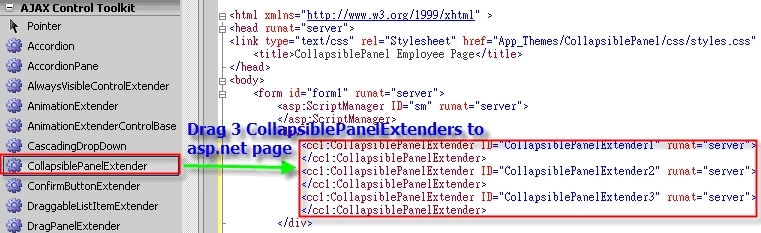
Figure 12. 3 CollapsiblePanelExtenders in the page.
Step 9. Apply each CollapiblePanelExtender control with panels
<cc1:CollapsiblePanelExtender ID="cpeIntroduction" runat="server" TargetControlID="panelContentIntroduction" ExpandControlID="panelTitleIntroduction" CollapseControlID="panelTitleIntroduction" Collapsed="false"
ImageControlID="imgBackgroundIntroduction" ExpandedImage="App_Themes/CollapsiblePanel/images/HightLightIntroduction.png"
CollapsedImage="App_Themes/CollapsiblePanel/images/BackgroundIntroduction.png" SuppressPostBack="True" ScrollContents=true ></cc1:CollapsiblePanelExtender>
<cc1:CollapsiblePanelExtender ID="cpeEmployeeList" runat="server" TargetControlID="panelContentEmployeeList"
ExpandControlID="panelTitleEmployeeList" CollapseControlID="panelTitleEmployeeList" Collapsed="true"
ImageControlID="imgBackgroundEmployeeList" ExpandedImage="App_Themes/CollapsiblePanel/images/HightLightEmployeeList.png"
CollapsedImage="App_Themes/CollapsiblePanel/images/BackgroundEmployeeList.png" SuppressPostBack="True" ></cc1:CollapsiblePanelExtender>
<cc1:CollapsiblePanelExtender ID="cpeEmployeeDetail" runat="server" TargetControlID="panelContentEmployeeDetail"
ExpandControlID="panelTitleEmployeeDetail" CollapseControlID="panelTitleEmployeeDetail" Collapsed="true"
ImageControlID="imgBackgroundEmployeeDetail" ExpandedImage="App_Themes/CollapsiblePanel/images/HightLightEmployeeDetail.png"
CollapsedImage="App_Themes/CollapsiblePanel/images/BackgroundEmployeeDetail.png" SuppressPostBack="True"></cc1:CollapsiblePanelExtender>
In the Design View you should see those
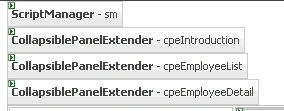
Figure 13. ScriptManager and 3 CollapsiblePanelExtenders on Design View
Now you should able to collapse and expand on those title panels as Figure 14. The only thing still need to modify is to avoid page refresh when click Employee ID hyper link.
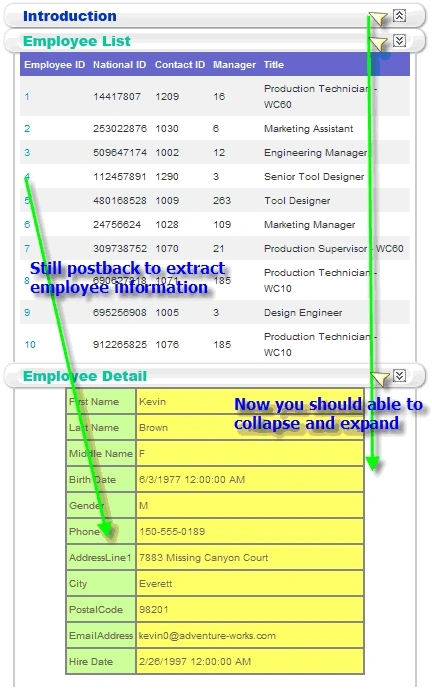
Figure 14. The panels can be collapse and expand
Step 10. Add UpdatePanel to avoid page refresh
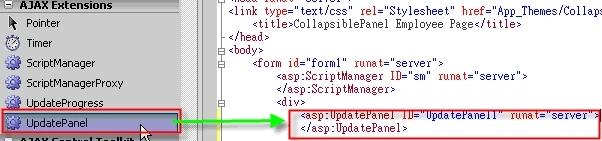
Figure 15 UpdatePanel in the page
Step 11. Add ContentTemplate tag within UpdatePanel
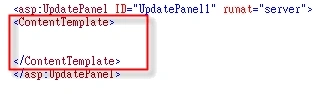
Figure 16. Add ContentTemplate
Step 12. Wrap all 3 CollapsiblePanelExtender controls, 3 title panels and 3 content panels inside of <asp: UpdatePanel><ContentTemplate>
<asp:UpdatePanel ID="upEmployeeDetail" runat="server">
<ContentTemplate>...
<cc1:CollapsiblePanelExtender ID="cpeIntroduction" runat="server" >...
</cc1:CollapsiblePanelExtender>
<cc1:CollapsiblePanelExtender ID="cpeEmployeeList" runat="server">...
</cc1:CollapsiblePanelExtender>
<cc1:CollapsiblePanelExtender ID="cpeEmployeeDetail" runat="server">...
</cc1:CollapsiblePanelExtender>
<asp:Panel ID="panelTitleIntroduction" runat="server" Height="25px" Width="405px">...
</asp:Panel>
<asp:Panel ID="panelContentIntroduction" runat="server" Height="160px" Width="415px">..
</asp:Panel>
<asp:Panel ID="panelTitleEmployeeList" runat="server" Height="25px" Width="405px">..
</asp:Panel>
<asp:Panel ID="panelContentEmployeeList" runat="server" Height="310px" Width="415px">..
</asp:Panel>
<asp:Panel ID="panelTitleEmployeeDetail" runat="server" Height="25px" Width="405px">..
</asp:Panel>
<asp:Panel ID="panelContentEmployeeDetail" runat="server" Height="300px" Width="415px">.
</asp:Panel>...
</ContentTemplate>
</asp:UpdatePanel>
Another cool property in CollapsiblePanel - ScrollContents
If you set ScrollContents to true, you can see the scroll bar in the content panel as Figure 17
<cc1:CollapsiblePanelExtender ID="cpeIntroduction" runat="server" TargetControlID="panelContentIntroduction"
ExpandControlID="panelTitleIntroduction" CollapseControlID="panelTitleIntroduction" Collapsed="false"
ImageControlID="imgBackgroundIntroduction" ExpandedImage="App_Themes/CollapsiblePanel/images/HightLightIntroduction.png"
CollapsedImage="App_Themes/CollapsiblePanel/images/BackgroundIntroduction.png" SuppressPostBack="True" ScrollContents=true ></cc1:CollapsiblePanelExtender>
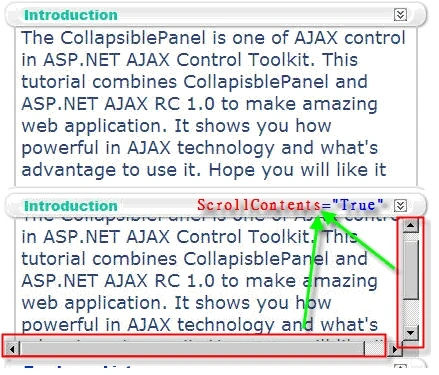
Figure 17 scroll bars in content panel
Mukesh KumarPosted Oct 19, 2015, 1:04 AM
Good article... thanks for sharing
Navin PanditPosted Oct 7, 2011, 12:22 PM
Very nice article, many thanks for sharing.
Tejas PatelPosted Aug 16, 2011, 6:32 AM
Wonderful article and help me a lot,but can you tell me how to get CollapiblePanel using Javascript.Do u have any idea than please let me know.
Khang DuyPosted May 19, 2011, 3:39 AM
Thank you very much. But I don't see AdventureWorks database in CollapiblePanelDemo_AJAXV1.zip file. Please upload it.
surya parkashPosted Jan 17, 2011, 3:38 AM
nice article ... thanks james
jo loPosted Oct 31, 2010, 8:33 AM
good
nora azaniPosted Apr 25, 2010, 11:55 AM
great!! great topic...
eliza sahooPosted Feb 10, 2010, 6:30 AM
Collapsible panel is one of the exotic controls present in Ajax Control Toolkit of ASP.NET. Apart from several built in functionalities, there are situations when the user needs to close (collapse) or open (expand) the collapsible panel through script. Further, there are “ExpandControlId” and “CollapseControlId” attributes present in the collapsible panel to control the collapse and expand on click events of respective assigned controls , yet sometimes we need to do it by other events.
varun singhPosted Mar 20, 2009, 7:45 AM
I want code of hovermenu control.
naveen chauhanPosted Jan 11, 2009, 12:21 PM
Hi friends I want to integrate online payment gateway in asp.net. Please advice how can i get API of payment gateway and integrate with our web site ? Please help naveen [email protected]
naveen chauhanPosted Jan 11, 2009, 12:19 PM
Hi friends please help me how can i develop voice chat in asp.net ? naveen [email protected]
naveen chauhanPosted Jan 11, 2009, 12:16 PM
Hello friend I want to draw a diagonal line at design time in asp.net. Please help me how can i draw a diagonal line. Naveen
Benoy VMPosted Jul 30, 2007, 4:39 PM
Good work and explains in detail...Nice work...
MattPosted Mar 2, 2007, 3:29 PM
This is a very nice article. Well done James. You suggested this on ASP.NET forums to my post. Thanks to you I can see a good example.