

Introduction
Here, we are going to see how to integrate different kinds of captcha in your application and how to use them.
Here, we are going to see how to integrate different kinds of captcha in your application and how to use them.
Prerequisite
Basic knowledge of ASP.NET MVC
Article Flow
- What is Captcha?
- Use of Captcha?
- Creating new project
- Integrate Captcha
What is Captcha ?
A CAPTCHA is a challenge-response system where in typically a dynamically generated image consisting of random letters and numbers is displayed to the users and the users are asked to re-enter the text in an attempt to verify that both of them match.
A CAPTCHA is a challenge-response system where in typically a dynamically generated image consisting of random letters and numbers is displayed to the users and the users are asked to re-enter the text in an attempt to verify that both of them match.
CAPTCHA stands for "Completely Automated Public Turing Test to Tell Computers and Humans Apart "
Use of Captcha?
- To prevent spam and automated form submissions in the website being developed, CAPTCHA is extremely useful.
- The primary purpose of CAPTCHA is to ensure that the data is being submitted by humans and not by an automated software system.
Creating new project
To integrate Captcha, we are going to create a simple registration application in the below steps.
Step 1 Create New Project and name it as CaptchaMVC5

Step 2
Select Empty MVC Web Application.
Select Empty MVC Web Application.

Step 3
After the creation of Project, Add Reference to your application. For that, right click References and select "Manage NuGet Packages".
After the creation of Project, Add Reference to your application. For that, right click References and select "Manage NuGet Packages".

Step 4
Search in NuGet as CaptchaMVC. Here, we are going to select MVC5 and click "Install" to add reference to our project.
Search in NuGet as CaptchaMVC. Here, we are going to select MVC5 and click "Install" to add reference to our project.

Step 5
After Installing the captcha from NuGet , you can see it in Project References.
After Installing the captcha from NuGet , you can see it in Project References.

Step 6
Create Controller to create ActionMethod for Respective view.
Create Controller to create ActionMethod for Respective view.

Step 7
Select Empty Controller.
Select Empty Controller.

Step 8
Name it as Captcha.
Name it as Captcha.
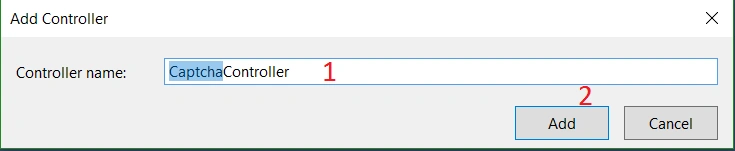
Step 9
Now, let's create View by right clicking autogenerated action method. Select "Add View" to create a new View for Actionmethod(Index).
Now, let's create View by right clicking autogenerated action method. Select "Add View" to create a new View for Actionmethod(Index).

Step 10
Create View with or without model.
Create View with or without model.

Step 11
Create a Model in the name of Registration under Models folder.
Create a Model in the name of Registration under Models folder.
- using System;
- using System.Collections.Generic;
- using System.Linq;
- using System.Web;
- namespace CaptchaMVC5.Models {
- public class Registration {
- public int Id {
- get;
- set;
- }
- public string UserName {
- get;
- set;
- }
- public string Password {
- get;
- set;
- }
- public string Address {
- get;
- set;
- }
- }
- }
Step 12 Create Controls in View
Add @model CaptchaMVC5.Models.Registration to make the View as strongly typed View.
Add namespace @using CaptchaMvc.HtmlHelpers to access the captcha htmlhelper classes.
And the View like below.
- @model CaptchaMVC5.Models.Registration
- @using CaptchaMvc.HtmlHelpers
- @ {
- ViewBag.Title = "Index";
- }
- @using(Html.BeginForm("Index", "Captcha", new {
- enctype = "multipart/form-data", id = "Captcha"
- })) {
- @Html.ValidationSummary(true) < fieldset > < legend > Registration < /legend> < div class = "form-group" > < label > Username < /label> < div > @Html.TextBoxFor(N => N.UserName, new {
- @id = "UserName", @class = "form-control", @placeholder = "UserName", required = "required"
- }) < /div> < /div> < div class = "form-group" > < label > Password < /label>
- @Html.PasswordFor(N => N.Password, new {
- @id = "Password", @class = "form-control", @placeholder = "Password", required = "required"
- }) < /div> < div class = "form-group" > < label > Address < /label>
- @Html.TextBoxFor(N => N.Address, new {
- @id = "Address", @class = "form-control", @placeholder = "Address", required = "required"
- }) < /div>
- @Html.MathCaptcha() < br / > < p > @ViewBag.ErrorMessage < /p> < p > < input type = "submit"
- value = "Send" / > < /p> < /fieldset>
- }
In the above View, I have added three razor controls to get input from users and added the @Html.MathCaptcha() to generate Math Captcha.
Step 13 Routeconfig
- using System;
- using System.Collections.Generic;
- using System.Linq;
- using System.Web;
- using System.Web.Mvc;
- using System.Web.Routing;
- namespace CaptchaMVC5 {
- public class RouteConfig {
- public static void RegisterRoutes(RouteCollection routes) {
- routes.IgnoreRoute("{resource}.axd/{*pathInfo}");
- routes.MapRoute(name: "Default", url: "{controller}/{action}/{id}", defaults: new {
- controller = "Captcha", action = "Index", id = UrlParameter.Optional
- });
- }
- }
- }
Step 14
Run the application.
Run the application.

Now, I am going to change this Math captcha to Char Captcha.
To generate Char Captcha, we need to use @Html.Captcha(Charslength). The Charslength minimum value should be 1.
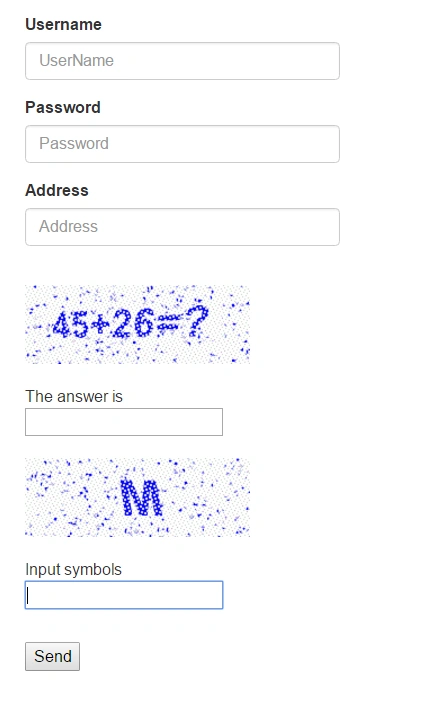
In the above result, you can see the M char, if you want to make the 4char captcha, just specify the captcha length as 4 - @Html.Captcha(4)

Now, validate the Captcha. To validate this, we need to use keyword "IsCaptchaValid" and for this keyword, we need to use using CaptchaMvc.HtmlHelpers; namespace.
- using System;
- using System.Collections.Generic;
- using System.Linq;
- using System.Web;
- using System.Web.Mvc;
- using CaptchaMVC5.Models;
- using CaptchaMvc.HtmlHelpers;
- namespace CaptchaMVC5.Controllers {
- public class CaptchaController: Controller {
- // GET: Captcha
- public ActionResult Index() {
- return View();
- }
- [HttpPost]
- public ActionResult Index(Registration Registration) {
- // Code for validating the Captcha
- if (this.IsCaptchaValid("Validate your captcha")) {
- ViewBag.ErrMessage = "Validation Messgae";
- }
- return View();
- }
- }
- }
Summary
Here, we have seen how to use Captcha in ASP.NET MVC application and how to use math and char captcha in ASP.NET MVC.
Here, we have seen how to use Captcha in ASP.NET MVC application and how to use math and char captcha in ASP.NET MVC.
Note
- Add reference from NuGet "CaptchaMVC"
- Add namespace in View "@using CaptchaMvc.HtmlHelpers"
- To generate MathCaptcha, use "@Html.MathCaptcha()"
- To generate CharCaptcha, use "@Html.Captcha(CharLength)"
- To validate captcha, use predefined keyword called "IsCaptchaValid"
- To access this keyword, use "using CaptchaMvc.HtmlHelpers"
In the next article, we will see how to use images and audio in captcha.
Oktay SERINKAYAPosted May 6, 2024, 2:55 PM
After placing character captcha in my view, there is an input box with label saying "Input symbols". How can I remove this label or translate it into my language?
pramod raisingPosted Aug 27, 2021, 5:53 AM
System.Web.HttpCompileException HResult=0x80004005 Message=(0): error CS1705: Assembly 'CaptchaMvc, Version=2.5.0.0, Culture=neutral, PublicKeyToken=fe46ad421dd3b0e6' uses 'System.Web.Mvc, Version=5.0.0.0, Culture=neutral, PublicKeyToken=31bf3856ad364e35' which has a higher version than referenced assembly 'System.Web.Mvc, Version=4.0.0.1, Culture=neutral, PublicKeyToken=31bf3856ad364e35' Source=<Cannot evaluate the exception source> StackTrace: <Cannot evaluate the exception stack trace>
Pintukumar ShashmalPosted Mar 3, 2021, 12:23 PM
GOOD, it worked for me
sudhan TPosted May 19, 2020, 12:59 PM
I am getting this error when testing and published in server DefaultCaptcha/Refresh 404 (Not Found) , But locally its working fine
Nikhil SrivastavaPosted Nov 12, 2019, 2:54 AM
HOW DO WE CHANGE THE TEXT BOX DESIGN AND CHANGE THE CAPTION FROM INPUT SYMBOL TO ENTER CAPTCHA
abhi ReddyPosted Apr 23, 2019, 12:37 AM
How to validate the captcha as a case sensitive..
Kishor TalaPosted Feb 18, 2019, 5:28 AM
Hi Shekhar,
Web EngineerPosted Aug 9, 2018, 7:25 AM
Captcha image is undefined
irshad alamPosted Jul 19, 2018, 4:43 AM
Always shows Error: captcha is not valid
harish raoPosted Apr 4, 2018, 5:34 AM
Do we have alpha numeric in this example... please let me know on the urgent basis
harish raoPosted Apr 4, 2018, 5:33 AM
Alpha numeric .. please let me know is it possible in this..
harish raoPosted Apr 4, 2018, 1:57 AM
Please respond immediately..
harish raoPosted Apr 4, 2018, 1:57 AM
Excellent it worked for me.. i wanted to get reset button and alpha numeric .. please let me know is it possible in this..
Tarun GosainPosted Mar 29, 2018, 11:22 PM
How to make it case sensitive ?
hfaharf hfaharfPosted Feb 25, 2018, 8:54 AM
I can't find the CaptchaMvc in NuGet search
shailesh voraPosted Feb 16, 2018, 2:58 AM
I have dot net application and I am not able to view captcha images so can you tell me what could be the reason, I am working with umbraco 7.5 MVC