

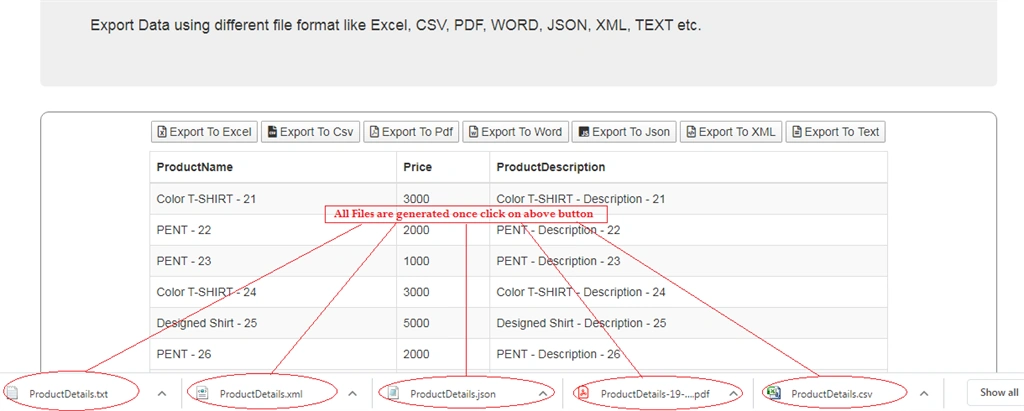
This article demonstrates how to export functionality with different types of file formats like excel, pdf, word, csv, json, xml and text files using a .net MVC application. I have implemented the most frequently used file format to export data in real time projects.
Here I will explain step by step from scrach, an application to each file export option with an effective way using Ajax call in mvc. I have attached the source code for this demo for all export options provided with a code snippet.
Step 1
Create a new project and SQL scripts for product table which are used in this article (which I have already shared in my previous article). You can find all details related to SQL script and table binding at the below link.
Step 2
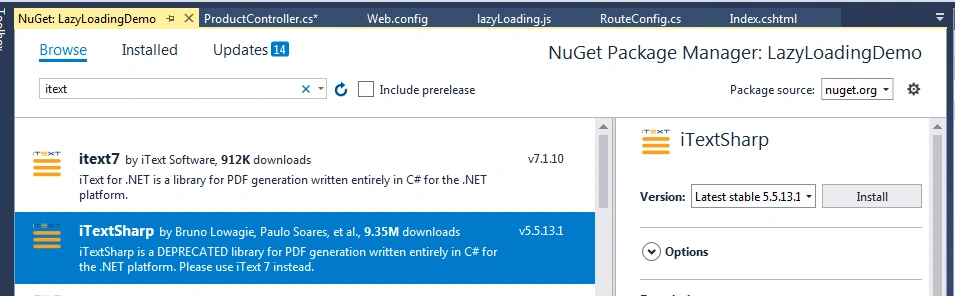
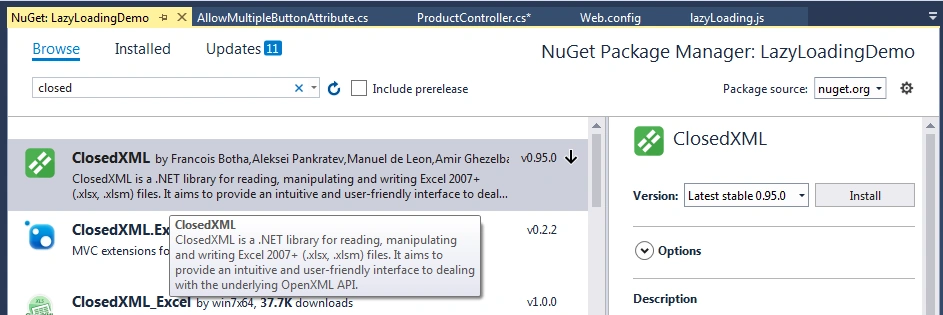
Here I have added two references which are required while working with Excel, Word and PDF generation. This reference is added from NuGet package manager.
The first reference is iTextSharp for pdf file to export data from data table in MVC.
The second reference is used to generate an Excel file to export data from data table in MVC.
Step 3
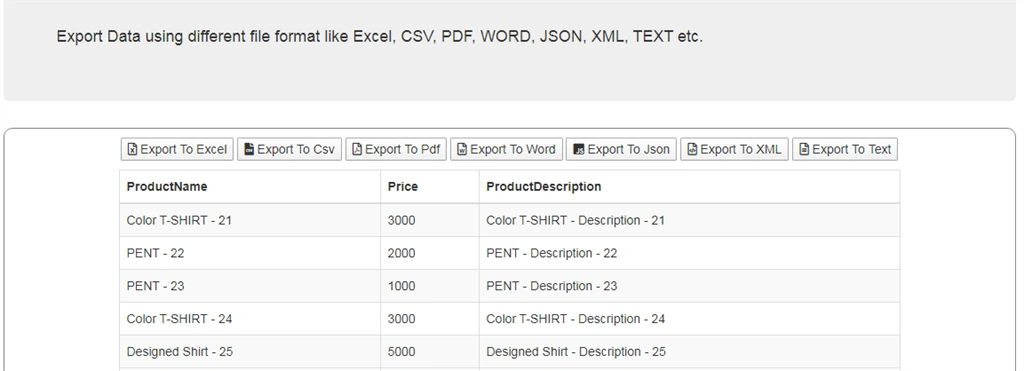
Let's startwith the options, one by one. Here is the screen with all Export button options available.
Step 4
I have created a new Controller, view and repositery to get product details from database.
- public class ProductRepository
- {
- private const int pageSize = 20;
- public List<Product> GetProducts(int? pageNumber)
- {
- var numberOfRecordToskip = pageNumber * pageSize;
- using (var context = new Products())
- {
- return context.ProductsDetails.OrderBy(x=>x.ProductID).Skip(Convert.ToInt32(numberOfRecordToskip)).Take(pageSize).ToList<Product>();
- }
- }
- }
- public class ProductController : Controller
- {
- private ProductRepository productRepository;
- // GET: Product
- public ActionResult Index()
- {
- return View();
- }
- [HttpGet]
- public ActionResult ProductList(int? pageNumber)
- {
- productRepository = new ProductRepository();
- var model = productRepository.GetProducts(pageNumber);
- return PartialView("~/Views/Product/ProductList.cshtml", model);
- }
- private DataTable GetProductsDetail(int? pageNumber)
- {
- productRepository = new ProductRepository();
- var products = productRepository.GetProducts(pageNumber);
- DataTable dtProduct = new DataTable("ProductDetails");
- dtProduct.Columns.AddRange(new DataColumn[4] { new DataColumn("ProductID"),
- new DataColumn("ProductName"),
- new DataColumn("Price"),
- new DataColumn("ProductDescription") });
- foreach (var product in products)
- {
- dtProduct.Rows.Add(product.ProductID, product.ProductName, product.Price, product.ProductDescription);
- }
- return dtProduct;
- }
- }
Step 5
Added Index.cshtml
- @model IEnumerable<LazyLoadingDemo.Product>
- <div class="jumbotron">
- <h2>Lazy Loading Example Using Ajax in MVC Application</h2>
- <p class="lead">
- <br />
- <h4>Export Data using different file format like Excel, CSV, PDF, WORD, JSON, XML, TEXT etc.</h4>
- </p>
- </div>
- <div class="table-responsive col-md-12" id="divajaxCall">
- <form action="" method="post">
- <div class="row">
- <div style="text-align:center; padding:0 0 0 0">
- <button type="submit" value="ExportToExcel" name="action">
- <i class="far fa-file-excel"></i> Export To Excel
- </button>
- <button type="submit" value="ExportToCsv" name="action">
- <i class="fas fa-file-csv"></i> Export To Csv
- </button>
- <button type="submit" value="ExportToPdf" name="action">
- <i class="far fa-file-pdf"></i> Export To Pdf
- </button>
- <button type="submit" value="ExportToWord" name="action">
- <i class="far fa-file-word"></i> Export To Word
- </button>
- <button type="submit" value="ExportToJson" name="action">
- <i class="fab fa-js-square"></i> Export To Json
- </button>
- <button type="submit" value="ExportToXml" name="action">
- <i class="far fa-file-code"></i> Export To XML
- </button>
- <button type="submit" value="ExportToText" name="action">
- <i class="far fa-file-alt"></i> Export To Text
- </button>
- </div>
- </div>
- <div class="row" style="text-align:center; padding : 5px 5px 5px 5px"></div>
- <div class="row">
- <table class="table table-striped table-bordered">
- <thead>
- <tr>
- <th>
- @Html.DisplayNameFor(model => model.ProductName)
- </th>
- <th>
- @Html.DisplayNameFor(model => model.Price)
- </th>
- <th>
- @Html.DisplayNameFor(model => model.ProductDescription)
- </th>
- </tr>
- </thead>
- <tbody>
- @if (Model != null)
- {
- @Html.Partial("~/Views/Product/ProductList", Model)
- }
- </tbody>
- </table>
- </div>
- <div class="row">
- <div id="loading" style="text-align:center; padding:0 0 0 0">
- <img src='~/Content/progress-loader1.gif' />
- </div>
- </div>
- <div class="divfooter">
- </div>
- </form>
- </div>
- <div id="divHide"></div>
- @section scripts{
- <script src="~/Scripts/lazyLoading.js"></script>
- <script type="text/javascript">
- $(function () {
- $("div#loading").hide();
- $("#divajaxCall").css("border", "1px solid gray");
- $("#divajaxCall").css("padding", "10px 5px 5px 5px");
- $("#divajaxCall").css("border-radius", "10px");
- });
- var ajaxCallUrl = '@Url.RouteUrl("ProductDataList")';
- $(window).scroll(scrollHandler);
- </script>
- }
- <link rel="stylesheet" href="https://maxcdn.bootstrapcdn.com/bootstrap/3.4.1/css/bootstrap.min.css">
- <link rel="stylesheet" href="~/Content/CustomStyle.css">
- <script src="https://ajax.googleapis.com/ajax/libs/jquery/3.4.1/jquery.min.js"></script>
- <script src="https://maxcdn.bootstrapcdn.com/bootstrap/3.4.1/js/bootstrap.min.js"></script>
- <script src="https://kit.fontawesome.com/00267cf40d.js" crossorigin="anonymous"></script>
Partial view ProductList.cshtml
- @model IEnumerable<LazyLoadingDemo.Product>
- @foreach (var item in Model)
- {
- <tr>
- <td>
- @Html.DisplayFor(modelItem => item.ProductName)
- </td>
- <td>@Html.DisplayFor(modelItem => item.Price)</td>
- <td> @Html.DisplayFor(modelItem => item.ProductDescription)</td>
- </tr>
- }
Step 6
I have created a custom attribute to handle multiple submit button clicks for single form in mvc.
- [AttributeUsage(AttributeTargets.Method, AllowMultiple = false, Inherited = true)]
- public class AllowMultipleButtonAttribute : ActionNameSelectorAttribute
- {
- public string Name { get; set; }
- public string Argument { get; set; }
- public override bool IsValidName(ControllerContext controllerContext, string actionName, MethodInfo methodInfo)
- {
- var isValidName = false;
- isValidName = controllerContext.HttpContext.Request[Name] != null &&
- controllerContext.HttpContext.Request[Name] == Argument;
- return isValidName;
- }
- }
Step 7
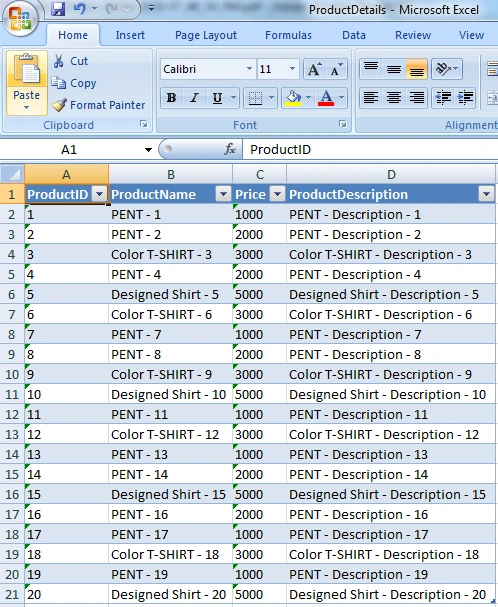
Let's start with Data export to Excel file. Here I have added a code snippet for exporting to Excel file post action method.
Export data to excel file
- [HttpPost]
- [AllowMultipleButton(Name = "action", Argument = "ExportToExcel")]
- public ActionResult ExportToExcel(int? pageNumber)
- {
- DataTable dtProduct = GetProductsDetail(pageNumber);
- using (XLWorkbook woekBook = new XLWorkbook())
- {
- woekBook.Worksheets.Add(dtProduct);
- using (MemoryStream stream = new MemoryStream())
- {
- woekBook.SaveAs(stream);
- return File(stream.ToArray(), "application/vnd.openxmlformats-officedocument.spreadsheetml.sheet", "ProductDetails.xlsx");
- }
- }
- }
Anandu G NathPosted Jan 11, 2024, 4:06 AM
Nice Article
richard cruzPosted Mar 29, 2022, 3:38 AM
Export data un txt file using async task handler rather for exporting database data to txtfile by the way can we use core 5 api for this.... thanks sir
richard cruzPosted Mar 29, 2022, 3:37 AM
Can u make a async method for this to txt file.... looking forward to it sir kumar...
Burak CanPosted Mar 22, 2022, 2:01 PM
How can i implement with multiple entities?
Rohit SinghPosted Feb 2, 2021, 10:11 AM
It can be possible with the help of third-party software.
arun sahaniPosted Apr 24, 2020, 9:27 AM
Plz also suggest for asp.net core 3.1 environment
shiva kskPosted Apr 21, 2020, 8:43 AM
I have one dou
sankeerth mPosted Apr 21, 2020, 3:09 AM
Var delimeter = ","; var lineEndDelimeter = ";"; ? is it going to replace any delimeter?. Can excel and pdf support around 1000 columns and 50k records. using this 3rd party tool