

Once we generate the script, the result will give you all the insert queries with other queries so that the data also will get inserted in your new database. We are going to use the option ‘Schema and data’ in SQL Server for this task. I hope the screen shots given will help you generate the script with insert queries.
Background
I was working with an article which has so many database transactions/actions, so I thought of attaching the database scripts with data also in the source code download section of the article, so that it may help the user to insert the data in his/her database. That made me think to write this article. I hope you will like this.
Steps To Generate Database Scripts With Data In SQL Server
Step 1: Right click on your database and select "Tasks", then "Generate Scripts".
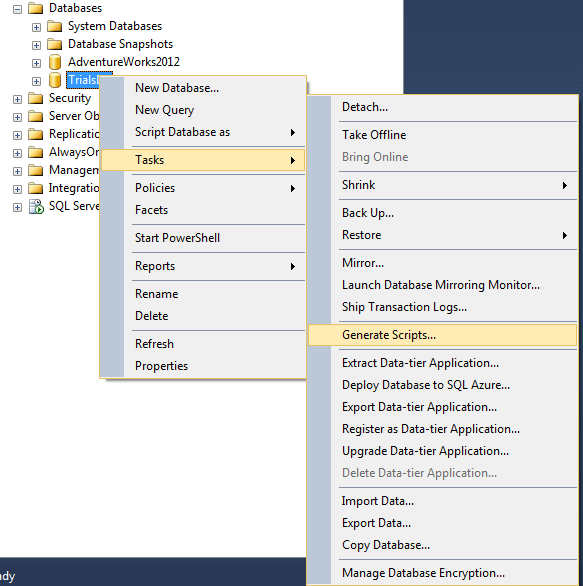
Database_Scripts_With_Data_Select_Option
Step 2: Click next in the introduction screen.
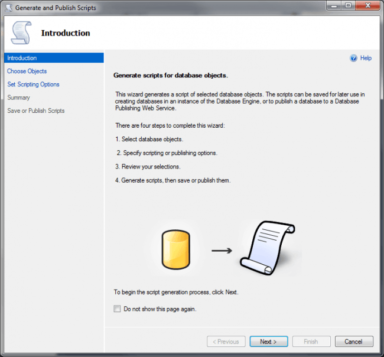
Database_Scripts_With_Data_Inroduction
Step 3: Select the database object which are all you need and then click next.

Database_Scripts_With_Data_Select_Database_Objects
Step 4: Now you will be shown a window which asks you about how your script should be published.
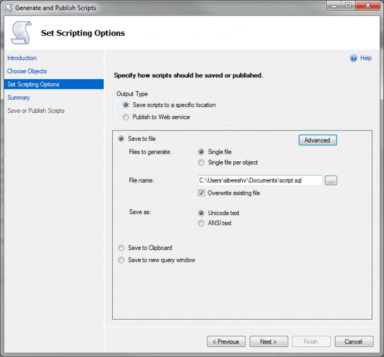
Database_Scripts_With_Data_Publish_Options
Click "Advanced" in that window.
Step 5: Select "Schema and data" from type of data to script option and then click OK.
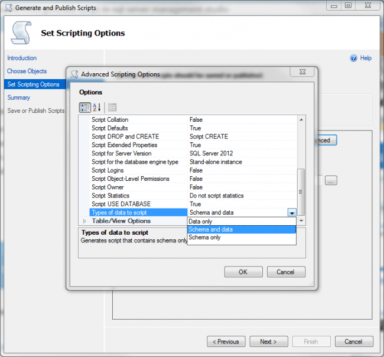
Database_Scripts_With_Data_Advanced
Click next.
Step 6: Click finish, now check the script file, it must have the insert queries too.
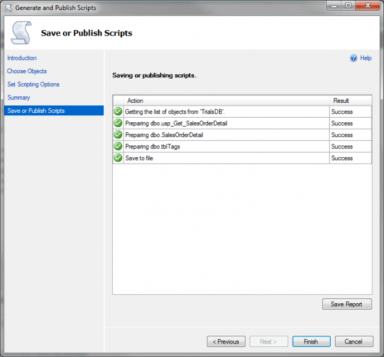
Database_Scripts_With_Data_Finish
Now what else is pending; go ahead and run your script.
Conclusion
Did I miss anything that you may think is needed? Have you ever wanted to do this requirement? Did you find this post useful? I hope you liked this article. Please share with me your valuable suggestions and feedback.
Your turn. What do you think?
A blog isn’t a blog without comments, but do try to stay on topic. If you have a question unrelated to this post, you’re better off posting it on C# Corner, Code Project, Stack Overflow, ASP.NET Forum instead of commenting here. Tweet or email me a link to your question there and I’ll definitely try to help if I can.
Sibeesh VenuPosted Jun 24, 2016, 2:39 AM
Prasanna M Thanks
Sibeesh VenuPosted Jun 24, 2016, 2:39 AM
Sonu Chaudhary Thanks
Prasanna MuraliPosted Jun 24, 2016, 1:53 AM
Nice one..
Sonu ChaudharyPosted Feb 25, 2016, 6:15 AM
nice one
Sibeesh VenuPosted Feb 25, 2016, 4:47 AM
Amit Singh Thanks much
Amit Kumar SinghPosted Feb 25, 2016, 4:27 AM
Good one
Sibeesh VenuPosted Feb 25, 2016, 12:46 AM
Mohammed Ibrahim Thanks much
Mohammed IbrahimPosted Feb 24, 2016, 7:12 PM
nice
Sibeesh VenuPosted Feb 24, 2016, 12:52 AM
Yashwant Vishwakarma Thanks a lot
Shubham KumarPosted Feb 24, 2016, 12:52 AM
nice
Sibeesh VenuPosted Feb 24, 2016, 12:52 AM
Raja T Thanks a lot
Sibeesh VenuPosted Feb 24, 2016, 12:51 AM
Kumaresh Rajalingam Thanks a lot
Sibeesh VenuPosted Feb 24, 2016, 12:51 AM
Abhay Shanker Thanks a lot
Sibeesh VenuPosted Feb 24, 2016, 12:51 AM
Pankaj Kumar Choudhary Thanks a lot
Sibeesh VenuPosted Feb 24, 2016, 12:51 AM
Santhakumar Munuswamy Thanks a lot
Yashwant VishwakarmaPosted Feb 23, 2016, 11:07 PM
Nice information, thanks for sharing !!
Raja TPosted Feb 23, 2016, 10:54 PM
Good.Thanks for sharing..
Kumaresh RajalingamPosted Feb 23, 2016, 8:13 PM
Good one sir
Abhay ShankerPosted Feb 23, 2016, 8:07 PM
Nice Share...
Pankaj Kumar ChoudharyPosted Feb 23, 2016, 7:50 PM
Nice Information sir............
Santhakumar MunuswamyPosted Feb 23, 2016, 2:05 PM
Thanks for nice article