

Prerequisites
The first step is to download the Closed XML SDK from the official site.
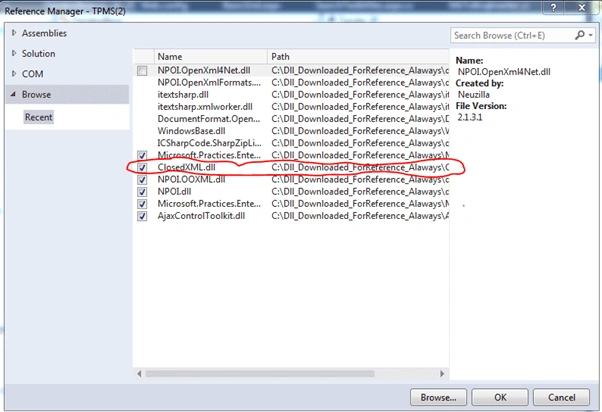
Second step is to kindly ensure to add the DLL, mentioned above, as shown in the screenshot, given below:
Kindly find the basic and installation information of OpenXML in the link, given below:
- Read Excel Files Using Open XML SDK In ASP.NET C#
- Open XML SDK To Read Workbook With Multiple Worksheets
using ClosedXML.Excel;
Code
- public void StartBoqWorkBookImport()
- {
- workbookProcessing("Maram_Section.xlsx");
- }
- private void workbookProcessing(string workbookname) {
- SqlDatabase objdb = new SqlDatabase(OSMC.constring_Property);
- string fullfilename = System.Web.HttpContext.Current.Server.MapPath(OneStopMethods_Common.boqserverfilepath + workbookname);
- XLWorkbook theWorkBook = new XLWorkbook(fullfilename);
- int worksheetcount = theWorkBook.Worksheets.Count;
- foreach(IXLWorksheet theWorkSheet in theWorkBook.Worksheets) {
- foreach(IXLRow therow in theWorkSheet.Rows()) {
- foreach(IXLCell thecell in therow.Cells()) {
- int tenderid = 1001;
- int Activity_Section_objseq = tenderosm.generateNextTenderObjSequenceNo(tenderid, "tender_boq_activity_section");
- string boqactivitysectionInsquery = " insert into tender_boq_activity_section(fk_tender_id,obj_seq_no,parent_obj_seq_no,activity_section_no,workbook_name,worksheet_name,row_index,cell_reference,element_type,element_description) values(" + tenderid + "," + Activity_Section_objseq + ",' 10 ','20','" + workbookname + "','" + theWorkSheet.Name + "'," + therow.RowNumber() + ",'" + thecell.Address + "','activity','" + thecell.Value + "');";
- objdb.ExecuteNonQuery(CommandType.Text, boqactivitysectionInsquery);
- }
- }
- }
- }
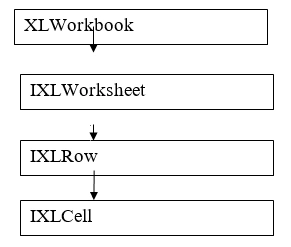
When you compare it to the OpenXML, it is similar (just for your additional information).
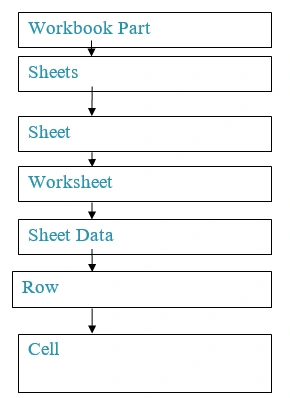
Kindly refer here. Read Excel files, using OpenXML to know the basics about OpenXML.
Conclusion
I hope this will be useful for the first time users of closed XML. Kindly, let me know your feedback or thoughts.
akanksha guptaPosted Aug 21, 2018, 7:58 AM
Hi, when i am export excel so integer cell value show in green colour icon. i am using using Excel = Microsoft.Office.Interop.Excel;Excel.Application app = new Excel.Application(); app.ErrorCheckingOptions.BackgroundChecking = false; give me suggestion to resolved this issue. but its not working
Karthik ElumalaiPosted Aug 11, 2016, 11:44 AM
Thanks for your good feeback..Vignesh Mani
Vignesh ManiPosted Aug 11, 2016, 11:37 AM
Nice