

Asynchronous Controller helps in those situations, where a Web page has to perform a long running task and the user cannot interact with other features of the Website. Cancellation Token on the other hand is an important part of the Asynchronous Controller. Cancellation Token comes in handy, when a user wants to cancel the long running process or to navigate to a new page. In a non-asynchronous controller environment, whenever a long or slow processing is done on a Web page, the interaction of the user with the Web page will be compromised, which results in the Web page being stuck, which apparently seems like the Web Server is down. Consider a situation, where a Web Server takes about 2 to 5 minutes to complete a task and even if a user clicks page refresh, the response from the Web Server seems non-responsive. This happens because when a user clicks refresh, there is no way to signal the running process, when the user has canceled the process. Hence, the process will continue to perform and the moment the process completes the action, the page will proceed with the designated user action. In such a scenario, it is important that at each cancellation, running process should be signaled and the corresponding proceeding task like long insertion of database should also be informed about the cancelling signal. The need of cancellation token is beautifully explained by Dave Paquette in his post on Cancelling Long Running Queries in ASP.NET MVC and Web API.
Prerequisites
The prerequisites include knowledge about the following technologies.
- ASP.NET MVC5.
- ADO.NET.
- Entity Framework.
- HTML.
- Javascript.
- AJAX.
- CSS.
- Bootstrap.
- C# programming.
- C# LINQ.
- jQuery.
You can download the complete source code for this or you can follow the step by step discussion below. The sample code is developed in Microsoft Visual Studio 2015 Enterprise. I am using random tables extract from Adventure Works Sample Database. I have also placed ".BAK" file for SQL Server, in case anyone is interested to execute the solution.
- Create new MVC5 Web Application project and name it "ImmediateRefreshWithLongDBQuery".
- Open "_Layout.cshtml" file under "Views->Shared" folder and replace the existing code with the following:Here, I have simply altered the existing layout and incorporated links to require the scripts and styles.
- <!DOCTYPE html>
- <html>
- <head>
- <meta charset="utf-8" />
- <meta name="viewport" content="width=device-width, initial-scale=1.0">
- <title>@ViewBag.Title</title>
- @Styles.Render("~/Content/css")
- @Scripts.Render("~/bundles/modernizr")
- <!-- Font Awesome -->
- <link rel="stylesheet" href="https://maxcdn.bootstrapcdn.com/font-awesome/4.4.0/css/font-awesome.min.css" />
- <!-- Data table -->
- <link rel="stylesheet" href="https://cdn.datatables.net/1.10.10/css/dataTables.bootstrap.min.css " />
- @* Custom *@
- @Styles.Render("~/Content/css/custom-style")
- </head>
- <body>
- <div class="navbar navbar-inverse navbar-fixed-top">
- <div class="container">
- <div class="navbar-header">
- <button type="button" class="navbar-toggle" data-toggle="collapse" data-target=".navbar-collapse">
- <span class="icon-bar"></span>
- <span class="icon-bar"></span>
- <span class="icon-bar"></span>
- </button>
- </div>
- <div class="navbar-collapse collapse">
- <ul class="nav navbar-nav">
- <li>@Html.ActionLink("Home", "Index", "Home")</li>
- <li>@Html.ActionLink("Slow Page", "IndexSlow", "Home")</li>
- </ul>
- </div>
- </div>
- </div>
- <div class="container body-content">
- @RenderBody()
- <hr />
- <footer>
- <center>
- <p><strong>Copyright © @DateTime.Now.Year - <a href="http://asmak9.blogspot.com/">Asma's Blog</a>.</strong> All rights reserved.</p>
- </center>
- </footer>
- </div>
- @Scripts.Render("~/bundles/jquery")
- @Scripts.Render("~/bundles/bootstrap")
- <!-- Data Table -->
- <script src="https://cdn.datatables.net/1.10.10/js/jquery.dataTables.min.js" type="text/javascript"></script>
- <script src="https://cdn.datatables.net/1.10.10/js/dataTables.bootstrap.min.js" type="text/javascript"></script>
- @Scripts.Render("~/bundles/custom-datatable")
- @RenderSection("scripts", required: false)
- </body>
- </html>
- Create a new page called "Index.cshtml" under "Views->Home" folder and place the code, mentioned below in it.Here, I am simply creating a page heading.
- @{
- ViewBag.Title = "Immediate Refresh with Slow DB Query";
- }
- <div class="jumbotron">
- <h1>Simple Page</h1>
- <p class="lead">This is a simple normal speed page.</p>
- </div>
Create new page called "IndexSlow.cshtml" under "Views->Home" folder and place the code, mentioned below in it.
- @{
- ViewBag.Title = "Immediate Refresh with Slow DB Query";
- }
- <div class="row">
- <div class="panel-heading">
- <div class="col-md-8 custom-heading3">
- <h3>
- <i class="fa fa-table"></i>
- <span>Slow Loading Page</span>
- </h3>
- </div>
- </div>
- </div>
- <div class="row">
- <section class="col-md-12 col-md-push-0">
- @Html.Partial("_ViewListPartial")
- </section>
- </div>
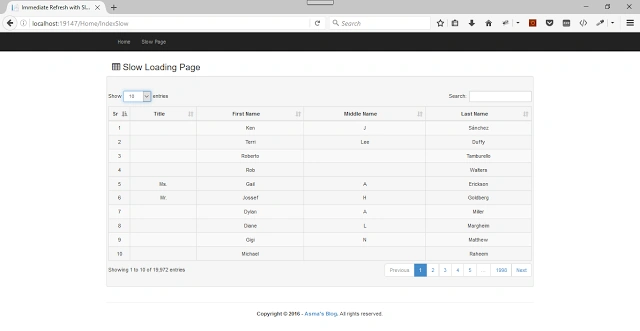
Here, I am simply creating a page heading and section for my partial view, where I will be displaying my random slow loaded list from the Web Server.
- Now, create a new partial page under "Views->Home" folder, name it "_ViewListPartial.cshtml" and place the code, mentioned below in it.Here, I have created a table holder that will be integrated with Datatables plugin with the data from the Server side. I have only provided table header information here, since the data will be integrated from the Server side.
- <section>
- <div class="well bs-component">
- <br />
- <div class="row">
- <div>
- <table class="table table-striped table-bordered table-hover"
- id="TableId"
- cellspacing="0"
- align="center"
- width="100%">
- <thead>
- <tr>
- <th>Sr</th>
- <th>Title</th>
- <th>First Name</th>
- <th>Middle Name</th>
- <th>Last Name</th>
- </tr>
- </thead>
- </table>
- </div>
- </div>
- </div>
- </section>
- Now, create a new script file under "Scripts" folder, name it "custom-datatable.js" and place the code, mentioned below in it.In the code, mentioned above, I have configured the plugin to load the data from the Server side.
- $(document).ready(function ()
- {
- $('#TableId').DataTable(
- {
- "columnDefs": [
- { "width": "5%", "targets": [0] },
- { "className": "text-center custom-middle-align", "targets": [0, 1, 2, 3, 4] },
- ],
- "language":
- {
- "processing": "<div class='overlay custom-loader-background'><i class='fa fa-cog fa-spin custom-loader-color'></i></div>"
- },
- "processing": true,
- "serverSide": true,
- "ajax":
- {
- "url": "/Home/GetData",
- "type": "POST",
- "dataType": "JSON"
- },
- "columns": [
- { "data": "Sr" },
- { "data": "Title" },
- { "data": "FirstName" },
- { "data": "MiddleName" },
- { "data": "LastName" }
- ]
- });
- });
- I have used entity framework ADO.NET database first approach to create my model out of my stored procedure. After you have created the model from the database, you need to add following line into your "*Model.Context.tt" file. Find your model constructor in the file and add following line i.e.The line, mentioned above will allow the Web Server to process long running database queries without timing out the Web Server. I have used 60 minutes wait before timeout. We are adding the code in *.tt file because whenever the model is refreshed, our added line will be automatically added into constructor
- ((IObjectContextAdapter)this).ObjectContext.CommandTimeout = 60000; // 60 mins.
- ((IObjectContextAdapter)this).ObjectContext.CommandTimeout = 60000; // 60 mins.
- Now, in "HomeController.cs" file, add the function, mentioned below to load the data in the database.In the code, mentioned above, we are loading the data from the database, using stored procedure with the signal of cancellation token pass to our resulting list conversion method.
- #region Load Data
- /// <summary>
- /// Load data method.
- /// </summary>
- /// <param name="cancellationToken">Cancellation token parameter</param>
- /// <returns>Returns - Data</returns>
- private async Task<List<sp_slow_test_Result>> LoadData(CancellationTokenSource cancellationToken)
- {
- // Initialization.
- List<sp_slow_test_Result> lst = new List<sp_slow_test_Result>();
- try
- {
- // Initialization.
- testEntities databaseManager = new testEntities();
- // Loading.
- lst = await databaseManager.Database.SqlQuery<sp_slow_test_Result>("EXEC sp_slow_test").ToListAsync(cancellationToken.Token);
- }
- catch (Exception ex)
- {
- // info.
- Console.Write(ex);
- }
- // info.
- return lst;
- }
- #endregion
- Now, let’s add our Asynchronous Controller into "HomeController.cs" file i.e.In the code, mentioned above, we have created Asynchronous Controller and cancellation token has been passed to it as well. Notice here that, when we call this method, using AJAX call, we do not need to pass any parameter from AJAX method. The Browser will automatically handle the passing of the cancellation token. We only need to capture that cancellation token in our controller method.
- #region Get data method.
- /// <summary>
- /// GET: /Home/GetData
- /// </summary>
- /// <param name="cancellationToken">Cancellation token parameter</param>
- /// <returns>Return data</returns>
- [NoAsyncTimeout]
- public async Task<ActionResult> GetData(CancellationToken cancellationToken)
- {
- // Initialization.
- JsonResult result = new JsonResult();
- try
- {
- // Initialization.
- CancellationToken disconnectedToken = Response.ClientDisconnectedToken;
- var source = CancellationTokenSource.CreateLinkedTokenSource(cancellationToken, disconnectedToken);
- // Initialization.
- string search = Request.Form.GetValues("search[value]")[0];
- string draw = Request.Form.GetValues("draw")[0];
- string order = Request.Form.GetValues("order[0][column]")[0];
- string orderDir = Request.Form.GetValues("order[0][dir]")[0];
- int startRec = Convert.ToInt32(Request.Form.GetValues("start")[0]);
- int pageSize = Convert.ToInt32(Request.Form.GetValues("length")[0]);
- // Loading.
- List<sp_slow_test_Result> data = await this.LoadData(source);
- // Total record count.
- int totalRecords = data.Count;
- // Verification.
- if (!string.IsNullOrEmpty(search) &&
- !string.IsNullOrWhiteSpace(search))
- {
- // Apply search
- data = data.Where(p => p.Sr.ToString().ToLower().Contains(search.ToLower()) ||
- p.Title.ToLower().Contains(search.ToLower()) ||
- p.FirstName.ToString().ToLower().Contains(search.ToLower()) ||
- p.MiddleName.ToLower().Contains(search.ToLower()) ||
- p.LastName.ToLower().Contains(search.ToLower())).ToList();
- }
- // Sorting.
- data = this.SortByColumnWithOrder(order, orderDir, data);
- // Filter record count.
- int recFilter = data.Count;
- // Apply pagination.
- data = data.Skip(startRec).Take(pageSize).ToList();
- // Loading drop down lists.
- result = this.Json(new { draw = Convert.ToInt32(draw), recordsTotal = totalRecords, recordsFiltered = recFilter, data = data }, JsonRequestBehavior.AllowGet);
- }
- catch (Exception ex)
- {
- // Info
- Console.Write(ex);
- }
- // Return info.
- return result;
- }
- #endregion
In the code, mentioned above, we are also using "[NoAsyncTimeout]" attribute at the method level because we do not want our Web Server to timeout our Asynchronous Controller.
- Open "Web.config" file and do add following line i.e.We are adding the line, mentioned above because we do not want our Web Server to timeout before our long running process completes.
- <system.web>
- <httpRuntime targetFramework="4.5" executionTimeout="100000" maxRequestLength="214748364" />
- </system.web>
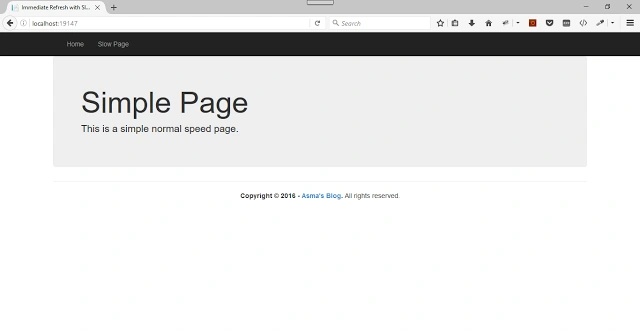
. - Now, execute the project and you will be able to see the Web page, shown below.
farooq smdPosted Apr 14, 2017, 1:52 PM
Nice one ..very useful......................
Prasanna MuraliPosted Nov 3, 2016, 7:27 AM
Nice post...