

Enabling SSL will make browser and server communication secure and prevent eavesdropping, tampering, and message forgery. It is recommended to have SSL or HTTPS binding on pages that contain sensitive information like passwords or financial data.
You can see my previous articles on IIS 7.5 Feature:
Let’s open IIS 7.5 manager and check whether Server Certificates module is present or not under IIS section as shown below:

Let’s select server node, double-click on Server Certificates and understand its settings:
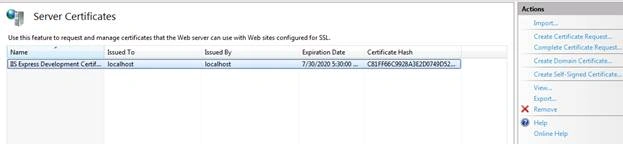
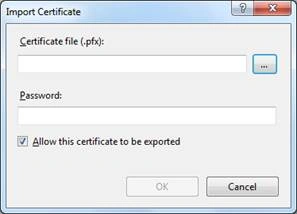
We can click on Import link for importing existing certificate [.pfx]. In general, this certificate file will be issued by CA like Verisign, GoDaddy.
We can create a certificate request by clicking on “Create Certificate Request” and filling details like common name [URL], organization etc.
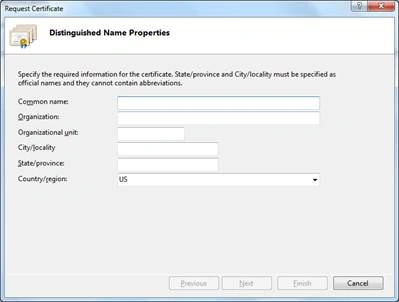
Fill the details and click on Next and select cryptographic provider and bit length:
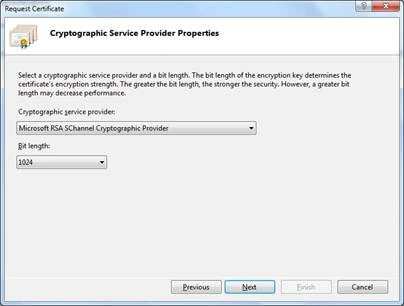
Click Next and give a file name to save the details. We can share this file with CA and get the certificate.
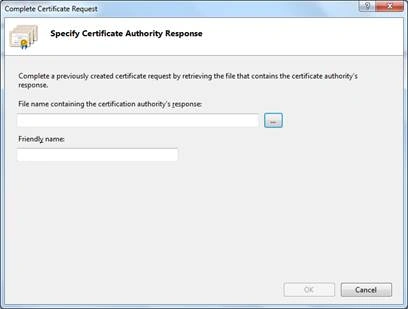
After getting the certificate, we can complete the request and use certificate by clicking on “Complete Certificate Request”:
We can create a domain certificate, that doesn’t require any external CA to issue it. We need to have a server that acts as a CA within your domain to create it.
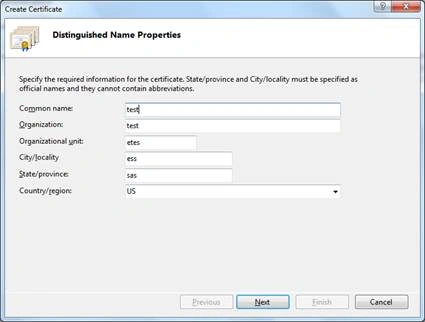
Click on “Create Domain Certificate” and enter necessary details:
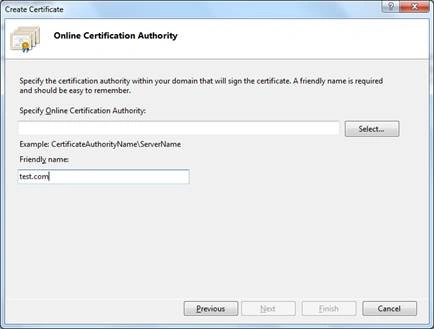
Click Next and select the server by clicking on Select, which will search for a CA server within windows domain.
We can create a self-signed certificate for testing SSL locally without a need of valid certificate from CA.
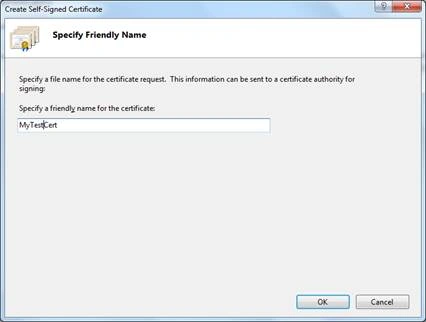
Click on “Create Self-signed Certificate” and gave a name to it:
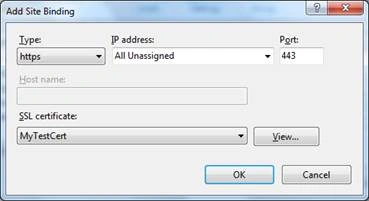
Let’s use it in our default web site by going to its bindings, add HTTPS binding and select certificate as shown below:
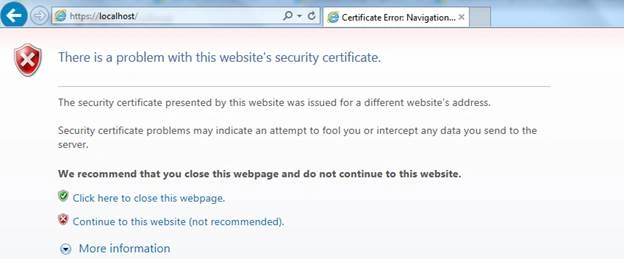
Let’s browse it over HTTPS, which shows a warning due to self-signed certificate. This can be ignored and clicking on “continue to this website” will show our web page:
We can use SSLDiag for troubleshooting certificate related issues. I am ending things here on Server Certificates, I hope this article will be helpful for all.
- An Overview Of IIS 7.5 Feature - Compression
- An Overview Of IIS 7.5 Feature - WebDAV
- An Overview of IIS 7.5 feature - Request Filtering
- An Overview Of IIS 7.5 Feature - Failed Request Event Buffering
- An Overview Of IIS 7.5 Feature - IP & Domain Restrictions
- An Overview Of IIS 7.5 Feature - HTTP Redirect
- An Overview Of IIS 7.5 Feature - Logging
Let’s open IIS 7.5 manager and check whether Server Certificates module is present or not under IIS section as shown below:
Let’s select server node, double-click on Server Certificates and understand its settings:
We can click on Import link for importing existing certificate [.pfx]. In general, this certificate file will be issued by CA like Verisign, GoDaddy.
We can create a certificate request by clicking on “Create Certificate Request” and filling details like common name [URL], organization etc.
Fill the details and click on Next and select cryptographic provider and bit length:
Click Next and give a file name to save the details. We can share this file with CA and get the certificate.
After getting the certificate, we can complete the request and use certificate by clicking on “Complete Certificate Request”:
We can create a domain certificate, that doesn’t require any external CA to issue it. We need to have a server that acts as a CA within your domain to create it.
Click on “Create Domain Certificate” and enter necessary details:
Click Next and select the server by clicking on Select, which will search for a CA server within windows domain.
We can create a self-signed certificate for testing SSL locally without a need of valid certificate from CA.
Click on “Create Self-signed Certificate” and gave a name to it:
Let’s use it in our default web site by going to its bindings, add HTTPS binding and select certificate as shown below:
Let’s browse it over HTTPS, which shows a warning due to self-signed certificate. This can be ignored and clicking on “continue to this website” will show our web page:
We can use SSLDiag for troubleshooting certificate related issues. I am ending things here on Server Certificates, I hope this article will be helpful for all.
Read more articles on IIS:
Prasanna MuraliPosted May 20, 2016, 9:13 PM
Nice one...
Bhuvanesh MohankumarPosted Apr 23, 2016, 6:22 PM
Good
Kuppurasu NagarajPosted Apr 23, 2016, 1:34 PM
Nice Sharing..
Debasis SahaPosted Apr 23, 2016, 6:26 AM
Nice One..
Gowtham RajamanickamPosted Apr 23, 2016, 12:05 AM
good one...
NitinPosted Apr 22, 2016, 11:36 PM
Nice
Sr KarthigaPosted Apr 22, 2016, 8:57 PM
good one
Vignesh ManiPosted Apr 22, 2016, 5:30 PM
Nice