
Here we have also
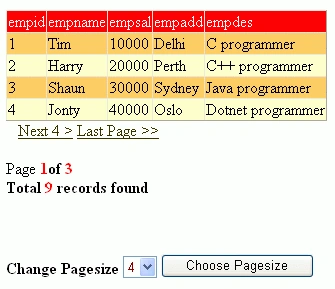
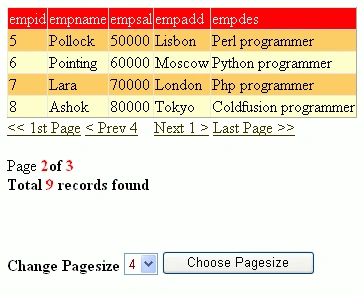
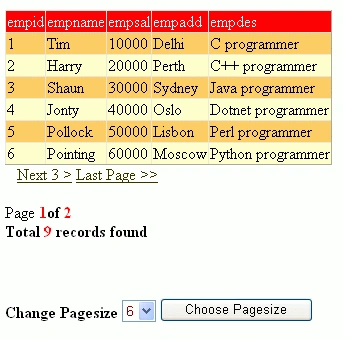
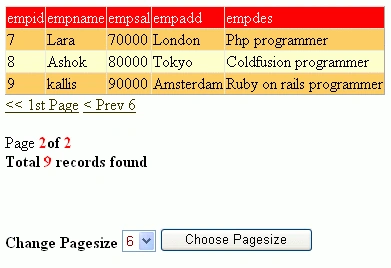
provided next and previous links to navigate the records. We can know how many
records are present in the database using a label control. The controls used in
this application are a DataGrid, four link buttons for (first, next, previous
and last), two label controls and a DropDownList.
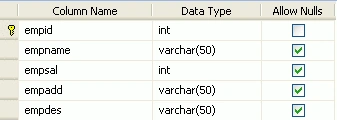
Table Creation
Default.aspx code
<%@ Page Language="vb" AutoEventWireup="false" CodeBehind="Default.aspx.vb"Inherits="Dropdown_Paging_in_Datagrid._Default" %>
<!DOCTYPE html PUBLIC "-//W3C//DTD
XHTML 1.0
Transitional//EN""http://www.w3.org/TR/xhtml1/DTD/xhtml1-transitional.dtd">
<html xmlns="http://www.w3.org/1999/xhtml" >
<head runat="server">
<title>Untitled
Page</title>
</head>
<body>
<form id="form1" runat="server">
<div>
<asp:DataGrid id="dg1" runat="server" AutoGenerateColumns="true"
AllowPaging="True" AllowCustomPaging="False"
PagerStyle-Visible = "False" HeaderStyle-BackColor="Red"
HeaderStyle-ForeColor="White" BackColor="#FFCC66" >
<PagerStyle Visible="False"></PagerStyle>
<AlternatingItemStyle BackColor="#FFFFCC" />
<HeaderStyle BackColor="Red" ForeColor="White"></HeaderStyle>
</asp:Datagrid>
<asp:linkbutton id="Firstbutton" Text="<<
1st Page" CommandArgument="0"
runat="server" onClick="NavigateButtonClick" ForeColor="#333300" ToolTip="First"/>
<asp:linkbutton id="Prevbutton" Text= "" CommandArgument="prev" runat="server"
onClick="NavigateButtonClick" ForeColor="#333300" ToolTip="Previous"/>
<asp:linkbutton id="Nextbutton" Text= "" CommandArgument="next" runat="server"
onClick="NavigateButtonClick" ForeColor="#333300" ToolTip="Next"/>
<asp:linkbutton id="Lastbutton" Text="Last
Page >>" CommandArgument="last"
runat="server" onClick="NavigateButtonClick" ForeColor="#333300" ToolTip="Last"/>
<br /><br />
<asp:Label id="PageCount" runat="server" /><br />
<asp:label id="TotalRecords" runat="server" /> <br /> <br /><br /><br />
Change Pagesize <asp:DropDownList id="d1" runat="server" ForeColor="Maroon">
<asp:ListItem>1</asp:ListItem>
<asp:ListItem>2</asp:ListItem>
<asp:ListItem>3</asp:ListItem>
<asp:ListItem Selected="True">4</asp:ListItem>
<asp:ListItem>5</asp:ListItem>
<asp:ListItem>6</asp:ListItem>
<asp:ListItem>7</asp:ListItem>
<asp:ListItem>8</asp:ListItem>
<asp:ListItem>9</asp:ListItem>
</asp:DropDownList>
<asp:button ID="showpage" text="Choose
Pagesize" runat="server" />
</div>
</form>
</body>
</html>

Paging in a DataGrid Using DropDownList
Join the conversation! Your thoughts help the community grow.
Sign in to leave a comment
It is the same account you read, post and publish with — and you will come straight back to this page.
SharadPosted Jul 22, 2015, 12:33 AM
Excellent..
Ghanashyam NayakPosted Mar 9, 2012, 4:24 AM
It's a really appreciated work done by you....keep it up... thanks for sharing it....