
Introduction: In this article we will discuss how to create a Zebra Style table by using JQuery. As we know that a zebra style means having multiple color most recently two colors then by using JQuery we will create a zebra style table. As we know that JQuery is the JavaScript Library which is being used to write the JavaScript code which have cross browser compatibility. Most probably we have to write less code to do such type of things. Further we are going to describe how to make a table with Zebra Style through JQuery.
Let's see the steps to create a table given below.
Step 1: Firstly you would have to take a ASP. NET application.
- Go to Visual Studio 2010.
- Take a new project name as ASP. Net web application.
- Give it a name as Zebra Style Table.
- Click Ok.
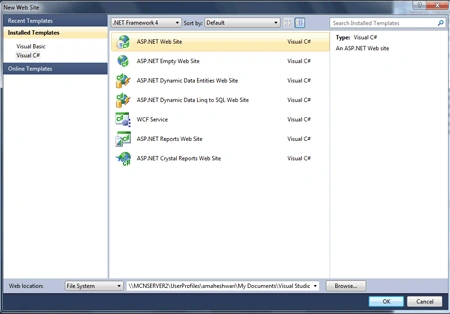
Step 2: Secondly you have to add a web page let see how would you add it.
-
Go to Solution Explorer.
-
Right click on Website application name as Zebra Style Table.
-
Add a New Item
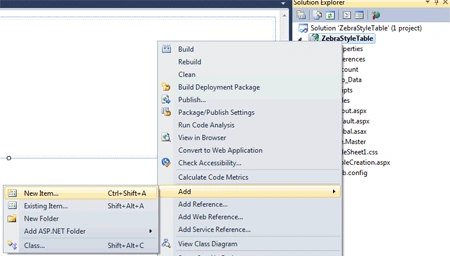
-
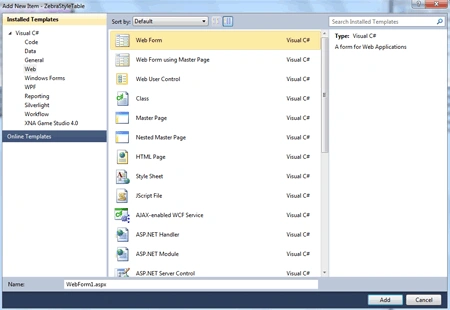
Select the Web form give it any name.
-
Click Ok, Let's see the figure given below.
Step 3: In this step we have to write the JavaScript code to add the source of JQuery for invoking all the method related to the JQuery.
Code: This code will be written in the source file of .aspx page which was added later.
<script type="text/javascript" src="../Scripts/jquery-1.4.1.min.js"> </script>
Description: This code will load the source file of JQuery whenever it is placed if you are using the visual studio 2010 it is already available in the Scripts folder of the website application. Due to this we can use the methods of the JQuery.
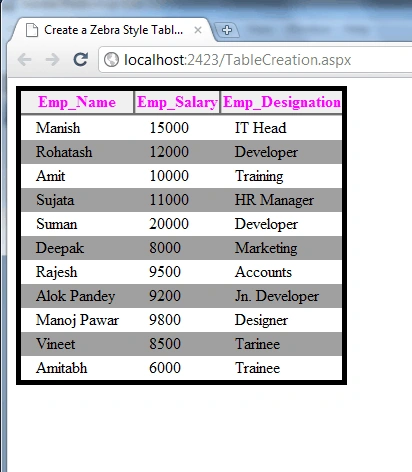
Step 4: Further we are going to write the JQuery method to make a table and every even no of column uses that style or odd that which is given below
Code:
<script type="text/javascript">
$(function () {
$("table tr:nth-child(even)").addClass("ZS");
});
</script>
<style type="text/css">
body,td
{
font-size: 10pt;
}
table
{
background-color: Lime;
border: 5px black solid;
border-collapse: collapse;
}
th
{
border: 3px outset silver;
background-color: ThreeDFace;
color: Fuchsia;
}
tr
{
background-color: ButtonShadow;
margin: 2px;
}
tr.ZS
{
background-color: White;
}
td
{
padding: 2px 15px;
}
</style>
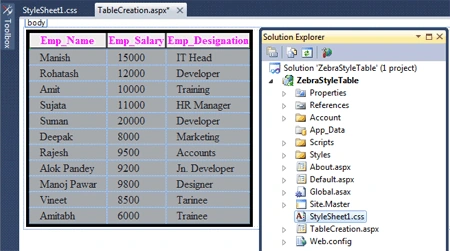
Step 5: In this step we are writting the complete code for the .aspx page named TableCreation.aspx.
Vijay PrativadiPosted Nov 11, 2011, 6:47 AM
Good One!!!