

Introduction
In this article I explain what a content provider is. A content provider is a collection of information of which a provider uses a way to access itself using another application. For example Contacts is a content provider because whenever we text a message, we want to import a number from the contact, then the contact provides us access to itself through another app, smsApplication. But in this article I create my own content provider that will provide all the content that will be available in this content provider, as described in the following procedure.
Step 1
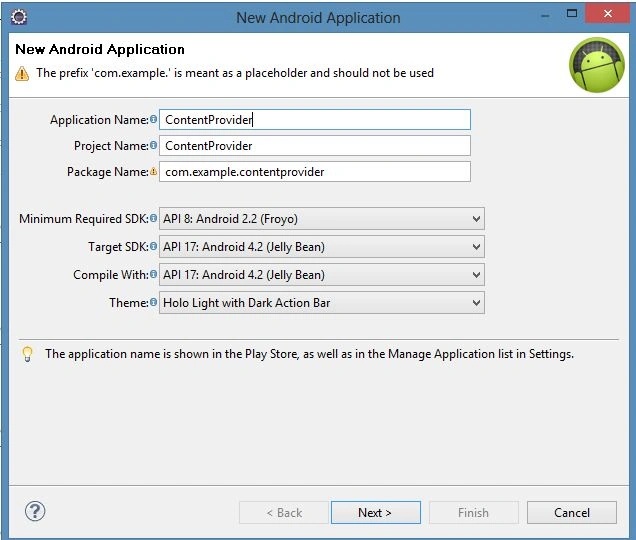
Create a new project as "File" -> "New" -> "Android Application Project" as shown below.
Step 2
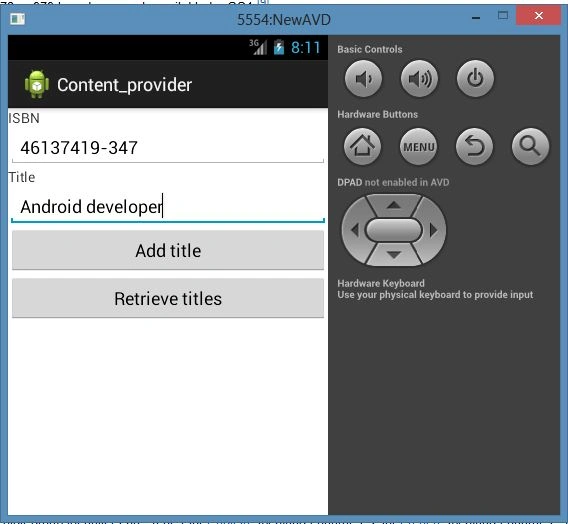
Now open the XML file "res/layout/activity_main.xml" and update it as in the following code.
- <?xml version="1.0" encoding="utf-8"?>
- <LinearLayout xmlns:android="http://schemas.android.com/apk/res/android"
- android:orientation="vertical"
- android:layout_width="fill_parent"
- android:layout_height="fill_parent" >
- <TextView
- android:layout_width="fill_parent"
- android:layout_height="wrap_content"
- android:text="ISBN" />
- <EditText
- android:id="@+id/txtISBN"
- android:layout_height="wrap_content"
- android:layout_width="fill_parent" />
- <TextView
- android:layout_width="fill_parent"
- android:layout_height="wrap_content"
- android:text="Title" />
- <EditText
- android:id="@+id/txtTitle"
- android:layout_height="wrap_content"
- android:layout_width="fill_parent" />
- <Button
- android:text="Add title"
- android:id="@+id/btnAdd"
- android:layout_width="fill_parent"
- android:layout_height="wrap_content" />
- <Button
- android:text="Retrieve titles"
- android:id="@+id/btnRetrieve"
- android:layout_width="fill_parent"
- android:layout_height="wrap_content" />
- </LinearLayout>
Step 3
Open Java from "src/com.newandroid.project/MainActivity.java" and update it with the following code.
- package com.content_provider;
- import android.app.Activity;
- import android.os.Bundle;
- import android.util.Log;
- import android.view.View;
- import android.widget.Button;
- import android.widget.EditText;
- import android.widget.ListView;
- import android.widget.Toast;
- import android.content.ContentValues;
- import android.database.Cursor;
- import android.net.Uri;
- public class MainActivity extends Activity {
- /** Called when the activity is first created. */
- ListView lv;
- @Override
- public void onCreate(Bundle savedInstanceState) {
- super.onCreate(savedInstanceState);
- setContentView(R.layout.activity_main);
- ContentValues editedValues = new ContentValues();
- editedValues.put(ContentDiary.TITLE, "Android Tips and Tricks");
- getContentResolver().update(
- Uri.parse(
- "content://com.ContentDiary.provider.books/books/2"),
- editedValues,
- null,
- null);
- getContentResolver().delete(
- Uri.parse("content://com.ContentDiary.provider.books/books/2"),
- null, null);
- getContentResolver().delete(
- Uri.parse("content://com.ContentDiary.provider.books/books"),
- null, null);
- ListView lv=(ListView) findViewById(R.id.view);
- Button btnAdd = (Button) findViewById(R.id.btnAdd);
- btnAdd.setOnClickListener(new View.OnClickListener() {
- public void onClick(View v) {
- ContentValues values = new ContentValues();
- values.put("title", ((EditText) findViewById(R.id.txtTitle)).getText().toString());
- values.put("isbn", ((EditText) findViewById(R.id.txtISBN)).getText().toString());
- Uri uri = getContentResolver().insert(
- Uri.parse("content://com.ContentDiary.provider.books/books"),
- values);
- Toast.makeText(getBaseContext(),uri.toString(), Toast.LENGTH_LONG).show();
- }
- });
- Button btnRetrieve = (Button) findViewById(R.id.btnRetrieve);
- btnRetrieve.setOnClickListener(new View.OnClickListener() {
- public void onClick(View v) {
- //---retrieve the titles---
- Uri allTitles = Uri.parse(
- "content://com.ContentDiary.provider.books/books");
- Cursor c = managedQuery(allTitles, null, null, null, "title desc");
- if (c.moveToFirst()) {
- do{
- Log.d("ContentProviders",
- c.getString(c.getColumnIndex(
- ContentDiary._ID)) + ", " +
- c.getString(c.getColumnIndex(
- ContentDiary.TITLE)) + ", " +
- c.getString(c.getColumnIndex(
- ContentDiary.ISBN)));
- } while (c.moveToNext());
- }
- }
- });
- }
- }
Step 5
Join the conversation! Your thoughts help the community grow.