

We know that there are three pillars of the internet, they are:
- The resource
- The URL
- The representation
The first two are very straight forward but the last one is a little confusing to understand. The representation is very important in the modern web. Why? People are currently not only using Desktop computers to browse the web, they are using various types of devices to consume web applications. And the interesting fact is that the various devices expect data in various formats.
For example, a few want data in normal HTML format and some in normal text format. Others need the JSON format and still others in XML format.
The formal definition of Content Negotiation is “the process of selecting the best representation for a given response when there are multiple representations available”.
Now, the fact should be clear, “Content Negotiation” means the client and server can negotiate. It’s not always possible for the server to return data in the requested format. That’s why it’s called negotiation, not demand. Ha. Ha... And in this case, the service will return data in the default format.
The question is, how does the Web API know what the client expects? By checking below the header of the request object.
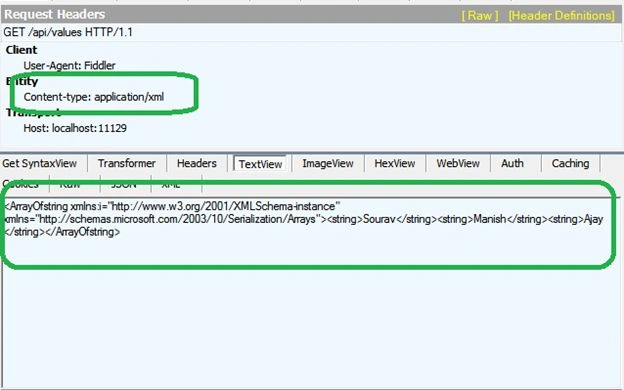
Content-type: which requests to API to represent data in this type.
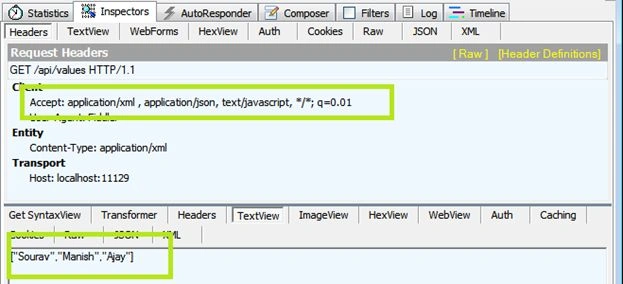
Accept: The acceptable media types for the response, such as “application/json,” “application/xml,” or a custom media type such as "application/vnd.example+xml".
Accept-Charset: The acceptable character sets, such as UTF-8 or ISO 8859-1.
Accept-Encoding: The acceptable content encodings, such as gzip.
Accept-Language: The preferred natural language, such as “en-us”.
Those are four headers of the request object for the request to the server to represent data in the requested way if possible.
In this example we will implement a simple Web API application and using Fiddler too we will request the Web API to return data in our preferred format. So, let’s start with an example.
Oh, before proceeding to the example I would like to clear up one more concept. We will provide those header values in this format.
Superset/Subset
For example, if the value is "application/json" then the “application is representing the superset” and “json” is the subset of the “application” superset.
If we specify “application/xml” then again “application” is the superset and “xml” is the subset of the application.
Fine, so let’s proceed to the example.
Request data in JSON format
This is currently the most popular format of data representation. So, so first we will see to return data in JSON format from the Web API.
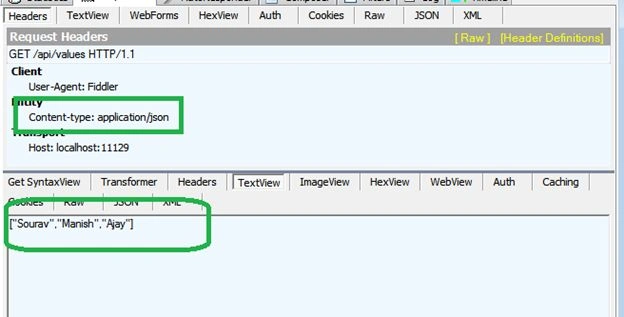
Here is our HTTP header information with HttpRequest message
User-Agent: Fiddler
Host: localhost:11129
Now, we are seeing that we did not set the Content-Type header to request data in JSON format. But Web API is returning data in JSON format. The reason is “If we do not specify any “Content-Type” then by default Web API will return JSON data. Like the following output.
Senthil KumarPosted Jan 6, 2025, 2:41 PM
This article copied from https://dotnettutorials.net/lesson/content-negotiation-web-api/
saravanakumar radhakrishnanPosted Oct 18, 2021, 5:33 PM
Easy english explaining is great
Sagar MistryPosted Dec 31, 2020, 7:28 AM
ANy reason why web API ignores the Accent header when more than one is specified ?
Tien LePosted Apr 30, 2017, 10:54 PM
Well put and easy to understand. Thank you, Sourav!
Lokesh KPosted Dec 6, 2016, 4:45 AM
Very to clear to understanding the above content.. thank you Sourav
Willian SousaPosted Dec 10, 2014, 6:38 PM
http://www.asp.net/web-api/overview/formats-and-model-binding/content-negotiation.. It's a copy?